Location Bar Characters 제작자: Paul Morris
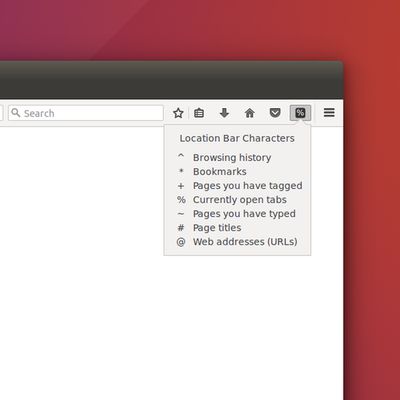
Have trouble remembering the special characters that filter the location bar's results? ( ^ * + % ~ # @ ) Like when you want to search only in bookmarks, or history, or open tabs, etc.? With this add-on a reminder is only a click away.
사용자 37명사용자 37명
확장 메타 데이터
스크린샷
정보
Did you know that when you type special characters into Firefox's location bar (aka: url bar, awesome bar) it filters/focuses the location bar's search results. For example, enter "%" to show only results from currently open tabs, or "*" for just your bookmarks, or "^" for just your history, etc.
This super simple add-on just provides a toolbar button that displays a panel to remind you what the characters are and what they do. Here they are:
^ Browsing history
* Bookmarks
+ Pages you've tagged
% Currently open tabs
~ Pages you've typed
# Page titles
@ Web addresses (URLs)
They can be entered before or after search terms. Learn more about them here:
https://support.mozilla.org/en-US/kb/awesome-bar-search-firefox-bookmarks-history-tabs#w_changing-results-on-the-fly
This super simple add-on just provides a toolbar button that displays a panel to remind you what the characters are and what they do. Here they are:
^ Browsing history
* Bookmarks
+ Pages you've tagged
% Currently open tabs
~ Pages you've typed
# Page titles
@ Web addresses (URLs)
They can be entered before or after search terms. Learn more about them here:
https://support.mozilla.org/en-US/kb/awesome-bar-search-firefox-bookmarks-history-tabs#w_changing-results-on-the-fly
5명이 3.4점으로 평가함
추가 정보
- 부가 기능 링크
- 버전
- 1.0.1resigned1
- 크기
- 16.15 KB
- 마지막 업데이트
- 2년 전 (2024년 4월 25일)
- 관련 카테고리
- 버전 목록
- 모음집에 추가