
LanguageTool Website Spellcheck - LTWS 제작자: M.H.
LanguageTool Website Spellcheck - LTWS is a convenient Firefox extension that allows you to check any text on web pages for spelling, grammar, and style issues using the powerful LanguageTool service.
사용자 568명사용자 568명
확장 메타 데이터
스크린샷

정보
Main Features:
Multilingual Support:
The extension supports a wide range of languages, including:
Arabic, Asturian, Belarusian, Breton, Catalan, Chinese, Crimean Tatar, Danish, Dutch, English, Esperanto, French, Galician, German, Greek, Irish, Italian, Japanese, Khmer, Persian, Polish, Portuguese, Romanian, Russian, Slovak, Slovenian, Spanish, Swedish, Tagalog, Tamil, Ukrainian
It automatically detects the language of the selected text or lets you manually select the desired checking language.
Privacy and Public API Notes
Installing a Local LanguageTool Server (optional):
For maximum privacy and control, you can run your own LanguageTool server locally. This is especially useful if you want to check sensitive texts or avoid using the public API.
Who Will Find This Extension Particularly Useful?
- Students and academics who need to produce error-free texts
- Bloggers and content creators who want to polish their online content
- Non-native speakers who need help with correct spelling
- Anyone who values correct spelling and grammar in their online communication
Permissions:
The extension requires certain permissions to function properly:
- Access to tabs and website content: To read and check the selected text
- Context menu access: For the "Check spelling" option in the right-click menu
- Storage access: To save your settings and list of ignored words
- Connection to LanguageTool servers: To perform spell checking (either locally or via the public API)
Privacy:
When using the public API, your text is sent to LanguageTool servers for checking. If you have privacy concerns, you can alternatively set up and use a local LanguageTool server.
Improve the quality of your texts on the web today with our handy spell checking tool!
Legal Notice:
This Firefox extension is a personal project and is not affiliated with or endorsed by LanguageTool or its developers. It is intended for educational and personal use only. The author does not claim any ownership of the LanguageTool brand or its associated trademarks.
Disclaimer:
This Firefox extension is provided 'as is', without any warranty, express or implied. Use entirely at your own risk. The author accepts no liability for any damage or loss arising from its use.
© 2025 Marc Horres - All rights reserved.
- Simple Text Checking: Select any text on a web page, right-click and choose "Check spelling" or use the hotkey CTRL+Q
- Handy Sidebar: Clear presentation of all detected errors with correction suggestions
- Flexible Language Detection: Automatic language detection or manual selection from over 30 supported languages
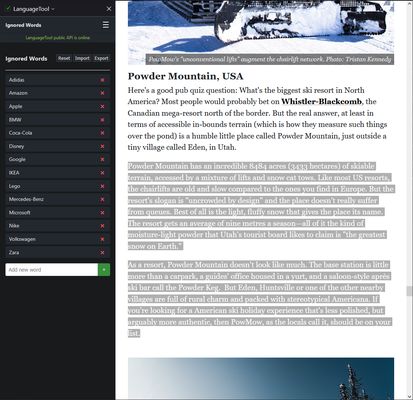
- Smart Word List: Create a personal list of ignored words that you can import and export
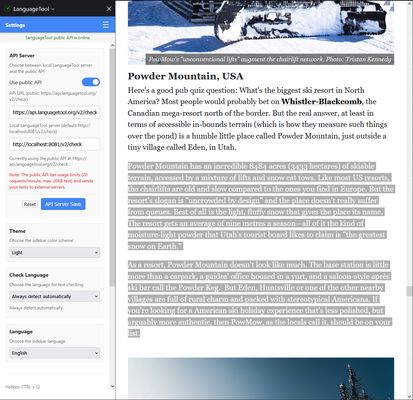
- Two Checking Modes: Connect to a local LanguageTool server or use the public API
- Customizable Design: Choose between light, dark, or automatic theme (based on your system settings)
Multilingual Support:
The extension supports a wide range of languages, including:
Arabic, Asturian, Belarusian, Breton, Catalan, Chinese, Crimean Tatar, Danish, Dutch, English, Esperanto, French, Galician, German, Greek, Irish, Italian, Japanese, Khmer, Persian, Polish, Portuguese, Romanian, Russian, Slovak, Slovenian, Spanish, Swedish, Tagalog, Tamil, Ukrainian
It automatically detects the language of the selected text or lets you manually select the desired checking language.
Privacy and Public API Notes
- The public API is rate-limited (20 requests/minute, 20KB/request)
- Text is sent to external servers when using the public API
- See the LanguageTool Privacy Policy
- All communication with the LanguageTool API is done via HTTPS for security
Installing a Local LanguageTool Server (optional):
For maximum privacy and control, you can run your own LanguageTool server locally. This is especially useful if you want to check sensitive texts or avoid using the public API.
- Download LanguageTool from languagetool.org and extract the archive.
- Start the server with the gui (languagetool.jar) or in the extracted directory with:
java -cp languagetool-server.jar org.languagetool.server.HTTPServer --port 8081 - For more details and advanced options, see the official guide: LanguageTool HTTP Server Guide
Who Will Find This Extension Particularly Useful?
- Students and academics who need to produce error-free texts
- Bloggers and content creators who want to polish their online content
- Non-native speakers who need help with correct spelling
- Anyone who values correct spelling and grammar in their online communication
Permissions:
The extension requires certain permissions to function properly:
- Access to tabs and website content: To read and check the selected text
- Context menu access: For the "Check spelling" option in the right-click menu
- Storage access: To save your settings and list of ignored words
- Connection to LanguageTool servers: To perform spell checking (either locally or via the public API)
Privacy:
When using the public API, your text is sent to LanguageTool servers for checking. If you have privacy concerns, you can alternatively set up and use a local LanguageTool server.
Improve the quality of your texts on the web today with our handy spell checking tool!
Legal Notice:
This Firefox extension is a personal project and is not affiliated with or endorsed by LanguageTool or its developers. It is intended for educational and personal use only. The author does not claim any ownership of the LanguageTool brand or its associated trademarks.
Disclaimer:
This Firefox extension is provided 'as is', without any warranty, express or implied. Use entirely at your own risk. The author accepts no liability for any damage or loss arising from its use.
© 2025 Marc Horres - All rights reserved.
리뷰어 2명이 3점으로 평가함
권한 및 데이터
추가 정보
- 부가 기능 링크
- 버전
- 1.5.1
- 크기
- 64.5 KB
- 최근 업데이트
- 일 년 전 (2025년 5월 3일)
- 관련 카테고리
- 라이선스
- All Rights Reserved
- 개인정보처리방침
- 이 부가 기능에 대한 개인정보처리방침 읽기
- 버전 목록
- 모음집에 추가