
Mark My Search 제작자: ator-dev
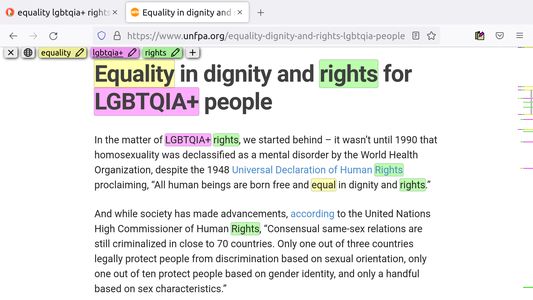
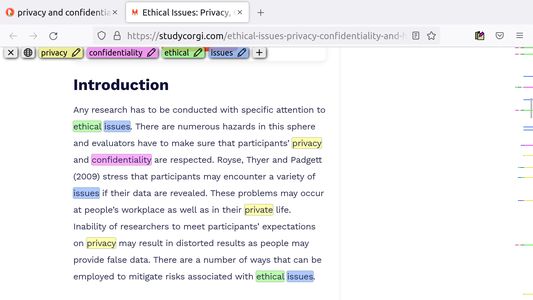
Highlight words and scroll to them with a button press. Auto-highlight your search keywords or define Keyword Lists for automation, and use regex for advanced searching.
사용자 110명사용자 110명
확장 메타 데이터
스크린샷

정보
Mark My Search is a complete word finder for anything you search online. Powerful highlighting and advanced features combine with a simple interface to provide effortless text finding. Vibrant highlights are visible on any page - located by markers in the scroll bar - and your keywords appear in a toolbar for editing and viewing. Keyboard shortcuts are available for every action, while varied options let you personalise to your taste.
Search for anything, on any search engine - DuckDuckGo, Google, Bing, even Reddit - and Mark My Search will pick out the words you're looking for, in that page and through any links you follow. Highlighting happens without having to press a button! Activate on any page using Alt+M or the context menu.
I respect your privacy, so no personal data is ever collected. Privacy Policy
Mark My Search is Free and Open Source Software, developed at github.com/searchmarkers/mark-my-search. See the Roadmap for planned improvements!
Visit the website for more information: markmysearch.ator.systems
Features and productivity
Main features:
Matching options:
Accessibility
To turn off visibility for automatic highlighting, simply open the options page at
To turn off automatic highlighting completely, click the extension's icon to open the popup, and disable "Detect search engines".
Permission justifications
Search for anything, on any search engine - DuckDuckGo, Google, Bing, even Reddit - and Mark My Search will pick out the words you're looking for, in that page and through any links you follow. Highlighting happens without having to press a button! Activate on any page using Alt+M or the context menu.
I respect your privacy, so no personal data is ever collected. Privacy Policy
Mark My Search is Free and Open Source Software, developed at github.com/searchmarkers/mark-my-search. See the Roadmap for planned improvements!
Visit the website for more information: markmysearch.ator.systems
Features and productivity
Main features:
- Enter keywords to find in the page
- Create and automate keyword lists in the popup
- Search query highlighting on any search engine
- Compact toolbar to view and edit the query
- Popup and settings menu for configuration
- Rapid scrolling to matches
- Keyword scrollbar markers
- Completely operable by mouse or keyboard
- Specific websites can be filtered
Matching options:
- Case sensitivity
- Whole words only
- Word stemming (match all word forms)
- Diacritics sensitivity (match accents)
- Regular expression
Accessibility
To turn off visibility for automatic highlighting, simply open the options page at
about:addons > [Mark My Search] > [Preferences] and disable both visibility settings. The highlights will be hidden, while the toolbar and scroll markers remain visible, ready to be shown at a moment's notice. This does not apply to manually activated highlighting.To turn off automatic highlighting completely, click the extension's icon to open the popup, and disable "Detect search engines".
Permission justifications
- Access browser tabs: Highlighting begins when a search happens in a tab.
- Access your data for all web sites: A scary permission but absolutely necessary to the basic function of the extension, enabling Mark My Search to read the structure of any webpage you visit (when activated) and subsequently insert highlighting. It does not read or interpret any data except to match it with your search keywords, and no data is ever stored.
- Read and modify bookmarks: Mark My Search checks for 'dynamic bookmarks' (shortcuts to search engines) to identify these searches. It does not modify bookmarks or store any data.
Limitations
- Certain sites can reorder text which contains highlights
- All highlight inserters have this problem. You can disable destructive (CLASSIC) highlighting in settings for an experimental method. See this feature for technical details.
- Using this API, it is finally possible to make a non-destructive page highlighter! The next update will feature the brand new highlighter along with many improvements. Note: the new engine will not work in Firefox until Mozilla finishes the API.
- Word stemming can result in unexpected matches
- If you know of a regex stemming technique and would like to help out, please let me know!
리뷰어 21명이 4.7점으로 평가함
권한 및 데이터
추가 정보
- 부가 기능 링크
- 버전
- 1.15.0
- 크기
- 132.69 KB
- 최근 업데이트
- 2년 전 (2025년 1월 15일)
- 관련 카테고리
- 라이선스
- 사용자 지정 라이선스
- 버전 목록
- 모음집에 추가