
Math Suite 제작자: Sevina
A suite of famous mathematical libraries for JavaScript
사용자 16명사용자 16명
확장 메타 데이터
스크린샷



정보
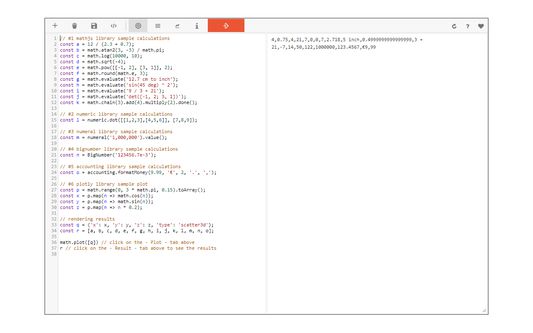
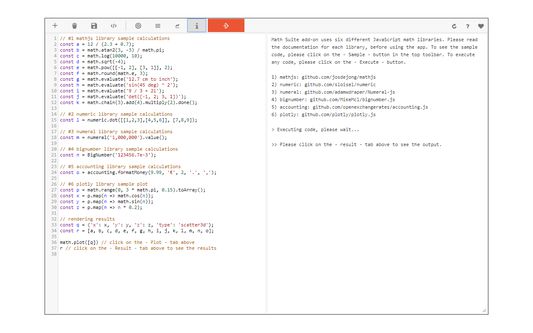
Math Suite is powerful math add-on that combines the power of six different math engines into a single add-on. List of available math engines are as following:
1) Mathjs: https://mathjs.org/docs/index.html
2) Numeral: http://numeraljs.com/#functions
3) BigNumber: https://mikemcl.github.io/bignumber.js/
4) Numeric: http://numericjs.com/documentation.html
5) Accounting: http://openexchangerates.github.io/accounting.js/#documentation
6) Plotly: https://github.com/plotly/plotly.js
This add-on supports all JavaScript commands in its console. Simply type any Math or JavaScript command that you would like in the add-on's console and then press on the - Execute - button at the top toolbar.
Please note that, each math engine has a separate documentation. Please read individual documentations before using the add-on (above links). There is a - Sample - button in the add-on's top toolbar which you can use to insert a sample math code in the console. Moreover, you can import your desired code to the add-on (.txt format). Please click on the (+) button in order to open the file input window. The file needs to be in a plain text format.
Note: for the plot function, this add-on uses the Plotly library. You can either use the "Plotly.newPlot" function directly or the simplified "math.plot" function provided. If you want to use the - Plotly - function, please put "output-plot" as the first argument which is the id for plot container in the app UI. "math.plot" uses this id in the background.
If you have a feature request, or found a bug to report, please fill the bug report form in the add-on's homepage.
1) Mathjs: https://mathjs.org/docs/index.html
2) Numeral: http://numeraljs.com/#functions
3) BigNumber: https://mikemcl.github.io/bignumber.js/
4) Numeric: http://numericjs.com/documentation.html
5) Accounting: http://openexchangerates.github.io/accounting.js/#documentation
6) Plotly: https://github.com/plotly/plotly.js
This add-on supports all JavaScript commands in its console. Simply type any Math or JavaScript command that you would like in the add-on's console and then press on the - Execute - button at the top toolbar.
Please note that, each math engine has a separate documentation. Please read individual documentations before using the add-on (above links). There is a - Sample - button in the add-on's top toolbar which you can use to insert a sample math code in the console. Moreover, you can import your desired code to the add-on (.txt format). Please click on the (+) button in order to open the file input window. The file needs to be in a plain text format.
Note: for the plot function, this add-on uses the Plotly library. You can either use the "Plotly.newPlot" function directly or the simplified "math.plot" function provided. If you want to use the - Plotly - function, please put "output-plot" as the first argument which is the id for plot container in the app UI. "math.plot" uses this id in the background.
If you have a feature request, or found a bug to report, please fill the bug report form in the add-on's homepage.
리뷰어 0명이 0점으로 평가함
추가 정보
- 부가 기능 링크
- 버전
- 0.1.5
- 크기
- 1.5 MB
- 최근 업데이트
- 7년 전 (2020년 1월 15일)
- 버전 목록
- 모음집에 추가