Media Queue 제작자: Zac Whalley
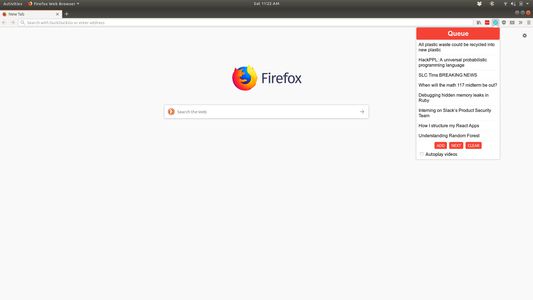
Adds a browser action icon to the toolbar. Click on the icon to add links to a queue.
확장 메타 데이터
스크린샷
정보
A Firefox extension for adding a queue to the browser. Links can be added to the queue which are removed after viewing.
Use
View the current queue by opening the popup
Add links in one of two ways:
1. Open the popup and click 'Add' on a page you want to save to the queue
2. Right click a link and select 'Add to media queue' in the context menu
Clear the queue with the 'Clear' button
Navigate to the next video with the 'Next' button, or keyboard shortcuts
Commands
Ctrl+Shift+Q or Command+Shift+Q: Navigate to next item in queue
Ctrl+Shift+1 or Command+Shift+1: Open popup to view queue / use UI controls
Use
View the current queue by opening the popup
Add links in one of two ways:
1. Open the popup and click 'Add' on a page you want to save to the queue
2. Right click a link and select 'Add to media queue' in the context menu
Clear the queue with the 'Clear' button
Navigate to the next video with the 'Next' button, or keyboard shortcuts
Commands
Ctrl+Shift+Q or Command+Shift+Q: Navigate to next item in queue
Ctrl+Shift+1 or Command+Shift+1: Open popup to view queue / use UI controls
0명이 0점으로 평가함
권한 및 데이터
추가 정보
- 부가 기능 링크
- 버전
- 1.1
- 크기
- 49.93 KB
- 마지막 업데이트
- 7년 전 (2019년 10월 19일)
- 관련 카테고리
- 버전 목록
- 모음집에 추가