
MetaClean for Gmail 제작자: Adarsus Developer Team
Removes metadata and hidden data in email attachments preventing the leakage of confidential information that occurs in this type of communication and avoiding possible economic and reputational damages derived from the malicious use of metadata.
사용자 63명사용자 63명
확장 메타 데이터
스크린샷
정보
Why should you use MetaClean for Gmail?
How to use MetaClean for Gmail?
Standard Functionalities:
Enterprise Functionalities:
How to view PDF document metadata?
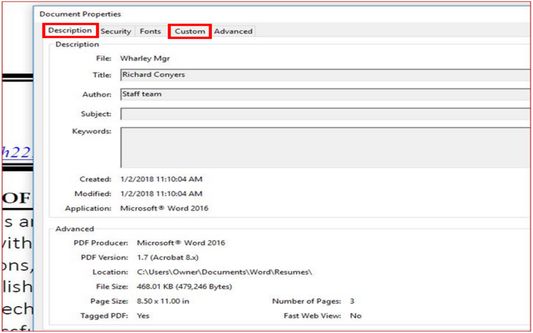
Open the concerned PDF document in Adobe Acrobat and go to File > Properties > Description and Custom tabs. It will show you a window that consists of different components of the metadata of the concerned PDF document.
How to view Microsoft Word/Excel/PowerPoint document metadata?
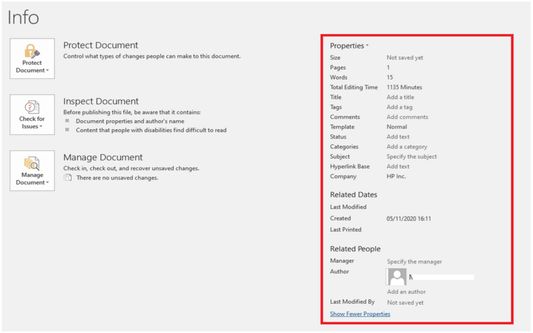
Open the Word/Excel/PowerPoint document and go to "File" menu. Click "Info" and then click "Show all Properties" to view the metadata entries for the document.
- Data Breach Prevention: Every document contains metadata. For example, metadata is embedded in the file and is different to the information that is typed on the page – such as Author, track changes or comments. It can tell the reader who created the document, how long was spent editing it, and where the document is saved. Cleaning a document of metadata means that the recipient will only be sent what would be printed. Removing potentially harmful forms of metadata from the attached files is a risk area that should be considered when investigating ways to prevent email-related data leaks.
- Phishing Attack Prevention: MetaClean prevents the exfiltration of information through metadata which is commonly used to generate phishing attacks.
- Ease of use and there is no user registration required: Just install and enjoy it!
How to use MetaClean for Gmail?
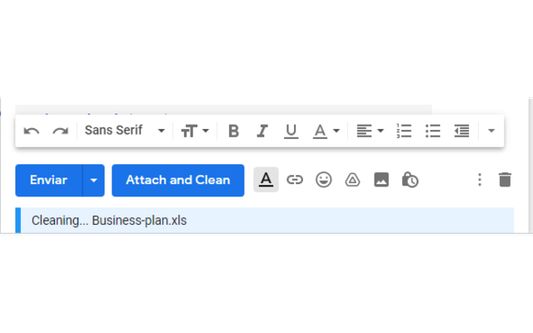
- This extension automatically processes the document's metadata when it is attached, you don't need to take any additional action, ensuring that the attachments you send are free of metadata and personal information.
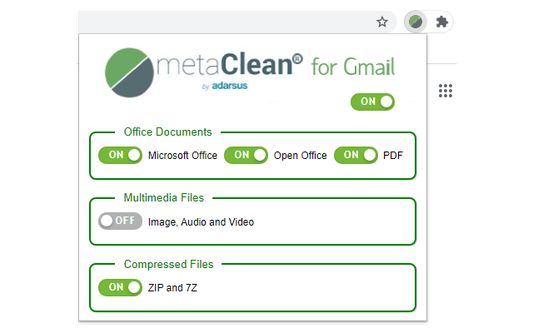
- It allows you to quickly and intuitively select the types of files to process (see screenshot).
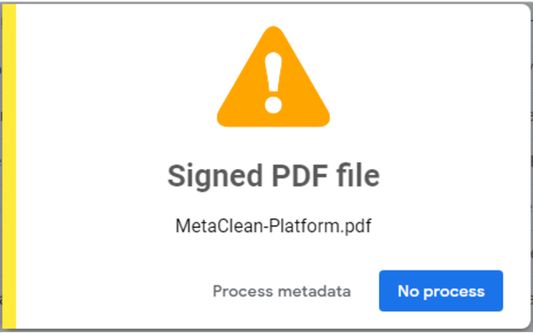
- It shows information of interest to the user, for example when a PDF file is digitally signed.
Standard Functionalities:
- FREE for personal use.
- Removes metadata from all versions of Microsoft Office, Open/Libre Office, PDF, RTF and Image, Audio and Video files. (See the list of supported file formats at: https://www.adarsus.com/en/file-formats-compatible-with-metaclean/)
- Supports ZIP and 7Z files: compressed documents will be processed by MetaClean.
- Detection of signed PDF files: To avoid invalidation of the signature, a warning will be displayed indicating whether you want to process the metadata of the signed PDF file (see screenshot).
- Displays a warning when attaching Microsoft Office files with change control and/or comments enabled.
- Delete hidden data such as: Printer routes, history of document changes, etc.
- For free version, the tag "Metadata removed by MetaClean (www.adarsus.com)" will be added to the keyword metadata in processed documents.
Enterprise Functionalities:
- Creation of metadata templates to remove, add or modify standard and customized metadata tags.
- The text: "Metadata removed by MetaClean (www.adarsus.com)" will be removed from the metadata tag: keyword.
How to view PDF document metadata?
Open the concerned PDF document in Adobe Acrobat and go to File > Properties > Description and Custom tabs. It will show you a window that consists of different components of the metadata of the concerned PDF document.
How to view Microsoft Word/Excel/PowerPoint document metadata?
Open the Word/Excel/PowerPoint document and go to "File" menu. Click "Info" and then click "Show all Properties" to view the metadata entries for the document.
리뷰어 2명이 5점으로 평가함
권한 및 데이터
필수 권한:
- mail.google.com에서 사용자의 데이터에 접근
선택적 권한:
- mail.google.com에서 사용자의 데이터에 접근
- www.metaclean.es에서 사용자의 데이터에 접근
추가 정보
- 부가 기능 링크
- 버전
- 4.0.2
- 크기
- 238.9 KB
- 최근 업데이트
- 8달 전 (2026년 1월 28일)
- 관련 카테고리
- 라이선스
- All Rights Reserved
- 버전 목록
- 모음집에 추가