
Missofis Request Interceptor 제작자: Kemal Yılmaz
A browser extension to intercept HTTP requests
사용자 4명사용자 4명
확장 메타 데이터
스크린샷

정보
Redirect HTTP requests with simple hosts file-like syntax, block website images with string matches.
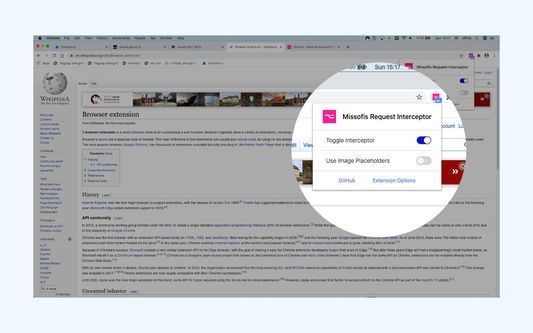
Missofis Request Interceptor is a request interceptor for those who simply want to redirect a public URL to a local one. Think it is as an enhanced hosts file right under your browser toolbar.
Usage:
The extension comes with two features, "redirections" and "matches".
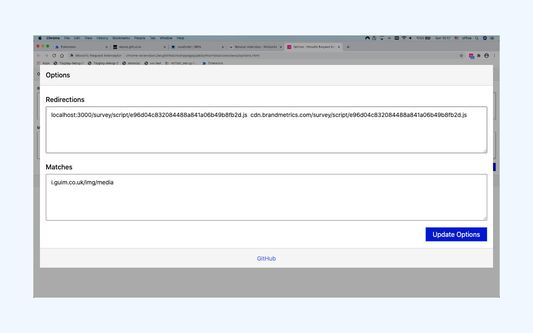
- Redirections are simple URL rewrites. If you add "localhost:3000/my-local-script.js example.com/my-live-script.js" line to the redirections then "https://example.com/my-live-script.js" will be rewritten as "https://localhost:3000/my-local-script.js". With the same logic, you may redirect a complete remote folder to a local one.
- Matches are different. They are plain request blockers. Provide a URL match like "cdn.example.com/assets/img" and all image request to those assets folder will be blocked.
- Syntax for redirections is "localhost:3000/my-local-script.js example.com/my-live-script.js". Two space separated strings separated with any number of spaces.
- Syntax for mathces is "cdn.example.com/assets/img". A single string to match image URLs.
- Comments are welcome with lines starting with # symbol.
What you can't do:
- You can't edit HTTP headers
- No regex support
- You can't top Content-Security-Policy response headers
Warning:
- This is a developer tool for experienced users. Redirections may result in catastrophes. So if you're not an experienced user, please consider not using this extension or get some help from someone.
- Avoid generic matchers like "my-local" "example.com". This extension is developed to debug a remote script with a local development environment. Nothing more than that. Generic matchers may also result "too many redirections" errors to be thrown by browsers.
- This tool is not an ad blocker.
Missofis Request Interceptor is a request interceptor for those who simply want to redirect a public URL to a local one. Think it is as an enhanced hosts file right under your browser toolbar.
Usage:
The extension comes with two features, "redirections" and "matches".
- Redirections are simple URL rewrites. If you add "localhost:3000/my-local-script.js example.com/my-live-script.js" line to the redirections then "https://example.com/my-live-script.js" will be rewritten as "https://localhost:3000/my-local-script.js". With the same logic, you may redirect a complete remote folder to a local one.
- Matches are different. They are plain request blockers. Provide a URL match like "cdn.example.com/assets/img" and all image request to those assets folder will be blocked.
- Syntax for redirections is "localhost:3000/my-local-script.js example.com/my-live-script.js". Two space separated strings separated with any number of spaces.
- Syntax for mathces is "cdn.example.com/assets/img". A single string to match image URLs.
- Comments are welcome with lines starting with # symbol.
What you can't do:
- You can't edit HTTP headers
- No regex support
- You can't top Content-Security-Policy response headers
Warning:
- This is a developer tool for experienced users. Redirections may result in catastrophes. So if you're not an experienced user, please consider not using this extension or get some help from someone.
- Avoid generic matchers like "my-local" "example.com". This extension is developed to debug a remote script with a local development environment. Nothing more than that. Generic matchers may also result "too many redirections" errors to be thrown by browsers.
- This tool is not an ad blocker.
리뷰어 0명이 0점으로 평가함
권한 및 데이터
추가 정보
- 부가 기능 링크
- 버전
- 1.1.0
- 크기
- 36.73 KB
- 최근 업데이트
- 6년 전 (2020년 11월 2일)
- 관련 카테고리
- 라이선스
- MIT 라이선스
- 버전 목록
- 모음집에 추가