
mozlz4-edit 제작자: Siarhei Kuzeyeu
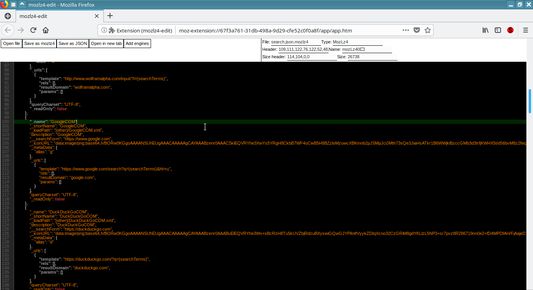
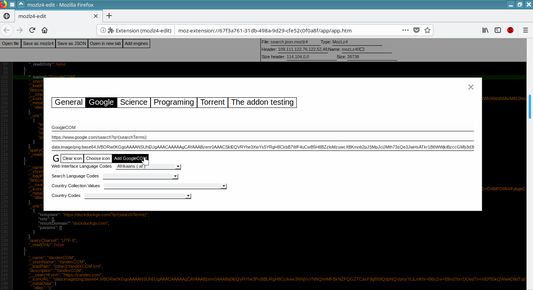
The addon lets you add custom search engines to the Mozilla Firefox without the Internet connection using! Add your own search engine to the Firefox! Actually mozlz4-edit is a simple mozlz4 file editor. You can open, edit and save mozlz4 files.
사용자 519명사용자 519명
확장 메타 데이터
스크린샷
정보
Warning! You should not delete default search engines from a search.json.mozlz4 file if you edit the file. If you delete a default search engine then the Firefox will reset search engine list to a default state. But you can add new search engines.
Maybe there is another way to delete default search engines except Firefox Preferences menu but I don't know how.
How to
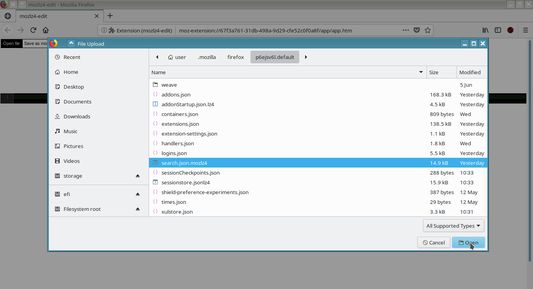
1. Find a search.json.mozlz4 file inside of your Mozilla Firefox profile folder.
2. Open the search.json.mozlz4 file with the mozlz4-edit extension.
3. Edit a search engine list.
4. Save the search.json.mozlz4 file in your Mozilla Firefox profile folder, replace the existed search.json.mozlz4 file by your new version.
5. Restart the Mozilla Firefox.
Note
There're .lz4 ( .jsonlz4, .jsonlz4-xxxx, .baklz4 etc) files inside of a Firefox's profile folder but actually they're mozlz4 files. You can try to open and edit these files.
About permissions (The block for paranoids only!)
All these permissions are needed to let the extension to work properly. Or at least it used to be like that at the time when I made the extension. In future Mozilla may change permission system and add more options that let differentiate permissions more accurately.
Some thoughts about Web Extension Search API and the extension.
The extension was made at the time when Web Extension API just came up. One of the main reason to make the extension was a joke about poor Search API that does not allow even to add your own search engine without the Internet connection. All Firefox extension that allow you to add a search engine by one click actually use the Internet connection and send your search engine to external service to let API that allow developer add search engine work (it is not about the extension or other extensions that export/import mozlz4 file). It is a restriction the Mozilla did. And funny moment here that even Google Chrome allow you to add your own search engine by few clicks through standard configuration menu. When I made the extension I thought that after few months Mozilla will make reach Search API because Mozilla already made extended variant of Google Chrome Web Extension API. I thought that after those few months I can freely delete the extension and forget about it. And here we are. (: After years of Web Extension API existence Mozilla did not add even a function to add custom search engine though standard configuration menu and the extension still is relevant and still in use by some users.
So the joke is still relevant.
To check Search API of Firefox see https://developer.mozilla.org/en-US/docs/Mozilla/Add-ons/WebExtensions/API/search
To check new version of the extension that is not finished yet see https://github.com/serj-kzv/mozlz4-edit/tree/develop (I done not know when I will have a time to finish it)
Maybe there is another way to delete default search engines except Firefox Preferences menu but I don't know how.
How to
1. Find a search.json.mozlz4 file inside of your Mozilla Firefox profile folder.
2. Open the search.json.mozlz4 file with the mozlz4-edit extension.
3. Edit a search engine list.
4. Save the search.json.mozlz4 file in your Mozilla Firefox profile folder, replace the existed search.json.mozlz4 file by your new version.
5. Restart the Mozilla Firefox.
Note
There're .lz4 ( .jsonlz4, .jsonlz4-xxxx, .baklz4 etc) files inside of a Firefox's profile folder but actually they're mozlz4 files. You can try to open and edit these files.
About permissions (The block for paranoids only!)
All these permissions are needed to let the extension to work properly. Or at least it used to be like that at the time when I made the extension. In future Mozilla may change permission system and add more options that let differentiate permissions more accurately.
Some thoughts about Web Extension Search API and the extension.
The extension was made at the time when Web Extension API just came up. One of the main reason to make the extension was a joke about poor Search API that does not allow even to add your own search engine without the Internet connection. All Firefox extension that allow you to add a search engine by one click actually use the Internet connection and send your search engine to external service to let API that allow developer add search engine work (it is not about the extension or other extensions that export/import mozlz4 file). It is a restriction the Mozilla did. And funny moment here that even Google Chrome allow you to add your own search engine by few clicks through standard configuration menu. When I made the extension I thought that after few months Mozilla will make reach Search API because Mozilla already made extended variant of Google Chrome Web Extension API. I thought that after those few months I can freely delete the extension and forget about it. And here we are. (: After years of Web Extension API existence Mozilla did not add even a function to add custom search engine though standard configuration menu and the extension still is relevant and still in use by some users.
So the joke is still relevant.
To check Search API of Firefox see https://developer.mozilla.org/en-US/docs/Mozilla/Add-ons/WebExtensions/API/search
To check new version of the extension that is not finished yet see https://github.com/serj-kzv/mozlz4-edit/tree/develop (I done not know when I will have a time to finish it)
리뷰어 41명이 4.8점으로 평가함
권한 및 데이터
추가 정보
- 부가 기능 링크
- 버전
- 4.1.2
- 크기
- 234.64 KB
- 최근 업데이트
- 7년 전 (2019년 7월 7일)
- 관련 카테고리
- 라이선스
- MIT 라이선스
- 버전 목록
- 모음집에 추가