
Firefox Multi-Account Containers 제작자: Firefox
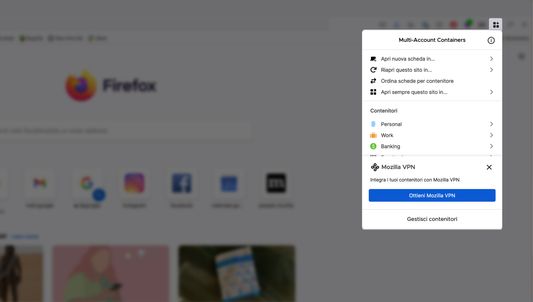
Firefox Multi-Account Containers lets you keep parts of your online life separated into color-coded tabs. Cookies are separated by container, allowing you to use the web with multiple accounts and integrate Mozilla VPN for an extra layer of privacy.
확장 메타 데이터
스크린샷


정보
About This Extension
The Firefox Multi-Account Containers extension lets you carve out a separate box for each of your online lives – no more opening a different browser just to check your work email!
Under the hood, it separates website storage into tab-specific Containers. Cookies downloaded by one Container are not available to other Containers. You can even integrate individual Containers with Mozilla VPN to protect your browsing and location. With the Firefox Multi-Account Containers extension, you can...
After installing the Firefox Multi-Account Containers extension, click the Containers icon to edit your Containers. Change their colors, names, and icons. Long-click the new tab button to open a new Container tab.
For more information on how to use Multi-Account Containers, visit our help articles:
All about Multi Account Containers
Multi Container user - how to use Mozilla VPN
VPN subscriber - how to use Multi Account Containers
The Firefox Multi-Account Containers extension lets you carve out a separate box for each of your online lives – no more opening a different browser just to check your work email!
Under the hood, it separates website storage into tab-specific Containers. Cookies downloaded by one Container are not available to other Containers. You can even integrate individual Containers with Mozilla VPN to protect your browsing and location. With the Firefox Multi-Account Containers extension, you can...
- Sign in to two different accounts on the same site (for example, you could sign in to work email and home email in two different Container tabs.
- Keep different kinds of browsing far away from each other (for example, you might use one Container tab for managing your Checking Account and a different Container tab for searching for new songs by your favorite band)
- Avoid leaving social-network footprints all over the web (for example, you could use a Container tab for signing in to a social network, and use a different tab for visiting online news sites, keeping your social identity separate from tracking scripts on news sites)
- Protect your browsing activity in individual Containers using Mozilla VPN, so you can shop while travelling abroad but check your bank account from a server in your home country.
After installing the Firefox Multi-Account Containers extension, click the Containers icon to edit your Containers. Change their colors, names, and icons. Long-click the new tab button to open a new Container tab.
For more information on how to use Multi-Account Containers, visit our help articles:
All about Multi Account Containers
Multi Container user - how to use Mozilla VPN
VPN subscriber - how to use Multi Account Containers
리뷰어 8,064명이 4.6점으로 평가함
권한 및 데이터
필수 권한:
- 방문 기록에 접근
- 확장 기능 사용 확인과 테마 관리
- 브라우저 탭에 접근
- 모든 웹사이트에서 사용자의 데이터에 접근
선택적 권한:
- Firefox 이외의 프로그램과 메시지 교환
- 북마크 읽기 및 수정
- 최근 브라우징 기록, 쿠키, 관련 데이터 삭제
- 브라우저 프록시 설정 제어
데이터 수집:
- 개발자는 이 확장 기능이 데이터 수집을 요구하지 않는다고 밝히고 있습니다.
추가 정보
- 부가 기능 링크
- 버전
- 8.3.8
- 크기
- 904.6 KB
- 최근 업데이트
- 3달 전 (2026년 6월 24일)
- 관련 카테고리
- 버전 목록
- 모음집에 추가