
Multilevel Speed Dial 제작자: Ruslan Komarichev
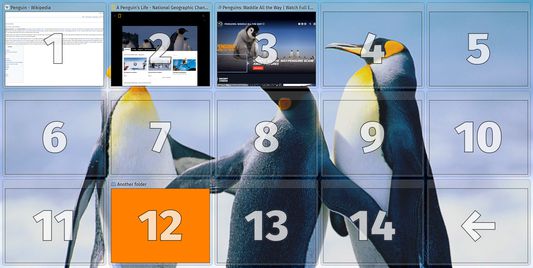
Organize frequently visited sites in a convenient menu of visual bookmarks and folders instead of a blank browser page. You can quickly open a bookmark or folder from any other tab using keyboard shortcuts.
사용자 263명사용자 263명
확장 메타 데이터
스크린샷

정보
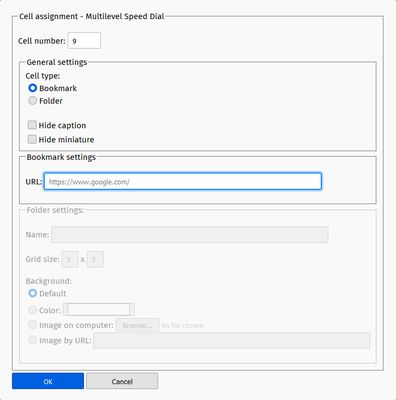
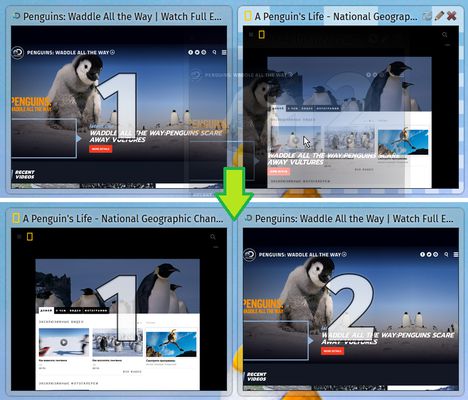
Organize frequently visited sites in a convenient menu of visual bookmarks instead of a blank browser page. Bookmarks can be divided into folders, and folders - into ther folders. You can quickly open a bookmark or folder from any other tab using keyboard shortcuts. Each folder can be stylized. If you don't want to draw attention to a bookmark, it is not necessary to hide it somewhere far away, but you can only hide its preview and/or title and arrange it as it conveniently does. The structure of the bookmarks can be easily synchronized between different devices or saved to disk.
Why does this extension needed various permissions?
* by default, the extension doesn't have permissions marked as optional. They can be granted in the addon's settings to use extra functions.
Navigation with shortcuts
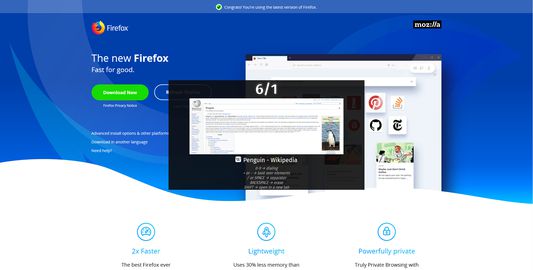
You can open a bookmark or a folder (hereinafter referred to as an element) from any page using shortcuts just after it completed loading. To do it you are to hold Ctrl and type element's address. Address - is a numbers of folders separated by slashes (symbol "/") that leads to a specific element. Just like files and folders on computer but with numbers.
So, holding Ctrl use these keys:
Why does this extension needed various permissions?
- Store unlimited amount of client-side data:
- storing of information about bookmarks and folders;
- storing of settings;
- Access browser tabs:
- opening bookmarks in existing or new tabs;
- processing keyboard shortcuts for navigating bookmarks from the keyboard;
- Access data on other sites:
- retrieve information about pages while creating bookmarks (page title, icon, screenshot-preview);
- placement on the pages of interface elements for navigation from the keyboard;
- Access browsing history (optional):
- compiling a list of proposals during the creation of the bookmark;
- Hide and show browser tabs (optional):
- request pages info (title, icon, preview screenshot) without displaying a new tab on the tabs panel when creating or updating bookmarks;
- Download files, read and modify the browser’s download history (optional):
- saving bookmarks structure as file. The extension does neither read nor modify the browser’s download history, just so the name of permission.
* by default, the extension doesn't have permissions marked as optional. They can be granted in the addon's settings to use extra functions.
Navigation with shortcuts
You can open a bookmark or a folder (hereinafter referred to as an element) from any page using shortcuts just after it completed loading. To do it you are to hold Ctrl and type element's address. Address - is a numbers of folders separated by slashes (symbol "/") that leads to a specific element. Just like files and folders on computer but with numbers.
So, holding Ctrl use these keys:
- 0-9 → dialing;
- +/- → look over elements;
- //SPACE → separator;
- Backspace → erase;
- Shift → open in a new tab (press one time is enough).
Navigation with shortcuts doesn't work on pages like "about:preferences", "about:addons", "about:..." etc. (Firefox special pages) and in some cases on different websites if they blocked this feature purposely.
리뷰어 26명이 4점으로 평가함
권한 및 데이터
필수 권한:
- 브라우저 탭에 접근
- 모든 웹사이트에서 사용자의 데이터에 접근
선택적 권한:
- 파일을 다운로드하고 브라우저의 다운로드 기록을 읽고 수정
- 방문 기록에 접근
- 브라우저 탭 보이고 숨기기
추가 정보
- 부가 기능 링크
- 버전
- 1.0.4f
- 크기
- 454.89 KB
- 최근 업데이트
- 7년 전 (2019년 5월 10일)
- 버전 목록
- 모음집에 추가