
Multiple Tab Handler 제작자: Piro (piro_or)
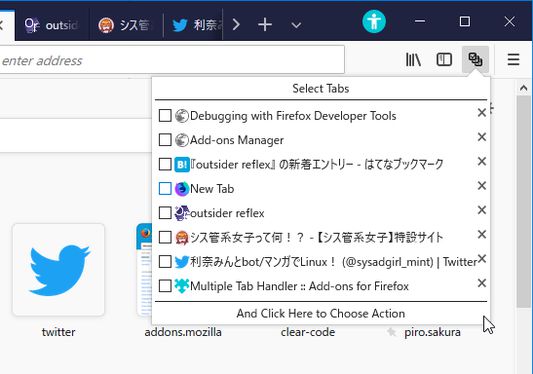
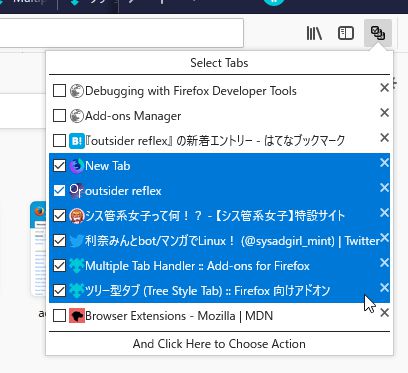
Allows you to select tabs by dragging and do something.
사용자 2,586명사용자 2,586명
확장 메타 데이터
스크린샷


정보
This addon provides a panel to select tabs by dragging. After selection you can choose a command to operate selected tabs with a menu. And you can also close multiple tabs directly by dragging on closeboxes.
The menu contains commands compatible to tab context menu of Firefox itself. You can add more commands provided by other tab related addons, for example:
* Copy Selected Tabs to Clipboard
* Save Selected Tabs to Files
* Tab Mover
Moreover, this addon is designed to work with Tree Style Tab. If you install both addons, you can select tabs in the sidebar by dragging . (Note that you need to long-press on a tab to start selection. Otherwise - if you start dragging immediately, it just moves the tab.)
The menu contains commands compatible to tab context menu of Firefox itself. You can add more commands provided by other tab related addons, for example:
* Copy Selected Tabs to Clipboard
* Save Selected Tabs to Files
* Tab Mover
Moreover, this addon is designed to work with Tree Style Tab. If you install both addons, you can select tabs in the sidebar by dragging . (Note that you need to long-press on a tab to start selection. Otherwise - if you start dragging immediately, it just moves the tab.)
리뷰어 122명이 3.7점으로 평가함
권한 및 데이터
추가 정보
- 부가 기능 링크
- 버전
- 3.2.5
- 크기
- 132.08 KB
- 최근 업데이트
- 한 달 전 (2026년 8월 27일)
- 개인정보처리방침
- 이 부가 기능에 대한 개인정보처리방침 읽기
- 버전 목록
- 모음집에 추가
For addon authors, Multiple Tab Handler provides public API. If your addon provides something special feature, you can add new menu item to the command list for selected tabs via API. For more details, see the API document.