Fire Resizer 제작자: Francesco De Stefano
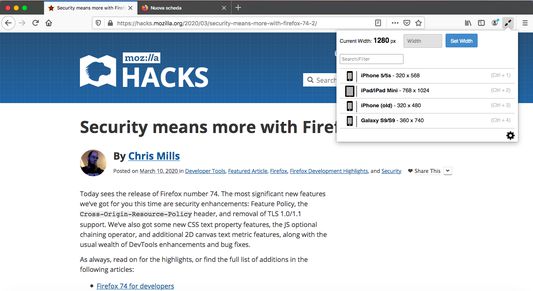
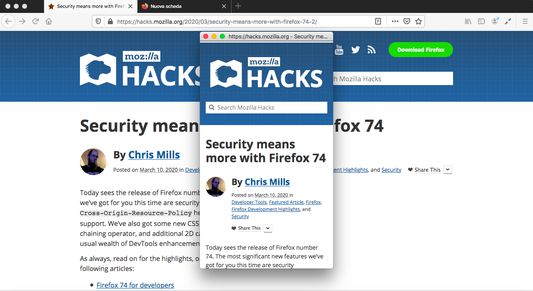
Display and set your browser width. Excellent for responsive web design and testing media queries. Includes keyboard shortcuts!
사용자 58명사용자 58명
확장 메타 데이터
스크린샷
정보
Add-on to resize the browser window.
With quick presets for mobile devices, check media queries or your mobile website with a single keystroke.
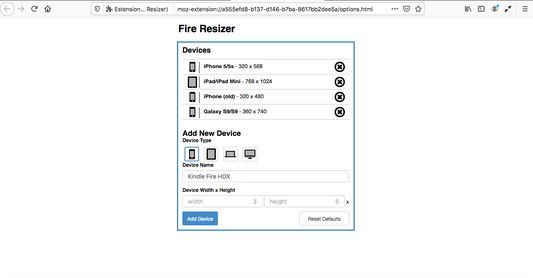
You can set your own custom presets for your devices.
Your presets will be synced across all devices currently logged into your account.
Keyboard Shortcuts
-
The extension allows for numerous keyboard shortcuts to speed up development:
* Ctrl + Right Arrow - opens the extension popup
* Up - manually increases browser width
* Down - manually decreases browser width
* Ctrl + 1-0 - resizes to saved preset
* Ctrl + Shift + 1-0 - resizes to the landscape/inverse of saved preset
* Ctrl + Esc - resets browser window to 1200x800
Cmd is substituted for Ctrl on Mac.
NOTE: Because Cmd + Shift + 3 and Cmd + Shift + 4 on a Mac take a screenshot, landscape orientation for the devices in position 3 and 4 won't work on a Mac.
With quick presets for mobile devices, check media queries or your mobile website with a single keystroke.
You can set your own custom presets for your devices.
Your presets will be synced across all devices currently logged into your account.
Keyboard Shortcuts
-
The extension allows for numerous keyboard shortcuts to speed up development:
* Ctrl + Right Arrow - opens the extension popup
* Up - manually increases browser width
* Down - manually decreases browser width
* Ctrl + 1-0 - resizes to saved preset
* Ctrl + Shift + 1-0 - resizes to the landscape/inverse of saved preset
* Ctrl + Esc - resets browser window to 1200x800
Cmd is substituted for Ctrl on Mac.
NOTE: Because Cmd + Shift + 3 and Cmd + Shift + 4 on a Mac take a screenshot, landscape orientation for the devices in position 3 and 4 won't work on a Mac.
6명이 4.2점으로 평가함
권한 및 데이터
추가 정보
- 부가 기능 링크
- 버전
- 2.1
- 크기
- 119.73 KB
- 마지막 업데이트
- 6년 전 (2020년 3월 15일)
- 관련 카테고리
- 버전 목록
- 모음집에 추가