
My Hours Time tracker 제작자: My Hours
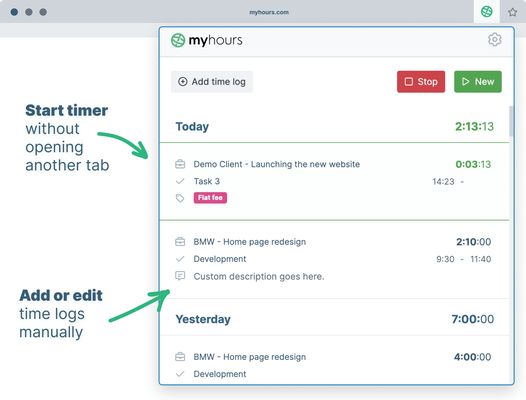
Track time without the need for opening another tab. Start timer or enter time manually right from the browser extension.
사용자 9명사용자 9명
확장 메타 데이터
스크린샷

정보
Track time without the need for opening another tab. Start timer or enter time manually right from the browser extension.
### Time tracking for teams
Track time without the need for opening another tab. Start timer or enter time manually right from the browser extension.
1. Setup your My Hours account
Sign up for My Hours account on myhours.com.
Create Projects, Tasks and Clients and invite your Team members to track time.
2. Download extension
Download Firefox extension from this page.
3. Sign in into your account
Each team member logs in with the same email and password they used in the web app.
4. Track time on projects & tasks
Select from a list of pre-assigned clients, project and tasks. Optionally add tags or custom description and enter time.
5. Start the timer or enter time manually
Start and stop the running stopwatch without opening another browser tab. Edit your time logs at any time.
6. Generate reports for clients or managers
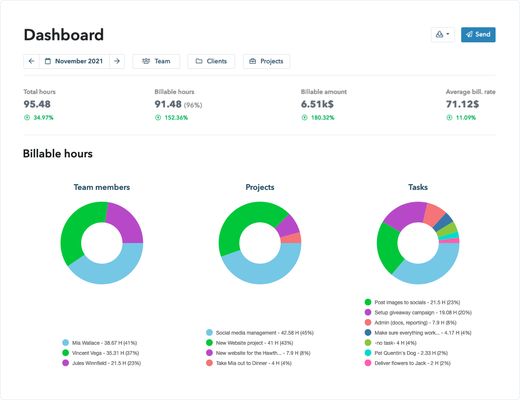
Finally go to myhours.com web app to create professional-looking reports for your clients or managers. Select from available reports and customize it based on your needs. Download to PDF or export to XLS.
For all questions reach out to support@myhours.com
### Time tracking for teams
Track time without the need for opening another tab. Start timer or enter time manually right from the browser extension.
1. Setup your My Hours account
Sign up for My Hours account on myhours.com.
Create Projects, Tasks and Clients and invite your Team members to track time.
2. Download extension
Download Firefox extension from this page.
3. Sign in into your account
Each team member logs in with the same email and password they used in the web app.
4. Track time on projects & tasks
Select from a list of pre-assigned clients, project and tasks. Optionally add tags or custom description and enter time.
5. Start the timer or enter time manually
Start and stop the running stopwatch without opening another browser tab. Edit your time logs at any time.
6. Generate reports for clients or managers
Finally go to myhours.com web app to create professional-looking reports for your clients or managers. Select from available reports and customize it based on your needs. Download to PDF or export to XLS.
For all questions reach out to support@myhours.com
0명이 0점으로 평가함
권한 및 데이터
필수 권한:
- 브라우저 탭에 접근
- monday.com 도메인의 사이트에서 사용자의 데이터에 접근
- basecamp.com 도메인의 사이트에서 사용자의 데이터에 접근
- api2.myhours.com에서 사용자의 데이터에 접근
- login.myhours.com에서 사용자의 데이터에 접근
- app.clickup.com에서 사용자의 데이터에 접근
- app.asana.com에서 사용자의 데이터에 접근
추가 정보
- 부가 기능 링크
- 버전
- 1.4.8
- 크기
- 2.92 MB
- 마지막 업데이트
- 일 년 전 (2024년 12월 19일)
- 관련 카테고리
- 라이선스
- All Rights Reserved
- 개인정보처리방침
- 이 부가 기능에 대한 개인정보처리방침 읽기
- 버전 목록
- 모음집에 추가