New Tab Here 제작자: pollti
Lets you open a new tab at any position. Using different configurable ways (keyboard shortcut, toolbar button, context menus of tabs, …) you can open tabs anywhere you like.
사용자 25명사용자 25명
확장 메타 데이터
스크린샷
정보
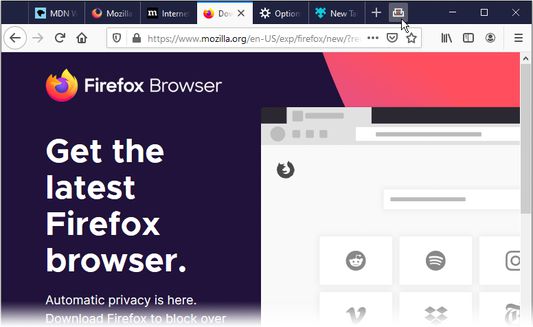
Always having many open tabs? I won't blame you – but I may have a useful feature for you :) Ever wanted to open a new tab in the middle? New Tab Here lets you open tabs wherever you want.
Current features:
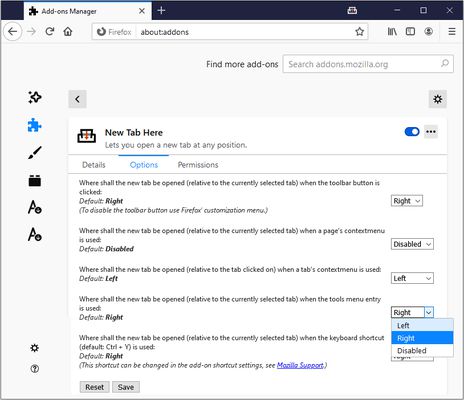
* Open new tabs at the position of the currently selected tab
** in page's context menu
** from toolbar button (in tab bar by default configuration)
** with a self-chosen keyboard shortcut, default: Ctrl+Y
** from Firefox' Tools menu
* Open a new tab at any position by right-clicking on a tab
All of these can separately be disabled in the add-on settings. You can also choose whether to open tabs to the left or right of the currently selected (or clicked respectively) tab for each separately.
Languages:
* English
* German
* Russian
Future features:
* new ideas or pull requests are welcome
Known bugs:
* None yet, please report bugs here: https://github.com/pollti/NewTabHere/issues
Current features:
* Open new tabs at the position of the currently selected tab
** in page's context menu
** from toolbar button (in tab bar by default configuration)
** with a self-chosen keyboard shortcut, default: Ctrl+Y
** from Firefox' Tools menu
* Open a new tab at any position by right-clicking on a tab
All of these can separately be disabled in the add-on settings. You can also choose whether to open tabs to the left or right of the currently selected (or clicked respectively) tab for each separately.
Languages:
* English
* German
* Russian
Future features:
* new ideas or pull requests are welcome
Known bugs:
* None yet, please report bugs here: https://github.com/pollti/NewTabHere/issues
6명이 5점으로 평가함
권한 및 데이터
추가 정보
- 부가 기능 링크
- 버전
- 2.0.0
- 크기
- 17.79 KB
- 마지막 업데이트
- 6년 전 (2020년 5월 29일)
- 버전 목록
- 모음집에 추가