
NOTEME.IO - WEB CLIPPER 제작자: noteme.io
One - Stop Online Productivity Space Bookmarks Manager. Notes. To Do List
확장 메타 데이터
스크린샷

정보
Tired of relying on too many apps for your online browsing workflow ?
noteme.io gathers all of the stuff that matters to you under one roof.
3 apps in one. Wave goodbye to switching tabs or swapping apps all the time!
Organize better. Write clearly. Get things done.
Organize with Ease
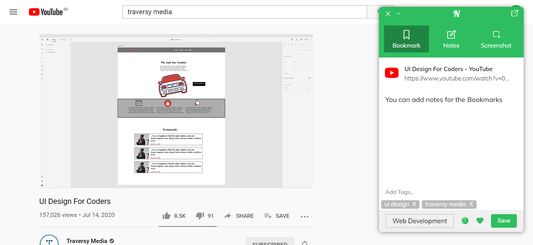
you can easily organize your bookmarks with categories and nested categories, suggested tags and custom filters.
Sort items by date, title, domain or manually by drag'n'drop between categories.
Full-Text Search & Permanent Library
Entire content of every web-page and PDF that you’ve saved is fully searchable.
Even if a page you’ve saved is taken down, you’ll still have a copy of it.
Better than a bookmark
No more searching from scratch. No more dead links. Clipped content is always available in your noteme account, whenever and wherever you need it.
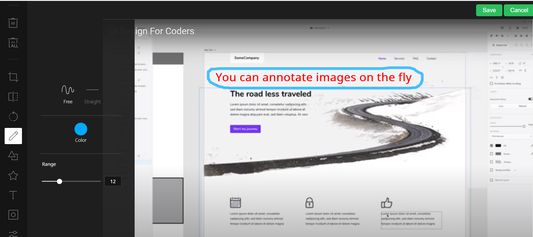
Annotate screenshots
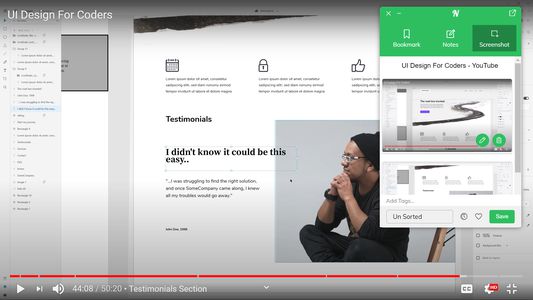
Take a screenshot of a webpage, then add text, callouts or annotations to highlight important information so you never forget why you saved it.
Organize on the fly
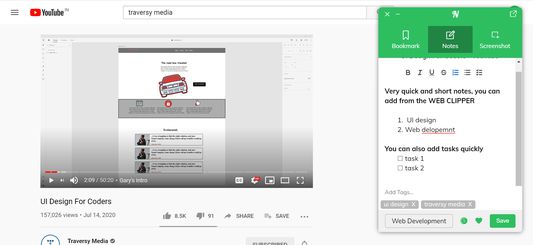
Add tags and remarks, edits titles, and save content to any card you choose so it’s easy to find it again later.
Take Your Bookmarks Everywhere
Securely access the bookmarks you’ve saved in from anywhere — even outside of the browser.
====================================
How to Search Your bookmarks Quickly
====================================
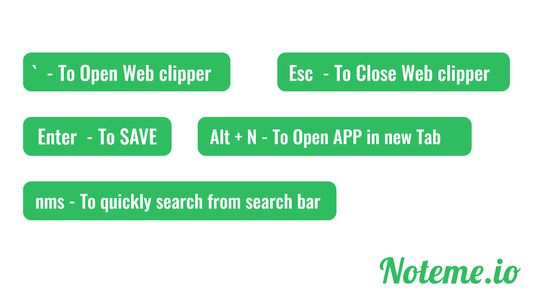
In search bar enter "nms" and space , now enter your search string and hit enter
============================================
How to Open noteme.io Quickly using keyborad
=============================================
Press Alt + N, This will open https://app.noteme.io in new tab.
======================================
How to open WEB CLIPPPER using keyborad
======================================
Press BACK-QUOTE( ` )
======================================
How to open WEB CLIPPPER using keyborad
======================================
Press BACK-QUOTE( ` )
======================================
How to Close WEB CLIPPPER using keyborad
======================================
Press ESCAPE( Esc )
noteme.io gathers all of the stuff that matters to you under one roof.
3 apps in one. Wave goodbye to switching tabs or swapping apps all the time!
Organize better. Write clearly. Get things done.
Organize with Ease
you can easily organize your bookmarks with categories and nested categories, suggested tags and custom filters.
Sort items by date, title, domain or manually by drag'n'drop between categories.
Full-Text Search & Permanent Library
Entire content of every web-page and PDF that you’ve saved is fully searchable.
Even if a page you’ve saved is taken down, you’ll still have a copy of it.
Better than a bookmark
No more searching from scratch. No more dead links. Clipped content is always available in your noteme account, whenever and wherever you need it.
Annotate screenshots
Take a screenshot of a webpage, then add text, callouts or annotations to highlight important information so you never forget why you saved it.
Organize on the fly
Add tags and remarks, edits titles, and save content to any card you choose so it’s easy to find it again later.
Take Your Bookmarks Everywhere
Securely access the bookmarks you’ve saved in from anywhere — even outside of the browser.
====================================
How to Search Your bookmarks Quickly
====================================
In search bar enter "nms" and space , now enter your search string and hit enter
============================================
How to Open noteme.io Quickly using keyborad
=============================================
Press Alt + N, This will open https://app.noteme.io in new tab.
======================================
How to open WEB CLIPPPER using keyborad
======================================
Press BACK-QUOTE( ` )
======================================
How to open WEB CLIPPPER using keyborad
======================================
Press BACK-QUOTE( ` )
======================================
How to Close WEB CLIPPPER using keyborad
======================================
Press ESCAPE( Esc )
리뷰어 0명이 0점으로 평가함
권한 및 데이터
추가 정보
- 부가 기능 링크
- 버전
- 4.0.8
- 크기
- 774.52 KB
- 마지막 업데이트
- 6년 전 (2020년 10월 6일)
- 라이선스
- All Rights Reserved
- 개인정보처리방침
- 이 부가 기능에 대한 개인정보처리방침 읽기
- 버전 목록
- 모음집에 추가