NugetPackageGenerator 제작자: Ahmed Amer Jaf
Generate A Batch List For A Package Include All Version Of The Package To Download Via IDM.
사용자 10명사용자 10명
확장 메타 데이터
스크린샷
정보
Firefox Helper AddOns That Allow You To Download All Version Of A Specific Package In Nuget With One Click.
In Order To Download Packages As A Batch You Need: Internet Download Manager.
How To Use:
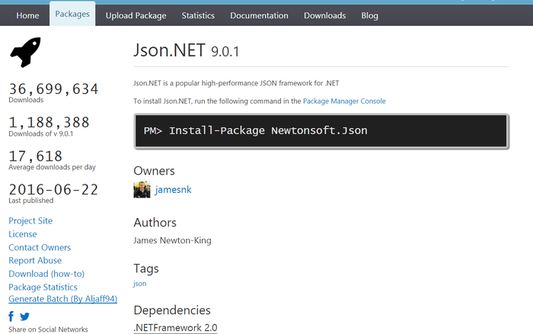
Goto Nuget.Org -> Select A Package You Need To Download -> In The Left Menu ( Where Project Site And Download Appear In Blue ) You Should See A New Option Called: Generate Batch (By Aljaff94) -> Click -> A Message Box Will Appear That Tell You: Urls Are Copped To Clipboard, Use IDM ...
Now Goto IDM -> Tasks -> Add Batch Download From Clipboard.
Note// This Project I Created To Help Me Created Offline Repository Cause My Slow Internet And I Published To Help Other People Like My Situation So Any Unlegal Usage Of This Extension I'm Not Responsible Of It.
In Order To Download Packages As A Batch You Need: Internet Download Manager.
How To Use:
Goto Nuget.Org -> Select A Package You Need To Download -> In The Left Menu ( Where Project Site And Download Appear In Blue ) You Should See A New Option Called: Generate Batch (By Aljaff94) -> Click -> A Message Box Will Appear That Tell You: Urls Are Copped To Clipboard, Use IDM ...
Now Goto IDM -> Tasks -> Add Batch Download From Clipboard.
Note// This Project I Created To Help Me Created Offline Repository Cause My Slow Internet And I Published To Help Other People Like My Situation So Any Unlegal Usage Of This Extension I'm Not Responsible Of It.
2명이 3.5점으로 평가함
권한 및 데이터
추가 정보
- 부가 기능 링크
- 버전
- 0.3resigned1
- 크기
- 16.18 KB
- 마지막 업데이트
- 2년 전 (2024년 4월 25일)
- 관련 카테고리
- 버전 목록
- 모음집에 추가