
Obsidian Easy Clipper 제작자: Nykko Lin
웹 콘텐츠를 Obsidian에 클립하고 YouTube 자막을 자동으로 전사하며 X (Twitter) 및 Reddit 게시물을 한 번의 클릭으로 저장합니다.
사용자 37명사용자 37명
확장 메타 데이터
스크린샷
정보
Obsidian Easy Clipper helps you capture articles, selections, videos, and social posts without clutter. It removes ads and distractions, preserves formatting, and saves content directly to your한 번의 클릭으로 웹 페이지, YouTube 스크립트, X 게시물, Reddit 게시물을 깔끔한 Markdown 형식으로 Obsidian에 저장하세요.
Obsidian Easy Clipper는 기사, 선택한 콘텐츠, 동영상, 소셜 게시물을 군더더기 없이 저장할 수 있도록 도와줍니다. 광고와 방해 요소를 제거하고 서식을 유지한 채 콘텐츠를 Obsidian Vault에 바로 저장해 노트를 깔끔하고 읽기 쉽게 정리할 수 있습니다.
주요 기능:
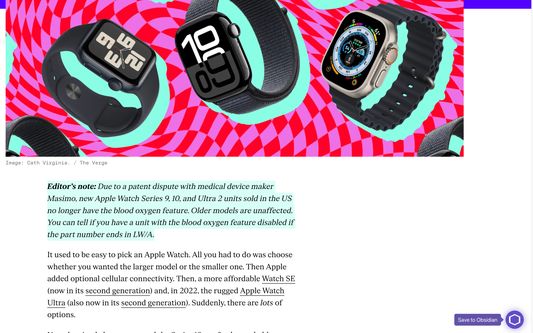
• 스마트 콘텐츠 추출 - 광고, 잡다한 요소, 관련 없는 페이지 요소를 자동으로 제거합니다
• 깔끔한 Markdown 변환 - 제목, 목록, 표, 링크, 코드 블록, LaTeX 수식을 유지합니다
• 소셜 게시물 저장 - X(Twitter)와 Reddit 게시물을 깔끔하고 읽기 쉬운 형식으로 Obsidian에 저장합니다
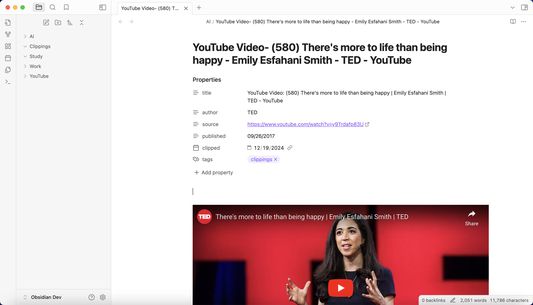
• YouTube 지원 - 한 번의 클릭으로 YouTube 동영상을 임베드합니다
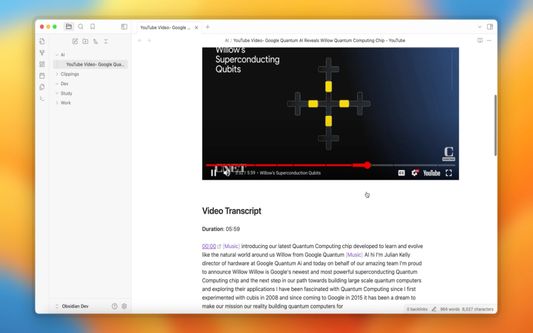
• YouTube 스크립트 저장 - 타임스탬프 기반 탐색과 함께 동영상 스크립트를 Obsidian에 자동 저장합니다
• 선택 저장 - 전체 페이지 또는 선택한 콘텐츠만 저장합니다
• 메타데이터 추출 - 제목, 작성자, 게시일, 원본 URL을 자동으로 가져옵니다
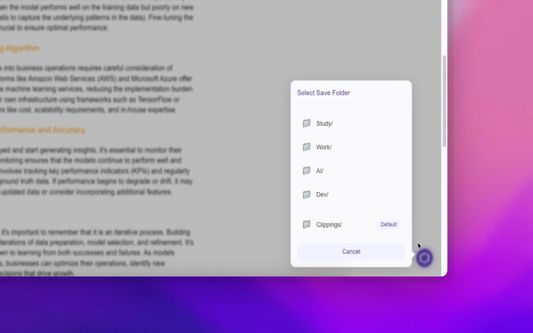
• 스마트 플로팅 버튼 - 필요할 때만 나타나며 마우스를 올리면 저장 메뉴가 열립니다
• 빠른 저장 Vault - 선호하는 Obsidian Vault에 더 빠르게 저장할 수 있도록 빠른 저장 Vault 옵션을 사용자 지정합니다
• 빠른 태그 - 저장 전에 태그를 즉시 추가해 더 잘 정리할 수 있습니다
• 사용자 지정 속성 - 더 구조적인 노트 정리를 위해 설정에서 사용자 지정 Obsidian 속성을 추가하고 관리합니다
• 다국어 지원 - 여러 인터페이스 언어를 지원하며 선호 언어에 자동으로 맞춥니다
사용 방법:
마우스를 브라우저 오른쪽 가장자리로 이동합니다
플로팅 버튼이 자동으로 나타납니다
버튼 위에 마우스를 올려 저장 메뉴를 엽니다
Vault와 대상 폴더를 선택하고 필요하면 태그를 추가한 뒤 Obsidian에 바로 저장합니다 Obsidian vault so your notes stay clean, readable, and organized.
Key Features:
• Smart Content Extraction - Automatically removes ads, clutter, and irrelevant page elements
• Clean Markdown Conversion - Preserves headings, lists, tables, links, code blocks, and LaTeX equations
• Social Post Saving - Save posts from X (Twitter) and Reddit to Obsidian in a clean, readable format
• YouTube Support - Embed YouTube videos with one click
• YouTube Transcript Capture - Automatically save video transcripts to Obsidian with timestamp-based navigation
• Selective Saving - Save an entire page or just the content you select
• Metadata Extraction - Automatically captures title, author, publish date, and source URL
• Smart Floating Button - Appears only when needed and reveals the save menu on hover
• Quick Save Vaults - Customize quick-save vault options for faster saving to your preferred Obsidian vaults
• Quick Tags - Add tags instantly before saving for better organization
• Custom Properties - Add and manage custom Obsidian properties in Settings for more structured note organization
• Multi-language Support - Supports multiple interface languages and automatically matches your preferred language
How it works:
Obsidian Easy Clipper는 기사, 선택한 콘텐츠, 동영상, 소셜 게시물을 군더더기 없이 저장할 수 있도록 도와줍니다. 광고와 방해 요소를 제거하고 서식을 유지한 채 콘텐츠를 Obsidian Vault에 바로 저장해 노트를 깔끔하고 읽기 쉽게 정리할 수 있습니다.
주요 기능:
• 스마트 콘텐츠 추출 - 광고, 잡다한 요소, 관련 없는 페이지 요소를 자동으로 제거합니다
• 깔끔한 Markdown 변환 - 제목, 목록, 표, 링크, 코드 블록, LaTeX 수식을 유지합니다
• 소셜 게시물 저장 - X(Twitter)와 Reddit 게시물을 깔끔하고 읽기 쉬운 형식으로 Obsidian에 저장합니다
• YouTube 지원 - 한 번의 클릭으로 YouTube 동영상을 임베드합니다
• YouTube 스크립트 저장 - 타임스탬프 기반 탐색과 함께 동영상 스크립트를 Obsidian에 자동 저장합니다
• 선택 저장 - 전체 페이지 또는 선택한 콘텐츠만 저장합니다
• 메타데이터 추출 - 제목, 작성자, 게시일, 원본 URL을 자동으로 가져옵니다
• 스마트 플로팅 버튼 - 필요할 때만 나타나며 마우스를 올리면 저장 메뉴가 열립니다
• 빠른 저장 Vault - 선호하는 Obsidian Vault에 더 빠르게 저장할 수 있도록 빠른 저장 Vault 옵션을 사용자 지정합니다
• 빠른 태그 - 저장 전에 태그를 즉시 추가해 더 잘 정리할 수 있습니다
• 사용자 지정 속성 - 더 구조적인 노트 정리를 위해 설정에서 사용자 지정 Obsidian 속성을 추가하고 관리합니다
• 다국어 지원 - 여러 인터페이스 언어를 지원하며 선호 언어에 자동으로 맞춥니다
사용 방법:
마우스를 브라우저 오른쪽 가장자리로 이동합니다
플로팅 버튼이 자동으로 나타납니다
버튼 위에 마우스를 올려 저장 메뉴를 엽니다
Vault와 대상 폴더를 선택하고 필요하면 태그를 추가한 뒤 Obsidian에 바로 저장합니다 Obsidian vault so your notes stay clean, readable, and organized.
Key Features:
• Smart Content Extraction - Automatically removes ads, clutter, and irrelevant page elements
• Clean Markdown Conversion - Preserves headings, lists, tables, links, code blocks, and LaTeX equations
• Social Post Saving - Save posts from X (Twitter) and Reddit to Obsidian in a clean, readable format
• YouTube Support - Embed YouTube videos with one click
• YouTube Transcript Capture - Automatically save video transcripts to Obsidian with timestamp-based navigation
• Selective Saving - Save an entire page or just the content you select
• Metadata Extraction - Automatically captures title, author, publish date, and source URL
• Smart Floating Button - Appears only when needed and reveals the save menu on hover
• Quick Save Vaults - Customize quick-save vault options for faster saving to your preferred Obsidian vaults
• Quick Tags - Add tags instantly before saving for better organization
• Custom Properties - Add and manage custom Obsidian properties in Settings for more structured note organization
• Multi-language Support - Supports multiple interface languages and automatically matches your preferred language
How it works:
- Move your mouse to the right edge of the browser
- The floating button appears automatically
- Hover over the button to open the save menu
- Choose a vault and destination folder, add tags if needed, and save directly to Obsidian
리뷰어 3명이 4.3점으로 평가함
권한 및 데이터
추가 정보
- 부가 기능 링크
- 버전
- 1.3.8
- 크기
- 193.81 KB
- 최근 업데이트
- 5달 전 (2026년 4월 16일)
- 관련 카테고리
- 버전 목록
- 모음집에 추가