
Open in Google Search Console 제작자: Meetanshi
Open pages in Google Search Console with specified time range
사용자 2명사용자 2명
확장 메타 데이터
스크린샷
정보
Open in Google Search Console offers a quick and efficient way to access the Google Search Console performance report for any page on your website.
The Google Search Console extension is designed for website owners, SEO specialists, and digital marketers. It quickly generates URL of Google Search Console performance report based on the configuration and opens it in a new tab.
Here's how to get started with the Search Console extension:
👉 Install the extension and open it
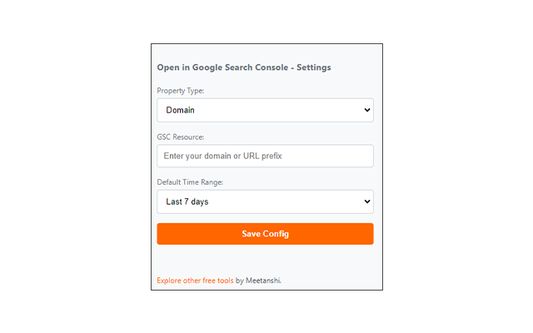
👉 Select your search console property type and enter the resource ID
👉 Choose the default time range for the performance report and save it
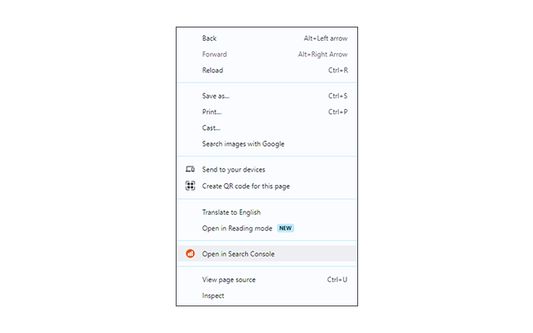
👉 Open any webpage on your site, right click and click "Open in Search Console."
In case you're facing any issues, re-check the resource ID value you've added. You must have access to the respective Google Search Console property in your account to access its reports.
NOTE: Our extension does not access any of your Google Search Console data.
The Google Search Console extension is designed for website owners, SEO specialists, and digital marketers. It quickly generates URL of Google Search Console performance report based on the configuration and opens it in a new tab.
Here's how to get started with the Search Console extension:
👉 Install the extension and open it
👉 Select your search console property type and enter the resource ID
👉 Choose the default time range for the performance report and save it
👉 Open any webpage on your site, right click and click "Open in Search Console."
In case you're facing any issues, re-check the resource ID value you've added. You must have access to the respective Google Search Console property in your account to access its reports.
NOTE: Our extension does not access any of your Google Search Console data.
0명이 0점으로 평가함
권한 및 데이터
추가 정보
- 부가 기능 링크
- 버전
- 1.1
- 크기
- 15.07 KB
- 마지막 업데이트
- 2년 전 (2024년 1월 3일)
- 버전 목록
- 모음집에 추가