Firefox 브라우저 부가 기능
  • 확장 기능
  • 테마
    • Firefox용
    • 사전 및 언어 팩
    • 다른 브라우저 사이트
    • Android 부가 기능
로그인
Open Previous Page in New Tab 미리보기

Open Previous Page in New Tab 제작자: Elias Jaffe

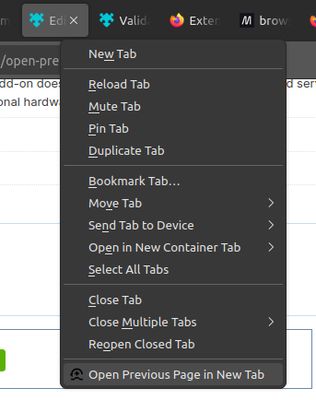
Adds a tab menu option to duplicate the current tab and hit the back button on the duplicated tab.

4 (리뷰 1개)4 (리뷰 1개)
사용자 2명사용자 2명
Firefox를 다운로드하고 확장 기능을 받으세요
파일 다운로드

확장 메타 데이터

스크린샷
A screenshot of the tab context menu with the "Open Previous Page In New Tab" option at the bottom.
정보
Why?
You opened a new link on purpose, but it accidentally opened in the same tab. You did not want to leave the old tab, but you also don't want to lose this new tab either. When this happens (and it happens to me a lot), I used to manually duplicate the tab and hit the back button. This saves you a click or two.

How to use:
1. Right-click on a tab
2. In the context menu that appears, click "Open Previous Page In New Tab".

How it works:
1. Duplicates the current tab, putting the newer one to the left, keeping your current tab in focus.
2. Hits the back button on the newer tab. If there is no history, it only duplicates the tab.
1명이 4점으로 평가함
로그인하여 이 확장 기능의 평점을 남겨주세요
아직 평점이 없습니다

별점 저장됨

5
0
4
1
3
0
2
0
1
0
리뷰 1개 모두 읽기
권한 및 데이터

필수 권한:

  • 방문 기록에 접근
  • 브라우저 탭에 접근
더 알아보기
추가 정보
부가 기능 링크
  • Copy add-on ID
버전
1.0
크기
10.95 KB
마지막 업데이트
2년 전 (2024년 6월 7일)
관련 카테고리
  • 탭
라이선스
MIT 라이선스
버전 목록
  • 모든 버전 보기
모음집에 추가
이 부가 기능 신고
Mozilla 홈페이지로 이동

부가 기능

  • 소개
  • Firefox 부가 기능 블로그
  • 확장 기능 워크샵
  • 개발자 허브
  • 개발자 정책
  • 커뮤니티 블로그
  • 포럼
  • 버그 신고
  • 리뷰 지침

브라우저

  • Desktop
  • Mobile
  • Enterprise

제품

  • Browsers
  • VPN
  • Relay
  • Monitor
  • Pocket
  • Bluesky (@firefox.com)
  • Instagram (Firefox)
  • YouTube (firefoxchannel)
  • 개인 정보
  • 쿠키
  • 법률

특별한 고지가 없는 한, 본 사이트의 콘텐츠는 Commons Attribution Share-Alike License v3.0 또는 그 이후 버전에 따라 사용이 허가됩니다.