
PageCleaner – Make items disappear 제작자: Maxime
Clean up web pages: hide ads, pop‑ups, cookie banners, distractions and any other element, site by site, with PageCleaner. Your web, your rules.
사용자 17명사용자 17명
확장 메타 데이터
스크린샷




정보
Clean up web pages: hide ads, pop‑ups, cookie banners, distractions and any other element, site by site, with PageCleaner. Your web, your rules.
PageCleaner – your web, your way
Tired of intrusive ads, GDPR pop‑ups, useless sidebars or floating videos that chase you while scrolling? With PageCleaner, you finally decide what you want to see. This extension is not a traditional ad‑blocker: it is a full personalization tool that lets you hide or remove any HTML element in a few clicks, for pages that are faster, clearer and easier on your attention.
⭐️ Key features
• 100 % custom cleaning
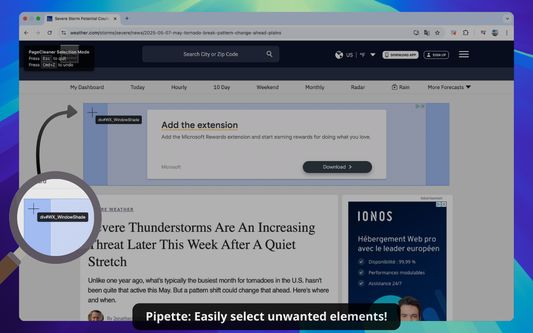
– Visual selector (eyedropper) directly from the extension icon.
– Expert mode: paste or type your own CSS selectors for ultra‑precise filtering (AI‑assisted).
• Smart rule organization
– Group your filters into categories (“Video ads”, “Cookie banners”, “Comments”, etc.).
– Enable or disable a whole group or an individual site with a single click.
• Fine‑grained site control
– PageCleaner acts only on the domains you choose; nothing changes elsewhere.
– Dynamic icon instantly shows whether rules are active on the current page.
• Backup, import and share
– Export all your rules to a JSON file to save or share them.
– Import a ready‑made configuration to save time.
• Lightweight and fast
– Optimized MutationObserver with debounce: no noticeable impact on load time.
– Minimal code loaded only when needed.
• Full privacy protection
– No personal data collected or transmitted; everything stays local or syncs via your Google account if you enable it.
🧑💻 How it works
• Click the PageCleaner icon and add the current site to your list.
• Select elements visually or specify them in CSS.
• PageCleaner applies a CSS class on every visit and the elements vanish instantly.
• Edit or disable your rules at any time from the settings panel.
🎯 Use‑case ideas
• Remove Shorts and suggestions on YouTube home.
• Hide the chat column on a streaming service to focus on the video.
• Block newsletter sign‑up pop‑ups covering content.
• Clear “Trending” or “Recommended” sidebars on forums.
• Dismiss persistent cookie banners even after acceptance.
📋 Permissions
The extension needs access to data on all sites solely to run your rules. PageCleaner never reads your history, analyzes your searches or sells your information. See our privacy policy for details.
Take back control of your browsing today: install PageCleaner and enjoy a cleaner, faster web tailored to you. 🧹
🏷️ Keywords: hide elements, block ads, remove pop‑up, cookie banner blocker, customize web page, site cleaning, Chrome extension, remove sidebars, clean browsing experience, layout control, faster pages, content filtering
PageCleaner – your web, your way
Tired of intrusive ads, GDPR pop‑ups, useless sidebars or floating videos that chase you while scrolling? With PageCleaner, you finally decide what you want to see. This extension is not a traditional ad‑blocker: it is a full personalization tool that lets you hide or remove any HTML element in a few clicks, for pages that are faster, clearer and easier on your attention.
⭐️ Key features
• 100 % custom cleaning
– Visual selector (eyedropper) directly from the extension icon.
– Expert mode: paste or type your own CSS selectors for ultra‑precise filtering (AI‑assisted).
• Smart rule organization
– Group your filters into categories (“Video ads”, “Cookie banners”, “Comments”, etc.).
– Enable or disable a whole group or an individual site with a single click.
• Fine‑grained site control
– PageCleaner acts only on the domains you choose; nothing changes elsewhere.
– Dynamic icon instantly shows whether rules are active on the current page.
• Backup, import and share
– Export all your rules to a JSON file to save or share them.
– Import a ready‑made configuration to save time.
• Lightweight and fast
– Optimized MutationObserver with debounce: no noticeable impact on load time.
– Minimal code loaded only when needed.
• Full privacy protection
– No personal data collected or transmitted; everything stays local or syncs via your Google account if you enable it.
🧑💻 How it works
• Click the PageCleaner icon and add the current site to your list.
• Select elements visually or specify them in CSS.
• PageCleaner applies a CSS class on every visit and the elements vanish instantly.
• Edit or disable your rules at any time from the settings panel.
🎯 Use‑case ideas
• Remove Shorts and suggestions on YouTube home.
• Hide the chat column on a streaming service to focus on the video.
• Block newsletter sign‑up pop‑ups covering content.
• Clear “Trending” or “Recommended” sidebars on forums.
• Dismiss persistent cookie banners even after acceptance.
📋 Permissions
The extension needs access to data on all sites solely to run your rules. PageCleaner never reads your history, analyzes your searches or sells your information. See our privacy policy for details.
Take back control of your browsing today: install PageCleaner and enjoy a cleaner, faster web tailored to you. 🧹
🏷️ Keywords: hide elements, block ads, remove pop‑up, cookie banner blocker, customize web page, site cleaning, Chrome extension, remove sidebars, clean browsing experience, layout control, faster pages, content filtering
리뷰어 0명이 0점으로 평가함
권한 및 데이터
추가 정보
- 부가 기능 링크
- 버전
- 2.0.0
- 크기
- 153.75 KB
- 최근 업데이트
- 일 년 전 (2025년 5월 10일)
- 개인정보처리방침
- 이 부가 기능에 대한 개인정보처리방침 읽기
- 버전 목록
- 모음집에 추가