Page Saver WE screenshot capture tool 제작자: Kathleen Brade, Mark Smith
Quickly and easily capture an image of a web page. Options allow you to control output format (PNG or JPEG), file name and more.
사용자 6,360명사용자 6,360명
확장 메타 데이터
스크린샷
정보
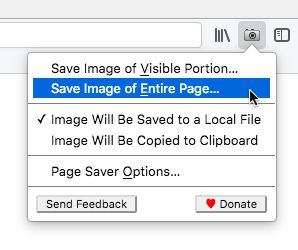
Page Saver WE lets you capture images of web pages and save them to a file in PNG or JPEG format, or to the system clipboard. Using Page Saver, you can capture a web page screenshot of an entire page or just the visible portion. To allow you to control the image capture process, a variety of options are provided including a file name pattern and support for an optional header and footer.
To begin using Page Saver WE, click the camera icon on your Firefox toolbar or press Alt+Shift+I (Linux and Windows) or ⌘+Shift+I (macOS).
Please Note: Due to restrictions Firefox imposes on extensions, Page Saver WE cannot capture images of internal Firefox pages such as about:addons or Mozilla hosted pages such as https://addons.mozilla.org/.
Questions? Contact the developers by sending email to support@pearlcrescent.com
To begin using Page Saver WE, click the camera icon on your Firefox toolbar or press Alt+Shift+I (Linux and Windows) or ⌘+Shift+I (macOS).
Please Note: Due to restrictions Firefox imposes on extensions, Page Saver WE cannot capture images of internal Firefox pages such as about:addons or Mozilla hosted pages such as https://addons.mozilla.org/.
Questions? Contact the developers by sending email to support@pearlcrescent.com
90명이 4.4점으로 평가함
권한 및 데이터
추가 정보
- 부가 기능 링크
- 버전
- 0.8.2
- 크기
- 103.28 KB
- 마지막 업데이트
- 4년 전 (2022년 7월 27일)
- 관련 카테고리
- 버전 목록
- 모음집에 추가