Firefox 브라우저 부가 기능
  • 확장 기능
  • 테마
    • Firefox용
    • 사전 및 언어 팩
    • 다른 브라우저 사이트
    • Android 부가 기능
로그인
Paranoia 미리보기

Paranoia 제작자: GDR!

Check if your emails arrived TLS-encrypted (and which corporations were able to read it nevertheless)

4.3 (리뷰 8개)4.3 (리뷰 8개)
사용자 3명사용자 3명
Firefox를 다운로드하고 확장 기능을 받으세요
파일 다운로드

확장 메타 데이터

스크린샷
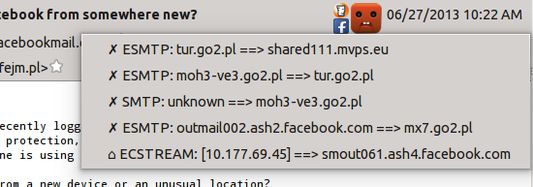
This is what an unencrypted connection looks like. The message passed the servers of Facebook and O2 Group.All the connections where the message has been passed over the internet. All of them unencrypted.Place your mouse over the corporation icon to learn its name
정보
This extension shows two basic pieces of information in the incoming email header pane:
  • Was the connection encrypted at all the time when this message was sent between servers?
  • Which large corporations had a copy of this message and, theoretically, could read it?
There is an emoticon showing the state of encryption. Click on the emoticon and you'll see a list of connections which were made before this message arrived in your inbox, and state of encryption of each of them.
  • Yellow super-happy emoticon = connection encrypted at all times, and hasn't passed any known big corporations
  • Yellow happy emoticon = connection encrypted on the public Internet
  • Blue sad emoticon = 1 connection not encrypted
  • Red terrified emoticon = message sent more than 1 time unencrypted, on the public network (internet)
The symbols in the list of connections are as following:
  • ✓ - encrypted
  • ✗ - unencrypted
  • ⌂ - unencrypted, but in a local network
On the left of the emoticon, small icons of internet corporations are displayed. Hold your mouse over the logo to see the name of a corporation. The list is not very complete and you're welcome to contribute new entries on Github.
8명이 4.3점으로 평가함
로그인하여 이 확장 기능의 평점을 남겨주세요
아직 평점이 없습니다

별점 저장됨

5
5
4
2
3
0
2
0
1
1
리뷰 8개 모두 읽기
추가 정보
부가 기능 링크
  • 홈 페이지
  • 지원 사이트
  • Copy add-on ID
버전
0.3.0
크기
90.63 KB
마지막 업데이트
7년 전 (2019년 10월 7일)
관련 카테고리
  • 개인 정보 보호 및 보안
  • 소셜 서비스
라이선스
GNU General Public License v2.0 전용
버전 목록
  • 모든 버전 보기
모음집에 추가
이 부가 기능 신고
Mozilla 홈페이지로 이동

부가 기능

  • 소개
  • Firefox 부가 기능 블로그
  • 확장 기능 워크샵
  • 개발자 허브
  • 개발자 정책
  • 커뮤니티 블로그
  • 포럼
  • 버그 신고
  • 리뷰 지침

브라우저

  • Desktop
  • Mobile
  • Enterprise

제품

  • Browsers
  • VPN
  • Relay
  • Monitor
  • Pocket
  • Bluesky (@firefox.com)
  • Instagram (Firefox)
  • YouTube (firefoxchannel)
  • 개인 정보
  • 쿠키
  • 법률

특별한 고지가 없는 한, 본 사이트의 콘텐츠는 Commons Attribution Share-Alike License v3.0 또는 그 이후 버전에 따라 사용이 허가됩니다.