
Password Hasher Plus - Password Generator 제작자: simu
Password Hasher Plus automatically enhances password strength (length and difficulty) to protect your accounts.
사용자 48명사용자 48명
확장 메타 데이터
스크린샷
정보
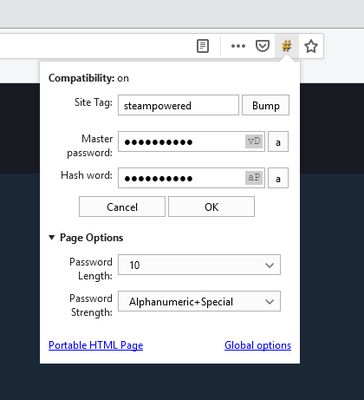
This extension allows you to choose different passwords for each website which requires an account without having to remember all of them. The extension achieves this by taking your master password and hashing it based on the website's domain (e.g. the google in www.google.com) to create a password that is unique to that website.
Quickstart Guide:
0a) First time only: check that site settings are correct and that you have enabled compatibility mode if you're coming from the old Firefox plugin.
0b) First time only: check the global settings in the options page of the extension to choose your password length.
1) Input your master password in the password field
2) Press the '#' button near the password field or use Ctrl+# to hash the password in place
3) Optional: Use the '*' button or press Ctrl+* to check either your master password or the hash word (depending on whether you've hashed your master password already or not).
4) Login
Password Hasher Plus is a replacement for the Password Hasher extension which unfortunately is not developed anymore and does not work correctly with multi-process Firefox and not at all with Firefox Quantum.
To generate hash words which are identical to the old version, you have to enable compatibility mode!
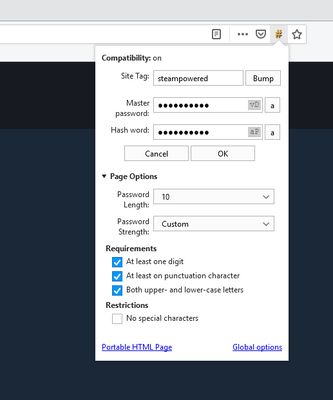
If you were using custom settings for the hash word you can use password strength "Custom" to select the options you were using. Note that "digits only" is present as strength "Numeric".
Optionally, you can also use your Firefox account to synchronize/share settings between different Firefox installations. See this Mozilla support article for details on how to setup Sync. Note that for synchronizing addon settings you have to enable synchronizing Addons in your browser's Firefox Account settings.
A quick explanation of the sync-related options:
1. Choose whether to use local or sync storage (the first dropdown menu).
2. Choose how to switch storage. You can select to use whatever settings exist in the storage you selected in step 1 ("Use existing settings"), alternatively you can choose to overwrite whatever is in the storage selected in step 1 with your current settings ("Overwrite existing settings"), third you can choose to merge your current settings with the settings which exist in the storage selected in step 1, giving preference to either the settings available locally or in Sync.
Because there is no WebExtensions API for accessing the browser's credential storage -- yet? see this Firefox bug -- you will have to migrate site tags and settings manually.
Quickstart Guide:
0a) First time only: check that site settings are correct and that you have enabled compatibility mode if you're coming from the old Firefox plugin.
0b) First time only: check the global settings in the options page of the extension to choose your password length.
1) Input your master password in the password field
2) Press the '#' button near the password field or use Ctrl+# to hash the password in place
3) Optional: Use the '*' button or press Ctrl+* to check either your master password or the hash word (depending on whether you've hashed your master password already or not).
4) Login
Password Hasher Plus is a replacement for the Password Hasher extension which unfortunately is not developed anymore and does not work correctly with multi-process Firefox and not at all with Firefox Quantum.
To generate hash words which are identical to the old version, you have to enable compatibility mode!
If you were using custom settings for the hash word you can use password strength "Custom" to select the options you were using. Note that "digits only" is present as strength "Numeric".
Optionally, you can also use your Firefox account to synchronize/share settings between different Firefox installations. See this Mozilla support article for details on how to setup Sync. Note that for synchronizing addon settings you have to enable synchronizing Addons in your browser's Firefox Account settings.
A quick explanation of the sync-related options:
1. Choose whether to use local or sync storage (the first dropdown menu).
2. Choose how to switch storage. You can select to use whatever settings exist in the storage you selected in step 1 ("Use existing settings"), alternatively you can choose to overwrite whatever is in the storage selected in step 1 with your current settings ("Overwrite existing settings"), third you can choose to merge your current settings with the settings which exist in the storage selected in step 1, giving preference to either the settings available locally or in Sync.
Because there is no WebExtensions API for accessing the browser's credential storage -- yet? see this Firefox bug -- you will have to migrate site tags and settings manually.
리뷰어 12명이 3.3점으로 평가함
권한 및 데이터
추가 정보
- 부가 기능 링크
- 버전
- 2.5.1
- 크기
- 167.1 KB
- 최근 업데이트
- 7년 전 (2019년 10월 31일)
- 관련 카테고리
- 버전 목록
- 모음집에 추가