
pCloud Save 제작자: pCloud
Save your favorite web images, videos, text and more to pCloud - up to 10 GB free storage. ★ Save web content through the right-click context menu ★ Select multiple images and save them at once ★ Mark articles, paragraphs and other types of text
사용자 2,179명사용자 2,179명
확장 메타 데이터
스크린샷
정보
Save your favorite web images, videos, text and more to pCloud - up to 10 GB free storage.
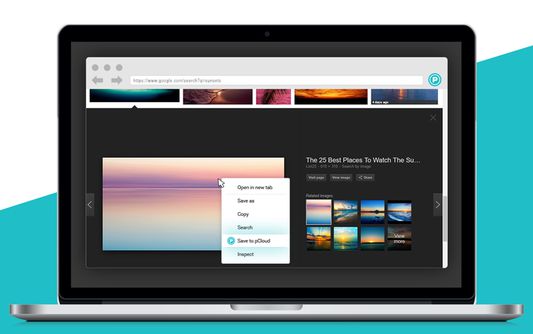
Save to pCloud allows you to save web images, videos, audiobooks and more from the context menu, directly to your pCloud account. Easily get a copy of your favorite web content and access it from your phone, laptop and from the web.
With Save to pCloud, you can:
★ Save web content through the right-click context menu
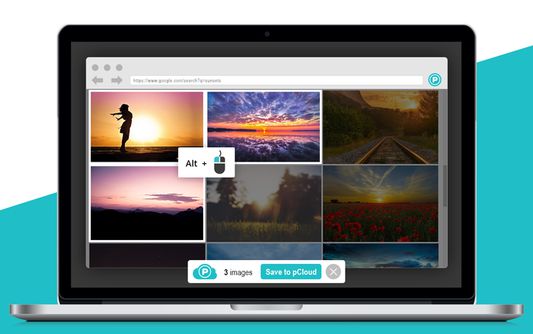
★ Select multiple web images and save them at once
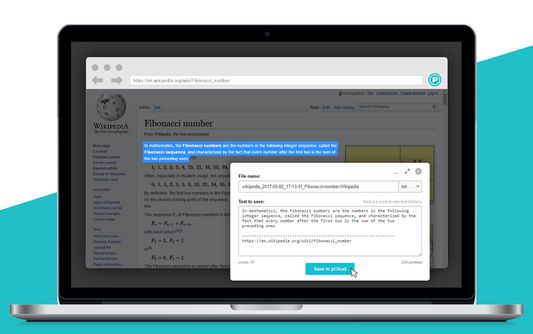
★ Mark articles, paragraphs and other types of text content and save away
Right-click on the file you want to save and select "Save to pCloud" from the context menu. Want to save more than one image at once? Hold the Alt key on your keyboard every time you choose an image. Then confirm your upload by clicking on the Save to pCloud button at the bottom of the screen.
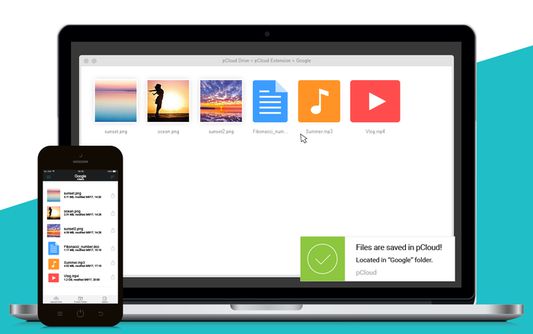
Every time you save to pCloud, you'll get a notification with details on the location of your files in pCloud and shortcut access.
Please note: Due to Firefox's updated security policy, if you're using Google, Facebook or AppleID to log into pCloud Save, you will need to follow these steps:
Alternatively, you can add pCloud Save to the list of exceptions:
About pCloud:
pCloud is the secure place for your photos, documents, and entire digital collection. Once your files are in pCloud, you will be able to easily access, share and collaborate on them, anytime you want, anywhere you go. Sign up now and get up to 10 GB of cloud storage for free. The app is available for all major mobile (Android, iOS and Windows Mobile), desktop (Windows, Mac OS, Linux) and web platforms.
------------
This extension uses Google Analytics to help us better understand and improve user experience. For more information read our Privacy Policy.
Save to pCloud allows you to save web images, videos, audiobooks and more from the context menu, directly to your pCloud account. Easily get a copy of your favorite web content and access it from your phone, laptop and from the web.
With Save to pCloud, you can:
★ Save web content through the right-click context menu
★ Select multiple web images and save them at once
★ Mark articles, paragraphs and other types of text content and save away
Right-click on the file you want to save and select "Save to pCloud" from the context menu. Want to save more than one image at once? Hold the Alt key on your keyboard every time you choose an image. Then confirm your upload by clicking on the Save to pCloud button at the bottom of the screen.
Every time you save to pCloud, you'll get a notification with details on the location of your files in pCloud and shortcut access.
Please note: Due to Firefox's updated security policy, if you're using Google, Facebook or AppleID to log into pCloud Save, you will need to follow these steps:
- Open the Firefox Settings and go to "Privacy & Security"
- Scroll down to the section "Permissions" and uncheck "Block pop-up windows"
- Click on pCloud Save (it will open as a new tab) and log into your account
- Go back to "Permissions" and check "Block pop-up windows"
Alternatively, you can add pCloud Save to the list of exceptions:
- Follow the first 3 steps above
- Click on pCloud Save (it will open as a new tab) and copy the URL
- Go back to the section "Permissions" and check "Block pop-up windows"
- Click "Exceptions" and enter the URL
- Click "Allow" and afterwards "Save changes"
About pCloud:
pCloud is the secure place for your photos, documents, and entire digital collection. Once your files are in pCloud, you will be able to easily access, share and collaborate on them, anytime you want, anywhere you go. Sign up now and get up to 10 GB of cloud storage for free. The app is available for all major mobile (Android, iOS and Windows Mobile), desktop (Windows, Mac OS, Linux) and web platforms.
------------
This extension uses Google Analytics to help us better understand and improve user experience. For more information read our Privacy Policy.
리뷰어 142명이 2.5점으로 평가함
권한 및 데이터
추가 정보
- 부가 기능 링크
- 버전
- 1.6.1
- 크기
- 2.19 MB
- 마지막 업데이트
- 한 달 전 (2026년 7월 23일)
- 관련 카테고리
- 개인정보처리방침
- 이 부가 기능에 대한 개인정보처리방침 읽기
- 버전 목록
- 모음집에 추가