
Pinterest Dark Theme 제작자: yaagame
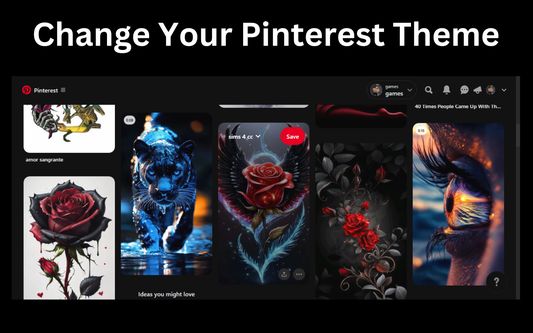
Use Pinterest Dark Mode desktop extension to activate a dark Pinterest theme.
사용자 3,128명사용자 3,128명
확장 메타 데이터
스크린샷
정보
🌙 Pinterest Dark Mode – Enhance Your Browsing Experience
Tired of bright screens while scrolling Pinterest? Activate Pinterest Dark Mode, a sleek and eye-friendly Chrome extension that transforms Pinterest into a beautiful, comfortable dark theme. Say goodbye to harsh white backgrounds and enjoy a modern, distraction-free interface.
🔥 Why Use Pinterest Dark Mode?
✅ Reduces eye strain during long browsing sessions
✅ Enhances focus with a sleek, distraction-free design
✅ Provides a stylish, modern look for a better experience
✅ Seamless integration – works instantly once installed
With Pinterest Dark Mode, every page is automatically adjusted to a consistent night theme, improving readability and aesthetics.
⚡ Key Features:
✔ Automatic Activation – No manual setup needed
✔ Optimized Performance – Smooth and lightweight
✔ Multiple Themes – Customize with different shades
✔ Adjustable Brightness & Contrast – Tailor to your comfort
✔ No Extra Permissions – Safe and secure
💡 Whether you prefer deep black, soft gray, or a custom hue, Pinterest Dark Mode allows you to personalize your browsing experience.
✨ Optimized for Pinterest
Unlike generic dark mode extensions, this extension is specifically designed for Pinterest. Every section, from the home feed to settings, is carefully optimized for a flawless dark mode experience.
→ Enhances visibility while keeping images and text crisp
→ Ensures a stylish, high-quality visual experience
→ Maintains the original design without distortion
🛠 Easy to Use
Installing Pinterest Dark Mode is quick and hassle-free:
✔ One-click activation – no complicated settings
✔ Works instantly after installation
✔ Does not affect other websites
🌑 Whether you're browsing Pinterest late at night or prefer a darker theme, this extension helps you stay focused and comfortable.
📌 FAQ – Frequently Asked Questions
1. How do I enable dark mode on Pinterest?
Install Pinterest Dark Mode from the Chrome Web Store. It automatically applies a dark theme for a more comfortable experience.
🌟 Upgrade your Pinterest experience today! Install Pinterest Dark Mode and enjoy a sleek, comfortable browsing experience.
Mellowtel is open-source in order to guarantee transparency. Anyone can view the code on GitHub. For privacy reasons, users always remain anonymous.
Mellowtel is opt-out by default and users that want to support you have to explicitly opt-in. Users can change their settings at any time also independently from the developer's website or product by going on the user control page.
Tired of bright screens while scrolling Pinterest? Activate Pinterest Dark Mode, a sleek and eye-friendly Chrome extension that transforms Pinterest into a beautiful, comfortable dark theme. Say goodbye to harsh white backgrounds and enjoy a modern, distraction-free interface.
🔥 Why Use Pinterest Dark Mode?
✅ Reduces eye strain during long browsing sessions
✅ Enhances focus with a sleek, distraction-free design
✅ Provides a stylish, modern look for a better experience
✅ Seamless integration – works instantly once installed
With Pinterest Dark Mode, every page is automatically adjusted to a consistent night theme, improving readability and aesthetics.
⚡ Key Features:
✔ Automatic Activation – No manual setup needed
✔ Optimized Performance – Smooth and lightweight
✔ Multiple Themes – Customize with different shades
✔ Adjustable Brightness & Contrast – Tailor to your comfort
✔ No Extra Permissions – Safe and secure
💡 Whether you prefer deep black, soft gray, or a custom hue, Pinterest Dark Mode allows you to personalize your browsing experience.
✨ Optimized for Pinterest
Unlike generic dark mode extensions, this extension is specifically designed for Pinterest. Every section, from the home feed to settings, is carefully optimized for a flawless dark mode experience.
→ Enhances visibility while keeping images and text crisp
→ Ensures a stylish, high-quality visual experience
→ Maintains the original design without distortion
🛠 Easy to Use
Installing Pinterest Dark Mode is quick and hassle-free:
✔ One-click activation – no complicated settings
✔ Works instantly after installation
✔ Does not affect other websites
🌑 Whether you're browsing Pinterest late at night or prefer a darker theme, this extension helps you stay focused and comfortable.
📌 FAQ – Frequently Asked Questions
1. How do I enable dark mode on Pinterest?
Install Pinterest Dark Mode from the Chrome Web Store. It automatically applies a dark theme for a more comfortable experience.
- Does Pinterest have a built-in dark mode?
Pinterest offers dark mode on mobile apps, but not on desktop. Use this extension to enable dark mode on your browser. - Is Pinterest Dark Mode safe to use?
Yes! The extension requires no extra permissions and works seamlessly without affecting other sites.
🌟 Upgrade your Pinterest experience today! Install Pinterest Dark Mode and enjoy a sleek, comfortable browsing experience.
Mellowtel is open-source in order to guarantee transparency. Anyone can view the code on GitHub. For privacy reasons, users always remain anonymous.
Mellowtel is opt-out by default and users that want to support you have to explicitly opt-in. Users can change their settings at any time also independently from the developer's website or product by going on the user control page.
리뷰어 10명이 4.2점으로 평가함
권한 및 데이터
필수 권한:
- pinterest.com 도메인의 사이트에서 사용자의 데이터에 접근
- pinterest.co.uk 도메인의 사이트에서 사용자의 데이터에 접근
- pinterest.ca 도메인의 사이트에서 사용자의 데이터에 접근
- pinterest.com.au 도메인의 사이트에서 사용자의 데이터에 접근
- pinterest.fr 도메인의 사이트에서 사용자의 데이터에 접근
- pinterest.de 도메인의 사이트에서 사용자의 데이터에 접근
- pinterest.es 도메인의 사이트에서 사용자의 데이터에 접근
- pinterest.jp 도메인의 사이트에서 사용자의 데이터에 접근
추가 정보
- 부가 기능 링크
- 버전
- 3.1.4
- 크기
- 20.22 KB
- 최근 업데이트
- 8달 전 (2026년 1월 17일)
- 관련 카테고리
- 버전 목록
- 모음집에 추가