Firefox 브라우저 부가 기능
확장 기능
테마
더보기…
Firefox용
사전 및 언어 팩
다른 브라우저 사이트
Android 부가 기능
로그인
검색
검색
"Play or Pause Tab" Menu Item
제작자:
Micah Tigley
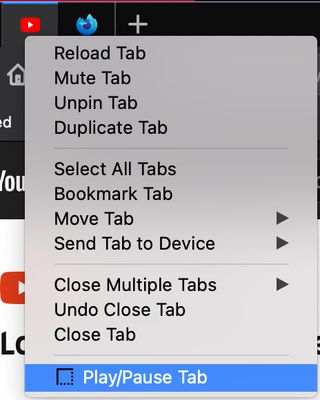
Adds a context menu item that will play/pause media on the selected tab.
실험적
실험적
4.8 (리뷰 5개)
4.8 (리뷰 5개)
사용자 69명
사용자 69명
Firefox를 다운로드하고 확장 기능을 받으세요
파일 다운로드
확장 메타 데이터
스크린샷
정보
How to Use:
1. Right-click the tab with the media content (video or audio) you'd like to play or pause.
2. Select "Play/Pause Tab" option.
Currently, the menu item will only appear for tabs that are on the following websites:
- Youtube
This project is being maintained at
https://github.com/tigleym/menu-play-pause-tab
.
리뷰어 5명이 4.8점으로 평가함
로그인하여 이 확장 기능의 평점을 남겨주세요
아직 평점이 없습니다
별점 저장됨
5
4
4
1
3
0
2
0
1
0
추가 정보
부가 기능 링크
지원 이메일
부가 기능 ID 복사
버전
0.1
크기
8.45 KB
최근 업데이트
6년 전 (2020년 11월 23일)
관련 카테고리
사진 및 동영상
탭
라이선스
Mozilla Public License 2.0
버전 목록
모든 버전 보기
모음집에 추가
모음집 선택…
새 모음집 만들기
이 부가 기능 신고