
Play to Kodi 제작자: Maciej Sitarz
Play, queue and remote control your favourite online media on Kodi / XBMC. This is a port of an add-on developed originally for Google Chrome.
사용자 537명사용자 537명
확장 메타 데이터
스크린샷


정보
Play, queue and remote control your favourite online media on Kodi / XBMC.
A Firefox Add-on (port of Google Chrome Extension) for sending online content to be played on XBMC/Kodi. Supported content include YouTube, CollegeHumor, eBaumsWorld, LiveLeak, Twitch.tv, Khan Academy, Lynda.com, Hulu, Cda.pl, AnimeLab, ARD MediaTek, Freeride.se, Katsomo.fi, Ruutu.fi, Yle Areena, SVTPlay.se, SoundCloud, MyCloudPlayers, MixCloud and even magnet links.
Requirements:
How to use:
Permissions:
Setup:
Known Issues:
Feedback/Report:
Visit the projects page on Github:
Firefox Add-on port Github project
Original Google Chrome Extension Github project
to submit issue tickets.
If you'd like to buy the original author a coffee so he can code longer, you can send him some bitcoins at:
1GcpoegwrJv7VBw51JCbbmiY6oun7kcn9c
Credits:
Icon was generously provided for free by IconDock.com :)
A Firefox Add-on (port of Google Chrome Extension) for sending online content to be played on XBMC/Kodi. Supported content include YouTube, CollegeHumor, eBaumsWorld, LiveLeak, Twitch.tv, Khan Academy, Lynda.com, Hulu, Cda.pl, AnimeLab, ARD MediaTek, Freeride.se, Katsomo.fi, Ruutu.fi, Yle Areena, SVTPlay.se, SoundCloud, MyCloudPlayers, MixCloud and even magnet links.
Requirements:
- XBMC/Kodi Eden (v11) or later
- YouTube, DailyMotion, CollegeHumor, eBaumsWorld, Twitch.TV, Hulu, SoundCloud or MixCloud plugins installed on Kodi
- For Hulu, you'll need a plugin from a third party repository
- YouTube plugin must be version 4.4.4 or later
How to use:
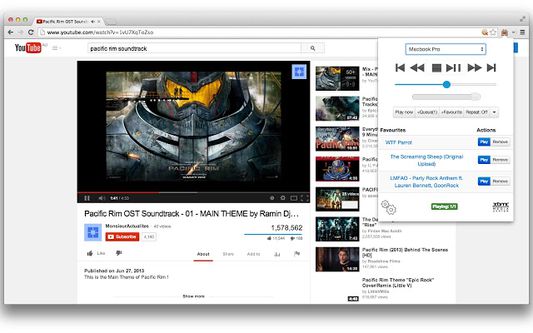
- "Play now" button sends the currently playing video of your active tab to Kodi. If there are videos currently in a queue, it would be cleared and the current video would be played
- "+Queue (X)" button puts the video of your current tab to the end of the playlist on Kodi. A number in parenthesis shows the number of items currently in the queue
- "+Favourite" button keeps the video of your current tab in your favourite list for easy access
- Drag and drop your favourites to rearrange them
- With the extension window open, you can use some of your keyboard keys to remotely control Kodi. These keys are: Arrow keys, Backspace, Enter, "I" and "C"
- Right click on YouTube links to play or queue
Permissions:
- Your data on all websites: Needed so that the extension could send JSON requests to any URL that you might put in the settings
- Your tabs and browsing activity: Used only for getting the URL of the current tab so that we could use it to obtain the video id for sending to Kodi
Setup:
- On Kodi, go under System > Settings > Services > Webserver
- Enable "Allow control of Kodi via HTTP, leave the port as default or set it to something else (if you know what you're doing). Write down the port number
- Username and password are optional
- Right click on the 'Play to Kodi' icon and select 'Options'
- Put in the IP address or hostname of your Kodi box and fill in the port number with the port number you wrote down earlier. Fill in the username and password if you entered one into Kodi
- Visit YouTube, watch some videos and click on the 'Play to Kodi' icon to play them on Kodi
Known Issues:
- Not all CollegeHumor videos play correctly. This is a problem with the CollegeHumor plugin on Kodi itself.
- SoundCloud content can't small skip forward. This is a problem with the SoundCloud plugin on Kodi.
- For Twitch.tv, only live streams can be played
Feedback/Report:
Visit the projects page on Github:
Firefox Add-on port Github project
Original Google Chrome Extension Github project
to submit issue tickets.
If you'd like to buy the original author a coffee so he can code longer, you can send him some bitcoins at:
1GcpoegwrJv7VBw51JCbbmiY6oun7kcn9c
Credits:
Icon was generously provided for free by IconDock.com :)
리뷰어 17명이 4.4점으로 평가함
권한 및 데이터
추가 정보
- 부가 기능 링크
- 버전
- 1.9.2resigned1
- 크기
- 304.95 KB
- 마지막 업데이트
- 2년 전 (2024년 4월 25일)
- 버전 목록
- 모음집에 추가