
postMessage-tracker-f 제작자: Hacks and Hops
Monitors postMessage usage (url, domain and stack) both by logging using CORS and also visually as an extension-icon. All credit goes to Frans Rosén.
사용자 131명사용자 131명
확장 메타 데이터
스크린샷
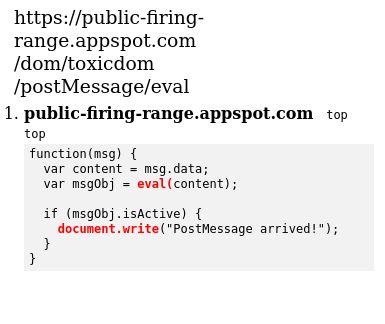
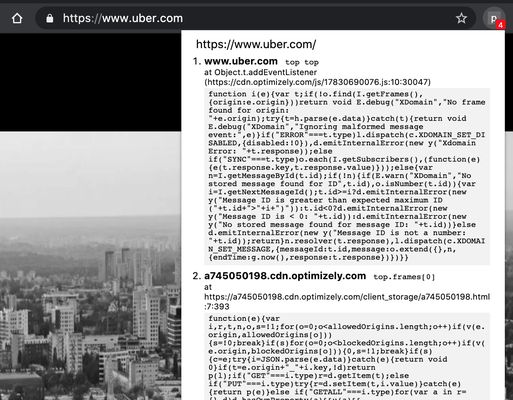

정보
postMessage-tracker-firefox
This is a super simple port of the extension with added potentially vulnerable function highlighting. All credit goes to Frans Rosén.
Code
This addon is free and open-source software (FOSS) all code can be found here: https://github.com/ACK-J/postMessage-tracker-firefox/tree/master
Please report your bugs or feature requests in a GitHub issue instead of in a review.
Description
Made by Frans Rosén. Presented during the "Attacking modern web technologies"-talk(Slides) at OWASP AppSec Europe back in 2018, but finally released in May 2020.
This Firefox extension monitors postMessage-listeners by showing you an indicator about the amount of listeners in the current window.
It supports tracking listeners in all subframes of the window. It also keeps track of short-lived listeners and listeners enabled upon interactions. You can also log the listener functions and locations to look them through them at a later stage by using the Log URL-option in the extension. This enables you to find hidden listeners that are only enabled for a short time inside an iframe.
It also shows you the interaction between windows inside the console and will specify the windows using a path you can use yourself to replay the message:
It also supports tracking communication happening between different windows, using `diffwin` as sender or receiver in the console.
Features
This is a super simple port of the extension with added potentially vulnerable function highlighting. All credit goes to Frans Rosén.
Code
This addon is free and open-source software (FOSS) all code can be found here: https://github.com/ACK-J/postMessage-tracker-firefox/tree/master
Please report your bugs or feature requests in a GitHub issue instead of in a review.
Description
Made by Frans Rosén. Presented during the "Attacking modern web technologies"-talk(Slides) at OWASP AppSec Europe back in 2018, but finally released in May 2020.
This Firefox extension monitors postMessage-listeners by showing you an indicator about the amount of listeners in the current window.
It supports tracking listeners in all subframes of the window. It also keeps track of short-lived listeners and listeners enabled upon interactions. You can also log the listener functions and locations to look them through them at a later stage by using the Log URL-option in the extension. This enables you to find hidden listeners that are only enabled for a short time inside an iframe.
It also shows you the interaction between windows inside the console and will specify the windows using a path you can use yourself to replay the message:
It also supports tracking communication happening between different windows, using `diffwin` as sender or receiver in the console.
Features
- Supports Raven, New Relic, Rollbar, Bugsnag and jQuery wrappers and "unpacks" them to show you the real listener.
- Tries to bypass and reroute wrappers so the Devtools console will show the proper listeners:
- Allows you to set a Log URL inside the extension options to allow you to log all information about each listener to an endpoint by submitting the listener and the function (to be able to look through all listeners later). You can find the options in the Extension Options when right-clicking the extension -> Manage Extension -> Preferences :
- Supports anonymous functions. Chrome (Unsure about Firefox) does not support to stringify an anonymous function, in the cases of anonymous functions, you will see the `bound`-string as the listener:
리뷰어 1명이 5점으로 평가함
권한 및 데이터
추가 정보
- 부가 기능 링크
- 버전
- 1.1.2
- 크기
- 30.74 KB
- 최근 업데이트
- 3년 전 (2024년 1월 24일)
- 관련 카테고리
- 라이선스
- MIT 라이선스
- 버전 목록
- 모음집에 추가