
PotPlayer YouTube Shortcut, Open Links 제작자: HelgeApps
Quickly play or add a Youtube video (playlist), Twitch, direct video links to Potplayer from the context menu or using the buttons on the site and also via middle-click
사용자 941명사용자 941명
확장 메타 데이터
스크린샷




정보
> HOW TO USE IT: You need to install the latest version of PotPlayer to get it working - https://potplayer.daum.net <
PotPlayer is a media player developed for Windows by South Korean Internet company Kakao (formerly Daum Communications). Player can play Youtube videos and videos from any other urls if it's direct video links.
팟플레이어는 항상 최신 버전을 사용하세요. (최신 버전: http://cafe.daum.net/pot-tool/BHPW)
동작이 안되면 팟플레이어의 설정(F5 키)를 열고 “파일 연결” 탭에서, “mp4”같은 재생하려는 확장자와 팟플레이어가 연결되어 있는지 확인하고 적용이나 확인 버튼을 누르세요.
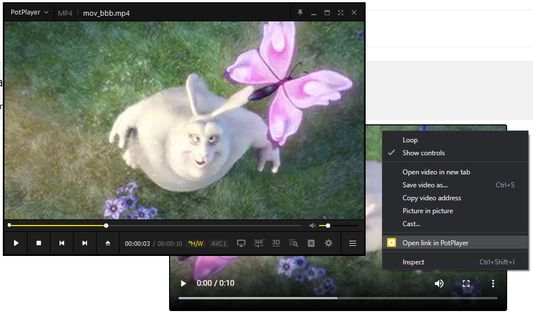
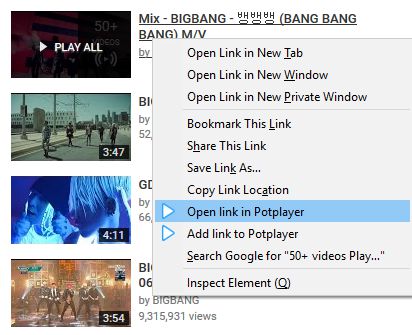
To open a Youtube video (playlist) in PotPlayer you can use the buttons on the site or you can use the menu items from the context menu (the right-click popup bar) on a Youtube link or on the actual Youtube page.
You can also use middle click on a Youtube page or a link to open it directly in the player. In order for that to work, you need to open the extension's preferences and enable the necessary features.
Optional features (disabled by default):
- auto-pause a video in Youtube player;
- pause Youtube player when Potplayer starts;
- play video using middle mouse click on youtube.com/watch* page;
- sync current video position (time) with PotPlayer;
- open a Youtube link in the player using middle mouse click on a link;
- «Open/Add link to player» in the context menu for any link
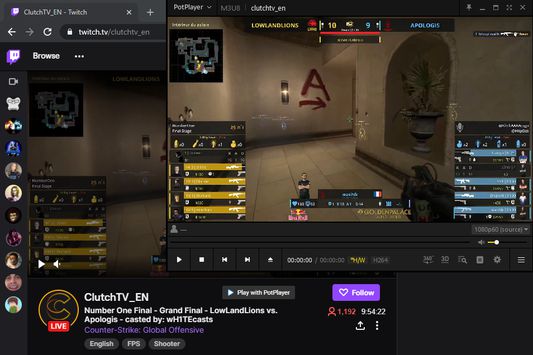
Twitch PotPlayer requirements: https://github.com/23rd/TwitchPotPlayer
If Firefox 84+ always asks for permission to open video in PotPlayer then do the next steps:
1) open "about:config"
2) find "network.protocol-handler.external.potplayer"
3) set it to " true"
PotPlayer is a media player developed for Windows by South Korean Internet company Kakao (formerly Daum Communications). Player can play Youtube videos and videos from any other urls if it's direct video links.
팟플레이어는 항상 최신 버전을 사용하세요. (최신 버전: http://cafe.daum.net/pot-tool/BHPW)
동작이 안되면 팟플레이어의 설정(F5 키)를 열고 “파일 연결” 탭에서, “mp4”같은 재생하려는 확장자와 팟플레이어가 연결되어 있는지 확인하고 적용이나 확인 버튼을 누르세요.
To open a Youtube video (playlist) in PotPlayer you can use the buttons on the site or you can use the menu items from the context menu (the right-click popup bar) on a Youtube link or on the actual Youtube page.
You can also use middle click on a Youtube page or a link to open it directly in the player. In order for that to work, you need to open the extension's preferences and enable the necessary features.
Optional features (disabled by default):
- auto-pause a video in Youtube player;
- pause Youtube player when Potplayer starts;
- play video using middle mouse click on youtube.com/watch* page;
- sync current video position (time) with PotPlayer;
- open a Youtube link in the player using middle mouse click on a link;
- «Open/Add link to player» in the context menu for any link
Twitch PotPlayer requirements: https://github.com/23rd/TwitchPotPlayer
If Firefox 84+ always asks for permission to open video in PotPlayer then do the next steps:
1) open "about:config"
2) find "network.protocol-handler.external.potplayer"
3) set it to " true"
리뷰어 94명이 4.5점으로 평가함
권한 및 데이터
추가 정보
- 부가 기능 링크
- 버전
- 1.28
- 크기
- 208.51 KB
- 최근 업데이트
- 일 년 전 (2025년 10월 12일)
- 관련 카테고리
- 버전 목록
- 모음집에 추가