
PrintFriendly - Print, PDF & Full Page Screenshot 제작자: Print Friendly & PDF
Make web pages printer-friendly, convert to PDFs, or capture full page screenshots. Remove ads for clean pages ready to print or save as PDFs.
사용자 50,230명사용자 50,230명
확장 메타 데이터
스크린샷




정보
Join the millions who use PrintFriendly to print or save any web page as a clean, high-quality PDF. You can adjust text size, remove unwanted images, and customize layouts. It works like Reader Mode, but gives you more control and better results.
PrintFriendly is perfect for teachers, students, researchers, or anyone who needs printable, shareable, and clutter-free content. Whether you’re printing, saving, or sharing, it’s never been easier to convert web pages to PDF with precision. Print articles, recipes, research, and even content from sites like ChatGPT.
🪄 PDF Conversion Made Easy
Convert web pages into clean, professional PDF documents without ads, headers, or sidebars. Preserve formatting including text, images, and links. Supports non-Latin characters and right-to-left languages.
You can also log into the extension and sync your account with our website, where you’ll find additional tools to convert, compress, edit, and sign PDFs. Your settings and preferences sync between the extension and website. Our online PDF viewer is available there as well.
💾 Save to Dropbox, Google Drive, OneDrive, or Notion
Send the finished PDF straight to where you already keep things. Dropbox and OneDrive files land in a PrintFriendly folder, and that folder is all PrintFriendly can see. In Google Drive, PrintFriendly only ever sees the files it creates. For Notion, pick the page or database each PDF goes into, from the pages you have shared with PrintFriendly. Set a default once and every save after that is a single click.
🎉 Effortless Printing
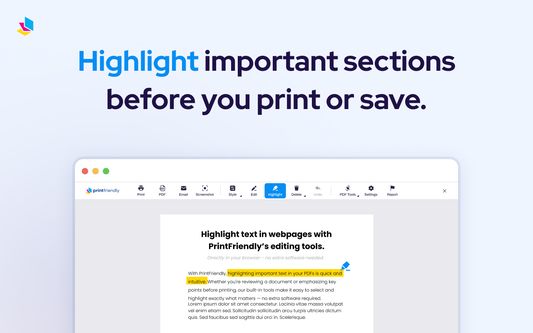
Print clutter-free web pages by removing unwanted elements like ads, navigation bars, pop-ups, and footers. Use our Delete function to easily remove unwanted sections of the page or the Highlight feature to emphasize key content. You can even edit the text before printing or downloading the page as a PDF. PrintFriendly supports page size detection, including A4 and Letter formats. Great for preparing clean printouts of ChatGPT conversations.
🎧 Listen: Read Any Article Aloud
Turn any web page into audio. Click Listen and PrintFriendly reads the cleaned-up article aloud, highlighting each sentence as it goes so you can follow along or just listen. Pick a voice and set the reading speed, skip forward or back by sentence, or click any paragraph to start from there. Text to speech that reads the article itself, not the menus, cookie banners, and share buttons around it. Voices come from the ones your system provides, labelled by accent. Free, with no new permissions. Great for long reads, research, and anyone who takes things in better by listening.
📸 Full Page Screenshot & Screen Capture
Take a full page screenshot or a current view screenshot of any web page with one click. Full page screen capture scrolls the page for you, so you capture all of it, not just what fits on screen. Works on sites with iframes, dynamic content, and layouts like ChatGPT. Export screenshots as PNG, JPG, or PDF, or turn a capture into a PDF whose text you can select and search. Ideal for archiving, sharing, or saving a visual record of the page exactly as it appears.
💯 Edit Before You Print or Save as PDF
Make changes directly on the page using our Edit feature. Modify text, adjust font size, remove images, delete headers or footers, and highlight important information. All tools are optimized for full-screen mode, responsive design, and include Undo support.
Upgrade your printing, PDF conversion, and screenshot experience today with PrintFriendly!
==============================
By using this extension, you agree to our Terms of Service and Privacy Policy:
Terms of Service:
https://www.printfriendly.com/terms
Privacy Policy:
https://www.printfriendly.com/privacy
PrintFriendly is perfect for teachers, students, researchers, or anyone who needs printable, shareable, and clutter-free content. Whether you’re printing, saving, or sharing, it’s never been easier to convert web pages to PDF with precision. Print articles, recipes, research, and even content from sites like ChatGPT.
🪄 PDF Conversion Made Easy
Convert web pages into clean, professional PDF documents without ads, headers, or sidebars. Preserve formatting including text, images, and links. Supports non-Latin characters and right-to-left languages.
You can also log into the extension and sync your account with our website, where you’ll find additional tools to convert, compress, edit, and sign PDFs. Your settings and preferences sync between the extension and website. Our online PDF viewer is available there as well.
💾 Save to Dropbox, Google Drive, OneDrive, or Notion
Send the finished PDF straight to where you already keep things. Dropbox and OneDrive files land in a PrintFriendly folder, and that folder is all PrintFriendly can see. In Google Drive, PrintFriendly only ever sees the files it creates. For Notion, pick the page or database each PDF goes into, from the pages you have shared with PrintFriendly. Set a default once and every save after that is a single click.
🎉 Effortless Printing
Print clutter-free web pages by removing unwanted elements like ads, navigation bars, pop-ups, and footers. Use our Delete function to easily remove unwanted sections of the page or the Highlight feature to emphasize key content. You can even edit the text before printing or downloading the page as a PDF. PrintFriendly supports page size detection, including A4 and Letter formats. Great for preparing clean printouts of ChatGPT conversations.
🎧 Listen: Read Any Article Aloud
Turn any web page into audio. Click Listen and PrintFriendly reads the cleaned-up article aloud, highlighting each sentence as it goes so you can follow along or just listen. Pick a voice and set the reading speed, skip forward or back by sentence, or click any paragraph to start from there. Text to speech that reads the article itself, not the menus, cookie banners, and share buttons around it. Voices come from the ones your system provides, labelled by accent. Free, with no new permissions. Great for long reads, research, and anyone who takes things in better by listening.
📸 Full Page Screenshot & Screen Capture
Take a full page screenshot or a current view screenshot of any web page with one click. Full page screen capture scrolls the page for you, so you capture all of it, not just what fits on screen. Works on sites with iframes, dynamic content, and layouts like ChatGPT. Export screenshots as PNG, JPG, or PDF, or turn a capture into a PDF whose text you can select and search. Ideal for archiving, sharing, or saving a visual record of the page exactly as it appears.
💯 Edit Before You Print or Save as PDF
Make changes directly on the page using our Edit feature. Modify text, adjust font size, remove images, delete headers or footers, and highlight important information. All tools are optimized for full-screen mode, responsive design, and include Undo support.
Upgrade your printing, PDF conversion, and screenshot experience today with PrintFriendly!
==============================
By using this extension, you agree to our Terms of Service and Privacy Policy:
Terms of Service:
https://www.printfriendly.com/terms
Privacy Policy:
https://www.printfriendly.com/privacy
리뷰어 670명이 4.2점으로 평가함
권한 및 데이터
추가 정보
- 부가 기능 링크
- 버전
- 7.2.7
- 크기
- 4.02 MB
- 최근 업데이트
- 한 달 전 (2026년 8월 31일)
- 관련 카테고리
- 라이선스
- Custom License
- 버전 목록
- 모음집에 추가