
Proxy Navbar Shortcut 제작자: Private Citizen
Adds a proxy settings shortcut icon to the navbar. Clean, simple, and uses the browser's existing proxy settings.
사용자 2명사용자 2명
확장 메타 데이터
스크린샷


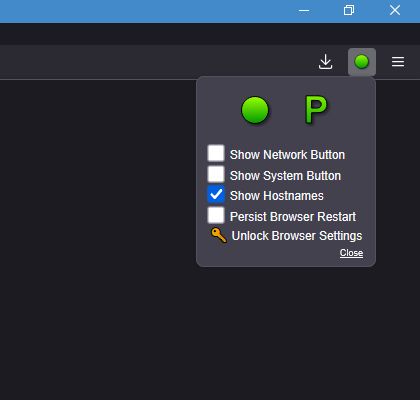


정보
This extension adds a proxy shortcut icon to the Firefox navbar, using the proxy servers already saved in the browser’s Network Settings.
The only function of this extension is to switch between turning the proxy on/off and selecting among the existing proxy servers configured in the Network Settings.
To add or edit proxy servers, open Firefox’s normal Network Settings
By default this extension will maintain proxy changes across browser restarts. If you would like a default state (like proxy always on/off on browser startup) set which state you want to be default in the Network Settings. Then in the proxy shortcut options unselect
IMPORTANT
Due to how Firefox handles permissions, any extension accessing proxy settings must be allowed to run in private windows. Select
When an extension modifies proxy settings, Firefox locks the normal Network Settings interface and displays a notice about the extension controlling networking settings. You do not need to disable this extension to regain access. Instead:
This unlocks the Network Settings control panel and restores the default proxy behavior.
PRIVACY NOTICE
This extension does NOT collect or transmit any data.
It only has permission to:
The only function of this extension is to switch between turning the proxy on/off and selecting among the existing proxy servers configured in the Network Settings.
To add or edit proxy servers, open Firefox’s normal Network Settings
[about:preferences] and update them there.By default this extension will maintain proxy changes across browser restarts. If you would like a default state (like proxy always on/off on browser startup) set which state you want to be default in the Network Settings. Then in the proxy shortcut options unselect
[ ]Persist Browser Restart.IMPORTANT
Due to how Firefox handles permissions, any extension accessing proxy settings must be allowed to run in private windows. Select
[X]Run in Private Windows during installation, or manually allow it afterward via the [about:addons] page.When an extension modifies proxy settings, Firefox locks the normal Network Settings interface and displays a notice about the extension controlling networking settings. You do not need to disable this extension to regain access. Instead:
- Click the proxy shortcut Icon in the navbar.
- Click the three-line Options button at the bottom right.
- Click the Unlock Browser Settings button.
This unlocks the Network Settings control panel and restores the default proxy behavior.
PRIVACY NOTICE
This extension does NOT collect or transmit any data.
It only has permission to:
- Read and modify the browser’s proxy settings.
- Read browser theme CSS colors.
- Save extension options in the browser’s local storage.
리뷰어 0명이 0점으로 평가함
권한 및 데이터
추가 정보
- 부가 기능 링크
- 버전
- 137.0.2.4
- 크기
- 14.69 KB
- 마지막 업데이트
- 일 년 전 (2025년 4월 26일)
- 관련 카테고리
- 라이선스
- All Rights Reserved
- 버전 목록
- 모음집에 추가