Firefox 브라우저 부가 기능
확장 기능
테마
더보기…
Firefox용
사전 및 언어 팩
다른 브라우저 사이트
Android 부가 기능
로그인
검색
검색
Quick Clone
제작자:
Kartikay Bagla
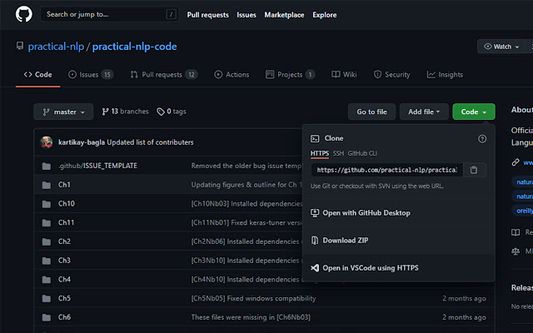
Quick Clone can open GitHub repositories in VS Code with one click.
실험적
실험적
0 (리뷰 0개)
0 (리뷰 0개)
사용자 29명
사용자 29명
Firefox를 다운로드하고 확장 기능을 받으세요
파일 다운로드
확장 메타 데이터
스크린샷
정보
How to use
Install the
VS Code extension
Install the corresponding browser extension
Navigate to a GitHub repository in your browser
Click on the green Code button and select "Open in VSCode"
Once VS Code opens, select the folder where the repository will be cloned
Once the cloning is complete, you can choose to open the cloned folder
0명이 0점으로 평가함
로그인하여 이 확장 기능의 평점을 남겨주세요
아직 평점이 없습니다
별점 저장됨
5
0
4
0
3
0
2
0
1
0
권한 및 데이터
필수 권한:
github.com에서 사용자의 데이터에 접근
추가 정보
부가 기능 링크
홈 페이지
지원 사이트
지원 이메일
Copy add-on ID
버전
1.0.1
크기
15.79 KB
마지막 업데이트
5년 전 (2021년 8월 21일)
관련 카테고리
기타
라이선스
GNU General Public License v3.0 전용
버전 목록
모든 버전 보기
모음집에 추가
모음집 선택…
새 모음집 만들기
이 부가 기능 신고