Quick Search - Selection Text 제작자: Ferdose
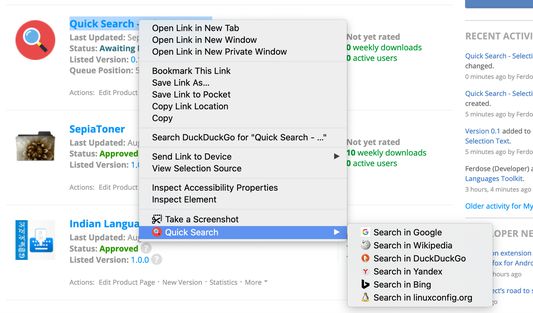
The purpose of this add-on is simple. It provides the ability to perform a search on different search engines based on the highlighted text
사용자 5명사용자 5명
확장 메타 데이터
스크린샷
정보
The purpose of this add-on is simple. It provides the ability to perform a search on different search engines based on the highlighted text.
Currently supports the following search engines:
* Google
* Wikipedia
* DuckDuckGo
* Yandex
* Bing
* LinuxConfig.org
How to use ?
1. Well, obviously the first thing to do is Install this add-on
2. Whichever web page you are on, select the text that you want to run a search query on
3. Perform Right click of the mouse and find the option 'Quick Search' -- it looks similar to what is shown in the screenshot attached somewhere above/below in this page
4. Select one of the search engines from the available list
5. New Tab opens with the chosen search engine and selected text as the search query
6. Enjoy few moments of your time saved using this add-on compared to normal search query that you perform and thank me later...!!
Currently supports the following search engines:
* Wikipedia
* DuckDuckGo
* Yandex
* Bing
* LinuxConfig.org
How to use ?
1. Well, obviously the first thing to do is Install this add-on
2. Whichever web page you are on, select the text that you want to run a search query on
3. Perform Right click of the mouse and find the option 'Quick Search' -- it looks similar to what is shown in the screenshot attached somewhere above/below in this page
4. Select one of the search engines from the available list
5. New Tab opens with the chosen search engine and selected text as the search query
6. Enjoy few moments of your time saved using this add-on compared to normal search query that you perform and thank me later...!!
1명이 5점으로 평가함
추가 정보
- 부가 기능 링크
- 버전
- 0.1
- 크기
- 108.42 KB
- 마지막 업데이트
- 6년 전 (2020년 9월 3일)
- 버전 목록
- 모음집에 추가