Firefox 브라우저 부가 기능
  • 확장 기능
  • 테마
    • Firefox용
    • 사전 및 언어 팩
    • 다른 브라우저 사이트
    • Android 부가 기능
로그인
QuoteMe 미리보기

QuoteMe 제작자: Achim Leitner

Add block quotation marks around lines of text or regular quotes around some text in editor fields. Block quotes: Select the lines you want to quote or put the cursor to the line that should be quoted and press the toolbar button or [Ctrl]+[E].

2.3 (리뷰 3개)2.3 (리뷰 3개)
사용자 7명사용자 7명
Firefox를 다운로드하고 확장 기능을 받으세요
파일 다운로드

확장 메타 데이터

스크린샷
정보
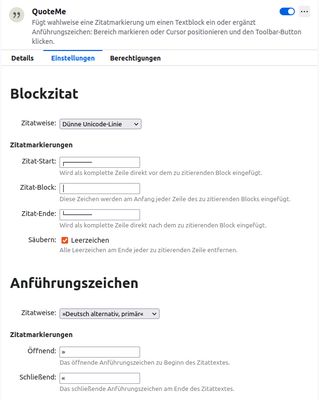
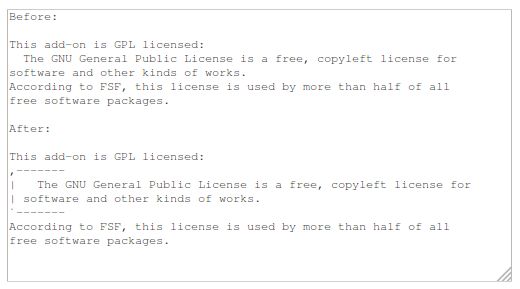
This WebExtension adds both a toolbar button and two keyboard shortcuts ([Ctrl]+[E] and [Alt]+[M]). It has two major modes, the first one is adding quotation marks around lines of text in a multiline text field (<textarea> ) of any web page. The typical usecases are text comments or bug reports which do not support html, markdown or other means of formatting text. If you want to visually separate your own comments from citations or code segments, you typically want to add a visual marker, like -------. This add on simplifies adding those markers. The type of markers is configurable.

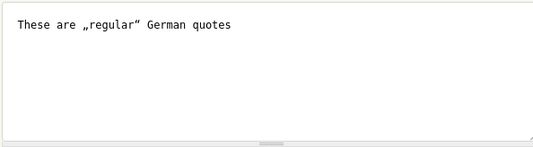
The other mode is adding regular text (inline) quotes like “To be, or not to be”. Again, the user can choose the type of quotes. To quote a single word, just place the text cursor in the word. For longer texts, mark them. The typical usecase is to enter typographically correct quotes.
3명이 2.3점으로 평가함
로그인하여 이 확장 기능의 평점을 남겨주세요
아직 평점이 없습니다

별점 저장됨

5
0
4
1
3
0
2
1
1
1
리뷰 3개 모두 읽기
추가 정보
부가 기능 링크
  • 홈 페이지
  • 지원 사이트
  • 지원 이메일
  • Copy add-on ID
버전
2.0.2
크기
35.39 KB
마지막 업데이트
3년 전 (2023년 6월 6일)
관련 카테고리
  • RSS 뉴스 및 블로그
  • 언어 지원 및 번역
라이선스
GNU General Public License v3.0 전용
버전 목록
  • 모든 버전 보기
모음집에 추가
이 부가 기능 신고
Mozilla 홈페이지로 이동

부가 기능

  • 소개
  • Firefox 부가 기능 블로그
  • 확장 기능 워크샵
  • 개발자 허브
  • 개발자 정책
  • 커뮤니티 블로그
  • 포럼
  • 버그 신고
  • 리뷰 지침

브라우저

  • Desktop
  • Mobile
  • Enterprise

제품

  • Browsers
  • VPN
  • Relay
  • Monitor
  • Pocket
  • Bluesky (@firefox.com)
  • Instagram (Firefox)
  • YouTube (firefoxchannel)
  • 개인 정보
  • 쿠키
  • 법률

특별한 고지가 없는 한, 본 사이트의 콘텐츠는 Commons Attribution Share-Alike License v3.0 또는 그 이후 버전에 따라 사용이 허가됩니다.