
reStyle 제작자: NiklasG
A user style manager which can load local files and apply UI styles even in Firefox 57+
사용자 26명사용자 26명
확장 메타 데이터
스크린샷
정보
This user style manager supports the usual installation of styles from URL and polling those URLs for updates.
In addition to that, you can load local styles and apply styles to the browser UI.
Installing styles
Styles can be installed from userstyles.org, GitHub or any other website that offers appropriate styles for download.
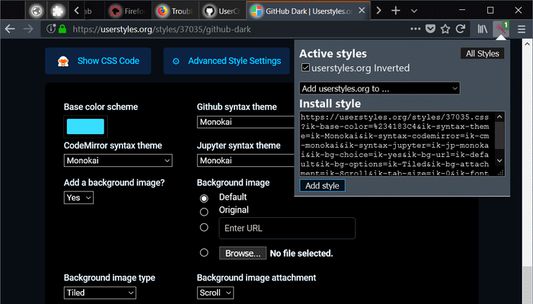
On userstyles.org, open the styles detail page, choose your settings if the style offers any, then click the reStyle icon in the browsers toolbar and "Add style" in the popup.
On other pages, you need to open the .css file before clicking the reStyle icon.
UI styles
Starting with Firefox 57, it is no longer possible for Add-ons to directly apply user styles to anything else than normal websites.
As a workaround, reStyle recognizes styles that will no longer work and writes them to the
Many UI styles will still be broken in Firefox 57+ due to the actual changes in the browser UI, but at least it will be possible to fix that and distribute the styles in a reasonably simple manner.
Development Mode
You can load styles from a local folder on your computer as user styles.
Styles matching normal content pages should be re-applied immediately when the files are saved.
NativeExt
In order to do the things described above, NativeExt must be installed on the system.
The add-on contains instructions on how to do that easily.
Permissions used
- "Access your data for all websites": To apply styles to any website you choose.
- "Access browser tabs": Apply styles to existing tabs (when installed/enabled/started).
- "Access browser activity during navigation": Apply styles to new tabs/pages.
- "Exchange messages with programs other than Firefox": Use NativeExt if installed. Useless otherwise.
- "Display notifications to you": Success messages after user actions, error messages. Status changes.
- "Access recently closed tabs": Under some rare conditions, reStyle needs to open temporary popups. This is used to remove them from the history after they are closed.
Implementation status
Reading styles locally, re-applying them on changes and applying UI styles works as intended (there is no way around the restart requirement).
Applying normal content styles works, bit is still somewhat expensive. Improvements here require patches to Firefox.
Automatic updates of remote styles (those installed from the internet) can not be disabled per style.
The initial setup UI of this add-on itself still needs some work.
Meta comments
reStyle supports meta comment blocks similar to those used in user scripts. They start with
In addition to that, you can load local styles and apply styles to the browser UI.
Installing styles
Styles can be installed from userstyles.org, GitHub or any other website that offers appropriate styles for download.
On userstyles.org, open the styles detail page, choose your settings if the style offers any, then click the reStyle icon in the browsers toolbar and "Add style" in the popup.
On other pages, you need to open the .css file before clicking the reStyle icon.
UI styles
Starting with Firefox 57, it is no longer possible for Add-ons to directly apply user styles to anything else than normal websites.
As a workaround, reStyle recognizes styles that will no longer work and writes them to the
userCrome.css (e.g. for the UI) and userContent.css (e.g. for about:-pages).The only major drawback of this compared to how Stylish for Firefox used to apply styles is that the browser must be restarted for changes to those files to be applied.Many UI styles will still be broken in Firefox 57+ due to the actual changes in the browser UI, but at least it will be possible to fix that and distribute the styles in a reasonably simple manner.
Development Mode
You can load styles from a local folder on your computer as user styles.
Styles matching normal content pages should be re-applied immediately when the files are saved.
NativeExt
In order to do the things described above, NativeExt must be installed on the system.
The add-on contains instructions on how to do that easily.
Permissions used
- "Access your data for all websites": To apply styles to any website you choose.
- "Access browser tabs": Apply styles to existing tabs (when installed/enabled/started).
- "Access browser activity during navigation": Apply styles to new tabs/pages.
- "Exchange messages with programs other than Firefox": Use NativeExt if installed. Useless otherwise.
- "Display notifications to you": Success messages after user actions, error messages. Status changes.
- "Access recently closed tabs": Under some rare conditions, reStyle needs to open temporary popups. This is used to remove them from the history after they are closed.
Implementation status
Reading styles locally, re-applying them on changes and applying UI styles works as intended (there is no way around the restart requirement).
Applying normal content styles works, bit is still somewhat expensive. Improvements here require patches to Firefox.
Automatic updates of remote styles (those installed from the internet) can not be disabled per style.
The initial setup UI of this add-on itself still needs some work.
Meta comments
reStyle supports meta comment blocks similar to those used in user scripts. They start with
==UserStyle== and can, besides the non-functional properties @name, @author, @license and @description, contain @include rules, which allow authors to wirte styles that can be included on domains chosen by the user via reStyles UI.리뷰어 10명이 3.3점으로 평가함
권한 및 데이터
필수 권한:
- Firefox 이외의 프로그램과 메시지 교환
- 알림 표시
- 최근에 닫힌 탭에 접근
- 브라우저 탭에 접근
- 탐색 중 브라우저 활동에 접근
- 모든 웹사이트에서 사용자의 데이터에 접근
선택적 권한:
- 북마크 읽기 및 수정
추가 정보
- 부가 기능 링크
- 버전
- 0.4.2resigned1
- 크기
- 203.74 KB
- 최근 업데이트
- 2년 전 (2024년 4월 25일)
- 버전 목록
- 모음집에 추가