
Read AI for Gmail and Meeting 제작자: Cổng Game SunWin
Upgrade your productivity with Read AI’s latest Gmail integration — bringing the power of AI to your inbox, meetings, and messages.
사용자 135명사용자 135명
확장 메타 데이터
스크린샷


정보
Upgrade your productivity with Read AI’s latest Gmail integration — bringing the power of AI to your inbox, meetings, and messages.
With Read AI for Gmail and Meeting Summaries, you can stay on top of your communication like never before. Seamlessly transform your emails, meetings, and messages into a unified and contextual feed right inside Gmail, helping you respond smarter and faster.
🔗 Key Features:
📧 AI-Optimized Email Summaries
- Instantly catch up on long email threads with one-sentence summaries and detailed bullet points, saving you time and effort in reaching inbox zero.
🔗 Unified Meeting and Message Integration
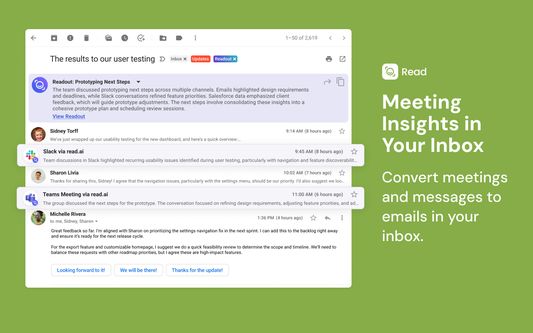
- Connect the dots between your meetings and messages, automatically converting content from Zoom, Teams, Meet, and Slack into contextual insights within your Gmail threads.
📚 Contextual Email Drafts
- Generate smart, context-rich email responses based on content from your emails, meetings, and messaging platforms like Zoom, Teams, and Slack.
🎤 Automatic Meeting Notes & Summaries
- Focus on your meetings while Read AI captures full summaries, transcripts, and highlights across all major video conferencing platforms (Google Meet, Microsoft Teams, Zoom).
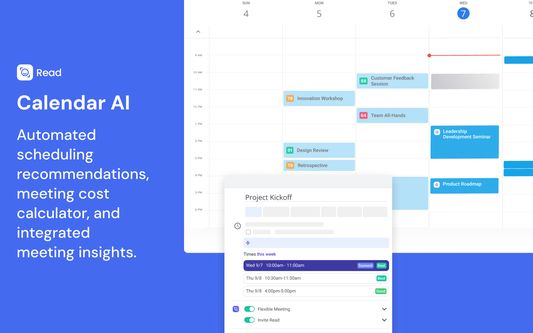
🗓️ Calendar & Smart Scheduling
- Effortlessly find the best time to meet, receive real-time meeting summaries, and calculate the cost of meetings directly in your Google Calendar.
- Read AI for Gmail and Meeting Summaries helps you stay organized, informed, and responsive—bringing AI to your existing workflows so you can optimize every meeting and email interaction.
Key Features for Email AI:
- Designed for Gmail: Read AI brings you superhuman powers to tackle your inbox with AI.
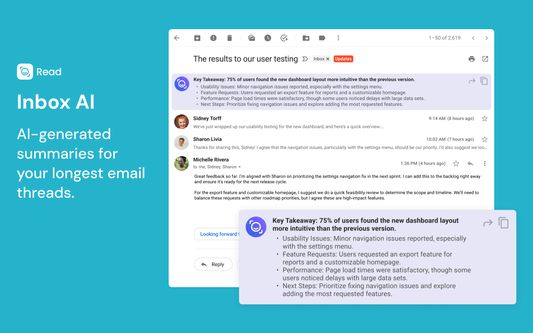
- Thread Summaries: Summarize the longest email threads into key takeaways and highlights using AI.
- Readouts: Pull insights from multiple sources, including meetings on Zoom, Teams, and Meet, along with conversations on Slack and Teams, displaying them in relevant email threads.
Key Features for Meeting AI:
- Automatic AI Notetaker: Receive an AI-generated report with a full meeting summary, action items, and key questions.
- Real-Time Transcription: Complete and accurate transcription, with speaker identification for clarity in final reports.
- Live Summaries: Instantly catch up on discussions if you’re late to a meeting with real-time live notes.
- Video Highlights: View AI-generated highlight reels with impactful moments from your calls.
- AI Speaker Coach: Get personalized feedback to improve your speaking skills—built directly into your meetings.
- Key Metrics: Measure meeting quality using engagement and sentiment metrics across participants.
- Integrations: Push your notes to other platforms like Hubspot, Salesforce, Slack, Google Docs, and OneNote.
Key Features for Calendar AI:
- Smart Scheduling: AI learns the best times for you to meet and recommends optimal times within Google Calendar.
- Scheduling Link: Share a single link to let others find a time to meet without the back-and-forth.
- Flexible Meetings: Mark meetings as “flexible” so Read AI can automatically reschedule them to a better time for all participants.
- Meeting Cost Calculator: Automatically calculate meeting costs to optimize attendance and prioritize the right participants.
With Read AI for Gmail and Meeting Summaries, you can stay on top of your communication like never before. Seamlessly transform your emails, meetings, and messages into a unified and contextual feed right inside Gmail, helping you respond smarter and faster.
🔗 Key Features:
📧 AI-Optimized Email Summaries
- Instantly catch up on long email threads with one-sentence summaries and detailed bullet points, saving you time and effort in reaching inbox zero.
🔗 Unified Meeting and Message Integration
- Connect the dots between your meetings and messages, automatically converting content from Zoom, Teams, Meet, and Slack into contextual insights within your Gmail threads.
📚 Contextual Email Drafts
- Generate smart, context-rich email responses based on content from your emails, meetings, and messaging platforms like Zoom, Teams, and Slack.
🎤 Automatic Meeting Notes & Summaries
- Focus on your meetings while Read AI captures full summaries, transcripts, and highlights across all major video conferencing platforms (Google Meet, Microsoft Teams, Zoom).
🗓️ Calendar & Smart Scheduling
- Effortlessly find the best time to meet, receive real-time meeting summaries, and calculate the cost of meetings directly in your Google Calendar.
- Read AI for Gmail and Meeting Summaries helps you stay organized, informed, and responsive—bringing AI to your existing workflows so you can optimize every meeting and email interaction.
Key Features for Email AI:
- Designed for Gmail: Read AI brings you superhuman powers to tackle your inbox with AI.
- Thread Summaries: Summarize the longest email threads into key takeaways and highlights using AI.
- Readouts: Pull insights from multiple sources, including meetings on Zoom, Teams, and Meet, along with conversations on Slack and Teams, displaying them in relevant email threads.
Key Features for Meeting AI:
- Automatic AI Notetaker: Receive an AI-generated report with a full meeting summary, action items, and key questions.
- Real-Time Transcription: Complete and accurate transcription, with speaker identification for clarity in final reports.
- Live Summaries: Instantly catch up on discussions if you’re late to a meeting with real-time live notes.
- Video Highlights: View AI-generated highlight reels with impactful moments from your calls.
- AI Speaker Coach: Get personalized feedback to improve your speaking skills—built directly into your meetings.
- Key Metrics: Measure meeting quality using engagement and sentiment metrics across participants.
- Integrations: Push your notes to other platforms like Hubspot, Salesforce, Slack, Google Docs, and OneNote.
Key Features for Calendar AI:
- Smart Scheduling: AI learns the best times for you to meet and recommends optimal times within Google Calendar.
- Scheduling Link: Share a single link to let others find a time to meet without the back-and-forth.
- Flexible Meetings: Mark meetings as “flexible” so Read AI can automatically reschedule them to a better time for all participants.
- Meeting Cost Calculator: Automatically calculate meeting costs to optimize attendance and prioritize the right participants.
0명이 0점으로 평가함
권한 및 데이터
필수 권한:
- read.ai 도메인의 사이트에서 사용자의 데이터에 접근
- calendar.google.com 도메인의 사이트에서 사용자의 데이터에 접근
- meet.google.com 도메인의 사이트에서 사용자의 데이터에 접근
추가 정보
- 부가 기능 링크
- 버전
- 0.9.0
- 크기
- 3.8 MB
- 마지막 업데이트
- 일 년 전 (2025년 2월 4일)
- 관련 카테고리
- 버전 목록
- 모음집에 추가