
Read Aloud: A Text to Speech Voice Reader 제작자: LSD Software
Read out loud the current web-page article with one click. Supports 40+ languages.
Android™용 Firefox에서 사용 가능Android™용 Firefox에서 사용 가능
사용자 228,042명사용자 228,042명
Android용 Firefox에서 이 확장 기능을 열려면 QR 코드를 스캔하세요

확장 메타 데이터
스크린샷
정보
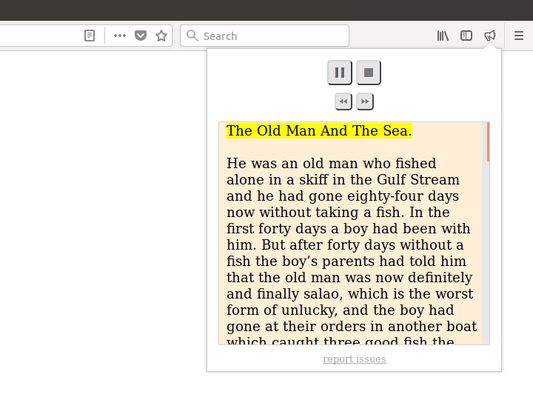
Tired of sitting, tired of reading? Click a button, jump on your bed, and have the article read aloud to you. You can choose from many available male and female voices. You can also set the pitch of the voice and the reading speed. Supports PDF. Supports EPUB (via the excellent EPUBReader extension).
Read Aloud is a Firefox extension that uses text-to-speech technology to convert webpage text to audio. It works on a variety of websites, including news sites, blogs, fan fiction, publications, textbooks, school and class websites, online universities and course materials.
Read Aloud is aimed at users who prefer to listen to content instead of reading, people with dyslexia or other learning disabilities, children learning to read, or simply to provide users with alternative way to consume web content.
Read Aloud allows you to select from a variety of text-to-speech voices, including those provided natively by the browser, as well as by text-to-speech cloud service providers such as Google Wavenet, Amazon Polly, IBM Watson, and Microsoft. Some of the cloud-based voices may require additional in-app purchase to enable.
Recent developments in machine learning and artificial intelligence has enabled very high-quality speech synthesis. Google Wavenet, Amazon Polly voices, for example, use bleeding edge technology to provide life-like synthetic speech that is close to that of human speech. Read Aloud allows you to use your own Google Cloud Platform and Amazon Web Services account to enable these voices.
To use Read Aloud, simply navigate to the web page you want to read, then click the Read Aloud icon on the Firefox menu. In addition, the shortcut keys ALT-P, ALT-O, ALT-Comma, and ALT-Period can be used to Play/Pause, Stop, Rewind, and Forward, respectively. You may select the text you want to read before activating the extension. Right clicking on the selected text will provide you with yet another context-menu option to activate Read Aloud.
To change the voice, reading speed, pitch, or enable text highlighting, go to the Options page either by right clicking on the Read Aloud icon and choose Options, or by clicking the Gear button on the extension popup (you'll need to stop playback to see the Gear button).
Privacy Policy
Personal information
If you use one of the Premium Voices, you'll be asked to sign in to your Google account and grant Read Aloud access to your basic user profile, which includes name and email address. We require this information for usage tracking, since the Premium Voices requires making a purchase when usage exceeds the monthly free tier. If you don't use the Premium Voices, you don't need to sign in, and no information is collected.
Browsing history
We do not track the user's browsing history. We realize the importance of privacy, so we make sure our extensions require only the minimum set of browser permissions to operate. In particular, during installation, it does not ask for the "Read your browsing history" or the "Read and change all your data on the websites you visit" permissions, both of which could be used to track the user's browsing history.
Text converted to speech
When you select one of the standard text-to-speech voices, the speech synthesis occurs locally on your computer and is never sent to the internet. And neither the input text nor the synthesized speech are saved or stored on your computer.
When you select one of the premium text-to-speech voices, the input text is sent to our cloud server for synthesis. The server may use your anonymized IP address and User-Agent data for purpose of analytics, abuse management, and service improvement. The server may cache the input text, as well as the synthesized speech, for short amounts of time as part of its normal operation; it does not save them to any type of permanent storage.
Geolocation
If you select a voice that is synthesized on our server, your anonymized IP address may be used for geolocation for analytics purposes.
Issue reporting and contact forms
If you use the in-app report-issue function or use the contact form on our support website, your comments and information may be kept in our support database for a maximum of 6 months.
Analytics
The extensions use Firefox Addons Store's built-in analytics. Firefox will collect basic extension usage data, including when the extension is installed, invoked, and uninstalled. The extension may also use its own counters to analyze usage patterns. This information is anonymized and do not present privacy concerns.
Read Aloud is a Firefox extension that uses text-to-speech technology to convert webpage text to audio. It works on a variety of websites, including news sites, blogs, fan fiction, publications, textbooks, school and class websites, online universities and course materials.
Read Aloud is aimed at users who prefer to listen to content instead of reading, people with dyslexia or other learning disabilities, children learning to read, or simply to provide users with alternative way to consume web content.
Read Aloud allows you to select from a variety of text-to-speech voices, including those provided natively by the browser, as well as by text-to-speech cloud service providers such as Google Wavenet, Amazon Polly, IBM Watson, and Microsoft. Some of the cloud-based voices may require additional in-app purchase to enable.
Recent developments in machine learning and artificial intelligence has enabled very high-quality speech synthesis. Google Wavenet, Amazon Polly voices, for example, use bleeding edge technology to provide life-like synthetic speech that is close to that of human speech. Read Aloud allows you to use your own Google Cloud Platform and Amazon Web Services account to enable these voices.
To use Read Aloud, simply navigate to the web page you want to read, then click the Read Aloud icon on the Firefox menu. In addition, the shortcut keys ALT-P, ALT-O, ALT-Comma, and ALT-Period can be used to Play/Pause, Stop, Rewind, and Forward, respectively. You may select the text you want to read before activating the extension. Right clicking on the selected text will provide you with yet another context-menu option to activate Read Aloud.
To change the voice, reading speed, pitch, or enable text highlighting, go to the Options page either by right clicking on the Read Aloud icon and choose Options, or by clicking the Gear button on the extension popup (you'll need to stop playback to see the Gear button).
Privacy Policy
Personal information
If you use one of the Premium Voices, you'll be asked to sign in to your Google account and grant Read Aloud access to your basic user profile, which includes name and email address. We require this information for usage tracking, since the Premium Voices requires making a purchase when usage exceeds the monthly free tier. If you don't use the Premium Voices, you don't need to sign in, and no information is collected.
Browsing history
We do not track the user's browsing history. We realize the importance of privacy, so we make sure our extensions require only the minimum set of browser permissions to operate. In particular, during installation, it does not ask for the "Read your browsing history" or the "Read and change all your data on the websites you visit" permissions, both of which could be used to track the user's browsing history.
Text converted to speech
When you select one of the standard text-to-speech voices, the speech synthesis occurs locally on your computer and is never sent to the internet. And neither the input text nor the synthesized speech are saved or stored on your computer.
When you select one of the premium text-to-speech voices, the input text is sent to our cloud server for synthesis. The server may use your anonymized IP address and User-Agent data for purpose of analytics, abuse management, and service improvement. The server may cache the input text, as well as the synthesized speech, for short amounts of time as part of its normal operation; it does not save them to any type of permanent storage.
Geolocation
If you select a voice that is synthesized on our server, your anonymized IP address may be used for geolocation for analytics purposes.
Issue reporting and contact forms
If you use the in-app report-issue function or use the contact form on our support website, your comments and information may be kept in our support database for a maximum of 6 months.
Analytics
The extensions use Firefox Addons Store's built-in analytics. Firefox will collect basic extension usage data, including when the extension is installed, invoked, and uninstalled. The extension may also use its own counters to analyze usage patterns. This information is anonymized and do not present privacy concerns.
To report an issue, please use the "report issue" feature inside the extension. You can also use Support link above.This is an open-source project. To contribute, please visit: https://github.com/ken107/read-aloud
리뷰어 1,284명이 3.8점으로 평가함
권한 및 데이터
필수 권한:
- translate.google.com에서 사용자의 데이터에 접근
- piper.ttstool.com에서 사용자의 데이터에 접근
- supertonic.ttstool.com에서 사용자의 데이터에 접근
선택적 권한:
- 탐색 중 브라우저 활동에 접근
- 모든 웹사이트에서 사용자의 데이터에 접근
추가 정보
- 부가 기능 링크
- 버전
- 1.81.1
- 크기
- 598.06 KB
- 최근 업데이트
- 8달 전 (2026년 2월 6일)
- 관련 카테고리
- 개인정보처리방침
- 이 부가 기능에 대한 개인정보처리방침 읽기
- 버전 목록
- 모음집에 추가