
Realize 제작자: Realize for React
A React component tree visualizer
사용자 46명사용자 46명
확장 메타 데이터
스크린샷

정보
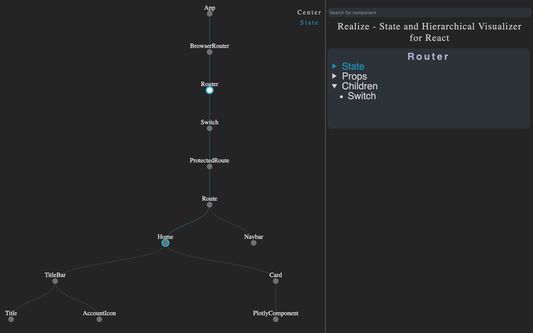
As React applications scale, it becomes more difficult to track state and to have a holistic overview of the component hierarchy. Realize is a tool to help developers visualize the structure and state flow of their React applications, especially when they are growing in scale and complexity. It currently supports React v.16.8.
❗️Prerequisites
1. You must have React Dev Tools installed to use Realize for React. Install it from here.
2. Realize is best used on non-deployed applications. This uglification of deployed websites makes the component structure pretty unreadable.
💻How to use
1. Click the blue 'Add to Firefox' button
2. Once installed, navigate to your React website
3. Open the dev tools window and click on the Realize panel
4. Trigger a state change to populate the component tree
4. Like us on Github
🔥Functionality:
Zoom & Pan - Hold down shift to enable dragging and zooming on the tree (to recenter just click the center button)
Component Focus - Click on a node to view state, props and children in the right and panel
State Flow - Click the 'state' toggle to show state flow on the tree. Stateful components have blue nodes and state flow is show by blue links
Search and Highlight - Enter a component name in the search bar to see all matching nodes pulsate
Authors
Fan Shao - Github | LinkedIn
Harry Clifford - Github | LinkedIn
Henry Black - Github | LinkedIn
Horatiu Mitrea - Github | LinkedIn
Contact
For contributions, concerns or others please visit us here
❗️Prerequisites
1. You must have React Dev Tools installed to use Realize for React. Install it from here.
2. Realize is best used on non-deployed applications. This uglification of deployed websites makes the component structure pretty unreadable.
💻How to use
1. Click the blue 'Add to Firefox' button
2. Once installed, navigate to your React website
3. Open the dev tools window and click on the Realize panel
4. Trigger a state change to populate the component tree
4. Like us on Github
🔥Functionality:
Zoom & Pan - Hold down shift to enable dragging and zooming on the tree (to recenter just click the center button)
Component Focus - Click on a node to view state, props and children in the right and panel
State Flow - Click the 'state' toggle to show state flow on the tree. Stateful components have blue nodes and state flow is show by blue links
Search and Highlight - Enter a component name in the search bar to see all matching nodes pulsate
Authors
Fan Shao - Github | LinkedIn
Harry Clifford - Github | LinkedIn
Henry Black - Github | LinkedIn
Horatiu Mitrea - Github | LinkedIn
Contact
For contributions, concerns or others please visit us here
리뷰어 1명이 1점으로 평가함
권한 및 데이터
추가 정보
- 부가 기능 링크
- 버전
- 1.0.0.0
- 크기
- 170.74 KB
- 최근 업데이트
- 6년 전 (2020년 6월 17일)
- 관련 카테고리
- 버전 목록
- 모음집에 추가