
Recurring emails for Gmail 제작자: Limelight Software SRL
Sends your emails at a later time once, or recurring every X hours/days/months/years
사용자 346명사용자 346명
확장 메타 데이터
스크린샷




정보
Recurring emails for Gmail is the #1 privacy-centric Firefox extension that allows you to send repeating emails over Gmail. No tracking, no ads, no banners and no bloatware. Contains free and paid plans. Compare plans here.
💥 More than 70,000 professionals across all stores have added the app to their browsers for next-level email productivity. Compose your email, set its sending schedule and you're done! You won't have to remember to send it again!
☄️NEW: Mail Merge and Advanced emails will connect data from any spreadsheet into a template, so you can easily create personalized and targeted repeating emails. Plug in your Google Sheets, CSV, XLS or ODS file and automate away!
🗓️ Complete Schedule
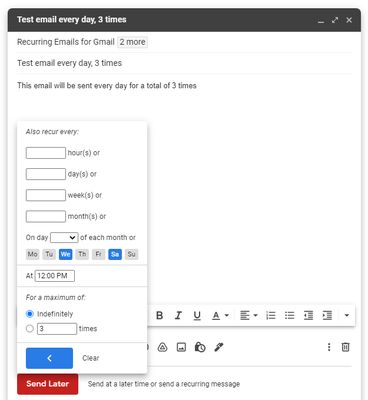
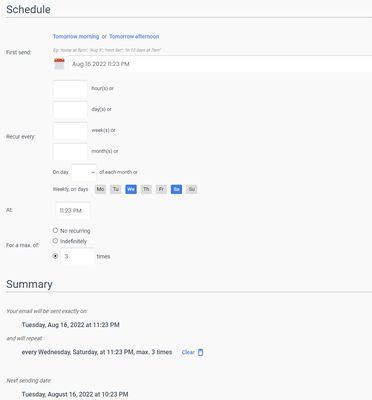
Send your emails one time by setting a later date, or many times by setting a fully customizable recurring schedule. Set the time of day, which days to send on or the number of times to send, all for a convenient schedule.
✍ Automatic follow-up
Set an automatic follow-up to send if your email is not getting any replies. A follow-up helps streamline processes by reducing the need for manual tracking and prompting timely responses, ultimately enhancing productivity and fostering stronger relationships with clients, colleagues, or prospects.
🛡️ Privacy? How?
Other extensions require you to give up your email privacy by asking for certain Gmail permissions. Consenting to those permissions allows them to read all your emails. That's right, all of them! We don't, and won't. We'd never ask you to consent to such permissions and the only sensitive permission required is “Send email on your behalf”.
🆓 Is it free?
Recurring emails for Gmail is free for personal, casual use (up to 5 automatic sends). Check out the paid PRO plans if you're a company or you simply need to get more out of it.
⌚ Convenience
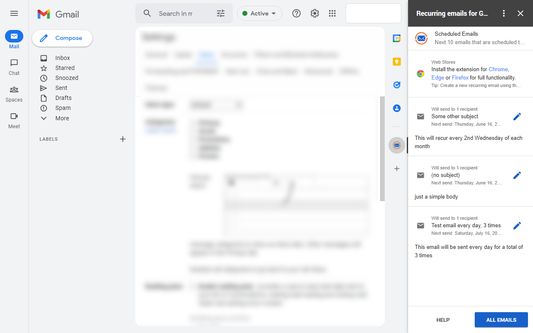
Create your email directly from the Gmail interface by using the extension's Send Later button or from the My Emails page in a simple to use and secure way. Edit your emails from the central web UI interface or from the extension popup.
👥 Contact management & Recipient sets
Easily import all your Google contacts which immediately become available in our powerful inline auto-complete feature. Create recipient sets and organize your contacts in groups or teams so you can select the group directly instead of typing addresses.
🗂️ Folders
Organize your email library in folders, allowing you to manage your emails more effectively. Create archives, trash, recipients folders, or any other folder type that helps you better organize your repeating emails.
🧠 AI-based search
Powerful search based on AI technologies for easy access to your library and even easier access to your data.
🔗 Integration
The extension fully integrates with Gmail, Google Workspace, or your favorite mobile device using Android or iOS. Set it and forget it with minimal disruption to your workflow.
📄 Templates
Use email templates to quickly draft new emails. Clone any of your existing emails in any state to create new emails from them. Any existing email fills the role of a template.
🧾 Receipts
Receive notifications directly in your inbox after an email has been sent giving you more control over your emails and keeping your in the loop.
🐾 Tracking
Email tracking notifies you when a sent email has been opened by one of your recipients. You can view those events by clicking the Logs icon in My Emails, or opening the extension popup.
🏷️ Send aliases
Send mail as any connected email address you have in your Gmail account. Either select the account using Gmail's native Compose popup at creation time, or from My Emails directly.
⏩ Skip
Skip the next sending of your email simply by clicking a button. Your email's next sending will be skipped automatically, but the scheduling then continues normally.
📦 Bulk actions
Pause, unpause or cancel all your emails instantly and with a single click so you can save even more time.
🖱️ Manual sending
Instantly send an already saved email without changing its schedule. Create notifications for your clients with a single click!
💥 More than 70,000 professionals across all stores have added the app to their browsers for next-level email productivity. Compose your email, set its sending schedule and you're done! You won't have to remember to send it again!
☄️NEW: Mail Merge and Advanced emails will connect data from any spreadsheet into a template, so you can easily create personalized and targeted repeating emails. Plug in your Google Sheets, CSV, XLS or ODS file and automate away!
🗓️ Complete Schedule
Send your emails one time by setting a later date, or many times by setting a fully customizable recurring schedule. Set the time of day, which days to send on or the number of times to send, all for a convenient schedule.
✍ Automatic follow-up
Set an automatic follow-up to send if your email is not getting any replies. A follow-up helps streamline processes by reducing the need for manual tracking and prompting timely responses, ultimately enhancing productivity and fostering stronger relationships with clients, colleagues, or prospects.
🛡️ Privacy? How?
Other extensions require you to give up your email privacy by asking for certain Gmail permissions. Consenting to those permissions allows them to read all your emails. That's right, all of them! We don't, and won't. We'd never ask you to consent to such permissions and the only sensitive permission required is “Send email on your behalf”.
🆓 Is it free?
Recurring emails for Gmail is free for personal, casual use (up to 5 automatic sends). Check out the paid PRO plans if you're a company or you simply need to get more out of it.
⌚ Convenience
Create your email directly from the Gmail interface by using the extension's Send Later button or from the My Emails page in a simple to use and secure way. Edit your emails from the central web UI interface or from the extension popup.
👥 Contact management & Recipient sets
Easily import all your Google contacts which immediately become available in our powerful inline auto-complete feature. Create recipient sets and organize your contacts in groups or teams so you can select the group directly instead of typing addresses.
🗂️ Folders
Organize your email library in folders, allowing you to manage your emails more effectively. Create archives, trash, recipients folders, or any other folder type that helps you better organize your repeating emails.
🧠 AI-based search
Powerful search based on AI technologies for easy access to your library and even easier access to your data.
🔗 Integration
The extension fully integrates with Gmail, Google Workspace, or your favorite mobile device using Android or iOS. Set it and forget it with minimal disruption to your workflow.
📄 Templates
Use email templates to quickly draft new emails. Clone any of your existing emails in any state to create new emails from them. Any existing email fills the role of a template.
🧾 Receipts
Receive notifications directly in your inbox after an email has been sent giving you more control over your emails and keeping your in the loop.
🐾 Tracking
Email tracking notifies you when a sent email has been opened by one of your recipients. You can view those events by clicking the Logs icon in My Emails, or opening the extension popup.
🏷️ Send aliases
Send mail as any connected email address you have in your Gmail account. Either select the account using Gmail's native Compose popup at creation time, or from My Emails directly.
⏩ Skip
Skip the next sending of your email simply by clicking a button. Your email's next sending will be skipped automatically, but the scheduling then continues normally.
📦 Bulk actions
Pause, unpause or cancel all your emails instantly and with a single click so you can save even more time.
🖱️ Manual sending
Instantly send an already saved email without changing its schedule. Create notifications for your clients with a single click!
리뷰어 7명이 5점으로 평가함
권한 및 데이터
추가 정보
- 부가 기능 링크
- 버전
- 1.6.0
- 크기
- 405.29 KB
- 최근 업데이트
- 2년 전 (2024년 10월 31일)
- 라이선스
- All Rights Reserved
- 개인정보처리방침
- 이 부가 기능에 대한 개인정보처리방침 읽기
- 버전 목록
- 모음집에 추가