
Remote Player for VLC™ 제작자: moris
Controls VLC player via toolbar popup UI
사용자 49명사용자 49명
확장 메타 데이터
스크린샷

정보
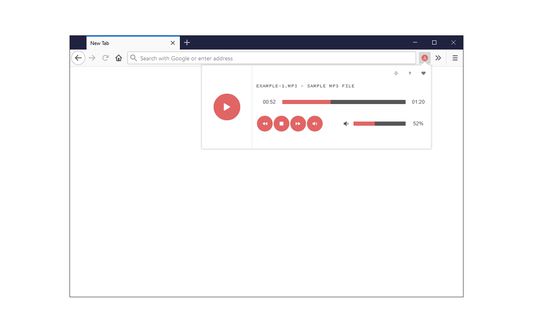
Remote Player for VLC™ is an addon that lets you control the VLC media player via your browser's toolbar.
Before using the addon please make sure:
1. VLC application is running on your machine (PC/MAC).
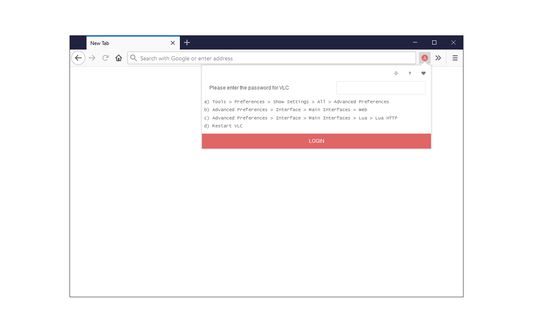
2. You have set the required VLC password. To do so, please follow the below steps:
a) In VLC app, please head to: Tools > Preferences > Show Settings > All > Advanced Preferences
b) Then, mark the option in: Advanced Preferences > Interface > Main Interfaces > Web
c) Then set a desired password here: Advanced Preferences > Interface > Main Interfaces > Lua > Lua HTTP
d) Restart the VLC application for changes to take effect.
Next, please open the toolbar popup UI in your browser and enter the above password in the input field (when the login window appeared). This password is used to connect the browser with the VLC media player (via AJAX technology). Once the password is set, you will see a simple media player for controlling VLC remotely.
Note: Remote Player for VLC™ does NOT belong or relate to the official VLC (VideoLAN) application at all. It is an unofficial extension that is developed and maintained independently. The official VLC software is only released for desktop machines. This unofficial extension is a wrapper to the original VLC application and tries to make it usable as a browser extension.
To report bugs, please fill the bug report form on the addon's homepage.
Before using the addon please make sure:
1. VLC application is running on your machine (PC/MAC).
2. You have set the required VLC password. To do so, please follow the below steps:
a) In VLC app, please head to: Tools > Preferences > Show Settings > All > Advanced Preferences
b) Then, mark the option in: Advanced Preferences > Interface > Main Interfaces > Web
c) Then set a desired password here: Advanced Preferences > Interface > Main Interfaces > Lua > Lua HTTP
d) Restart the VLC application for changes to take effect.
Next, please open the toolbar popup UI in your browser and enter the above password in the input field (when the login window appeared). This password is used to connect the browser with the VLC media player (via AJAX technology). Once the password is set, you will see a simple media player for controlling VLC remotely.
Note: Remote Player for VLC™ does NOT belong or relate to the official VLC (VideoLAN) application at all. It is an unofficial extension that is developed and maintained independently. The official VLC software is only released for desktop machines. This unofficial extension is a wrapper to the original VLC application and tries to make it usable as a browser extension.
To report bugs, please fill the bug report form on the addon's homepage.
1명이 1점으로 평가함
권한 및 데이터
추가 정보
- 부가 기능 링크
- 버전
- 0.1.5
- 크기
- 35.06 KB
- 마지막 업데이트
- 9달 전 (2025년 8월 18일)
- 관련 카테고리
- 버전 목록
- 모음집에 추가