
Remove Anything 제작자: RoadrunnerWMC
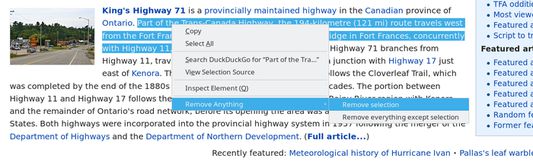
Remove anything (objects or selected text) from any page via the right-click menu. This is intended to be a WebExtensions alternative to "Nuke Anything Enhanced." Almost all of its features are supported, and the undo/redo system has been improved.
사용자 562명사용자 562명
확장 메타 데이터
스크린샷

정보
THIS ADD-ON IS NO LONGER MAINTAINED; SEE BELOW:
I wrote this simple add-on as a WebExtensions alternative to "Nuke Anything Enhanced," back in late 2017 when Firefox was in the process of dropping support for other extension types. At the time, it was unclear whether NAE was going to be ported or not; however, it did get updated not long after I released this. Accordingly, I don't plan to maintain this add-on anymore, and you should really use NAE instead of this one: https://addons.mozilla.org/en-US/firefox/addon/nuke-anything-enhanced/ . (I'm not affiliated with its developers in any way.)
Original description follows:
--------
Remove anything from any webpage!
This add-on allows you to remove any object or selected text from any page by right-clicking on it or by hitting Alt+Shift+R while hovering over it. Here are some ways this can be useful:
In case you accidentally remove something you didn't mean to, you can undo any number of object removals**. (And you can of course redo them as well.) Everything is reset when you refresh or go to a different page.
*This only works if the website is truly covering up the content with an overlay. Many websites do, but some instead send you an overlay in place of the content. Unfortunately, you can't retrieve the content from websites that do that.
**Undoing text removals isn't supported.
I wrote this simple add-on as a WebExtensions alternative to "Nuke Anything Enhanced," back in late 2017 when Firefox was in the process of dropping support for other extension types. At the time, it was unclear whether NAE was going to be ported or not; however, it did get updated not long after I released this. Accordingly, I don't plan to maintain this add-on anymore, and you should really use NAE instead of this one: https://addons.mozilla.org/en-US/firefox/addon/nuke-anything-enhanced/ . (I'm not affiliated with its developers in any way.)
Original description follows:
--------
Remove anything from any webpage!
This add-on allows you to remove any object or selected text from any page by right-clicking on it or by hitting Alt+Shift+R while hovering over it. Here are some ways this can be useful:
- You can remove header bars that stay at the top of the screen when you scroll and waste your screen space.
- You can remove full-screen overlays that require you to register on the website you're trying to look at*.
- You can remove popups that appear in the corner of the screen and ask you to take a survey.
- You can remove individual ads if you're not keen on using an ad blocker.
In case you accidentally remove something you didn't mean to, you can undo any number of object removals**. (And you can of course redo them as well.) Everything is reset when you refresh or go to a different page.
*This only works if the website is truly covering up the content with an overlay. Many websites do, but some instead send you an overlay in place of the content. Unfortunately, you can't retrieve the content from websites that do that.
**Undoing text removals isn't supported.
Due to Mozilla's restrictions (mentioned in a note on this page), this addon will not work on addons.mozilla.com. Please try it out on a different website.
리뷰어 27명이 4점으로 평가함
권한 및 데이터
추가 정보
- 부가 기능 링크
- 버전
- 1.4resigned1
- 크기
- 23.33 KB
- 최근 업데이트
- 2년 전 (2024년 4월 25일)
- 관련 카테고리
- 버전 목록
- 모음집에 추가