Firefox 브라우저 부가 기능
  • 확장 기능
  • 테마
    • Firefox용
    • 사전 및 언어 팩
    • 다른 브라우저 사이트
    • Android 부가 기능
로그인
Remove/Crop-to Selection 미리보기

Remove/Crop-to Selection 제작자: Nikos Asimakis

Remove or crop-to selection from context menu so that you can print or save only the parts you need. Additionally you can remove clicked elements and also remove ads, videos or other third-party content from web pages.

4 (리뷰 15개)4 (리뷰 15개)
사용자 454명사용자 454명
Firefox를 다운로드하고 확장 기능을 받으세요
파일 다운로드

확장 메타 데이터

스크린샷
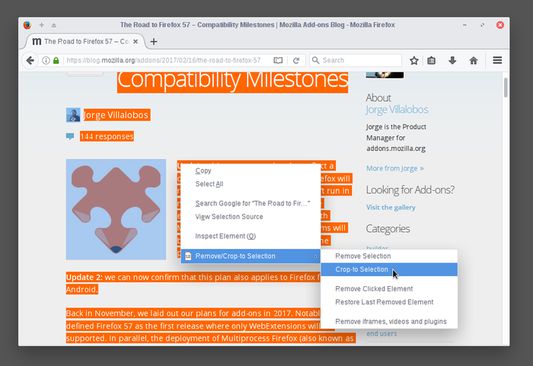
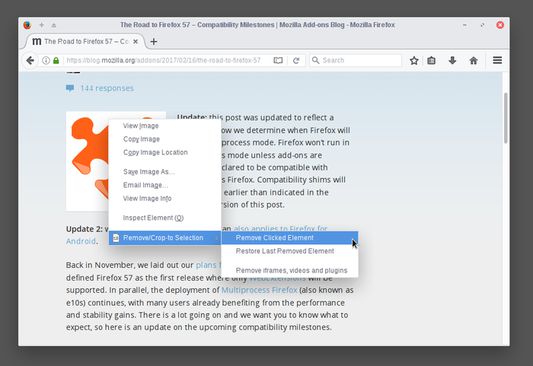
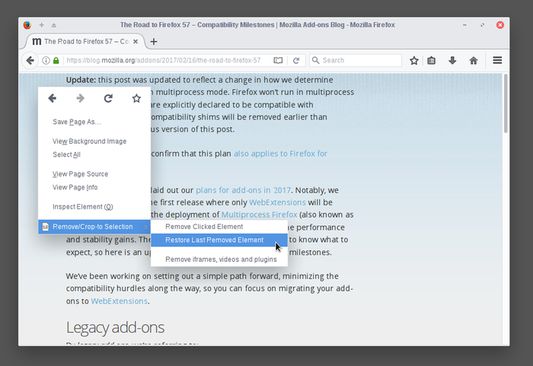
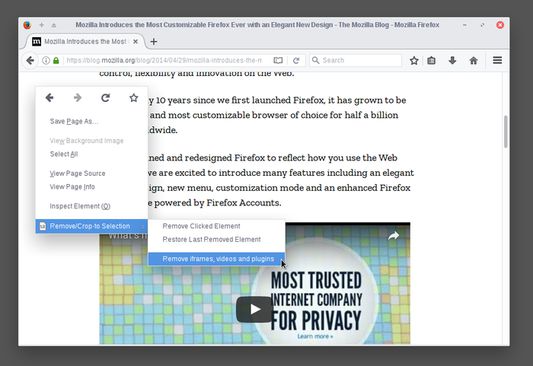
Select a part of a web page, right click and select "Crop-to Selection" to keep only your selection and remove everything else.Right click any element you don't need (images, buttons, widgets) and select "Remove Clicked Element" to remove it.If by mistake you remove something you want (like the article title) right click anywhere on the page and select "Restore Last Removed Element" to restore it. Alternatively, you can reload the page to undo all your changes.To remove ads, videos or other third-party content from the web page, right click anywhere and select "Remove iframes, videos & plugins".By combining everything you can print (or save) only the parts of the web page you want, saving paper and ink.
정보
Sometimes you may want to print or save only a part of a web page.

With this add-on you can select a part of a web page (text, images, etc), right click on the selection and:
  • click "Remove Selection" from the context menu to remove the selection, or
  • click "Crop-to Selection" to keep only the selection and remove everything else.

Now you can print or save only the parts of a web page you want.

All your changes are local and non permanent and by reloading the web page all your changes are gone.

Additionally, you can right click any element (image, paragraph, title, etc) on the web page and click "Remove Clicked Element" to remove it. To undo your last edit right click and select "Restore Last Removed Element" or simply reload the web page like before.

If your web page contains third party content (like ads, iframes, etc) or multimedia content (like videos, plugins, etc) right click on an empty part of the web page and select "Remove iframes, videos & plugins". This way you can remove annoyances and make sure that they are not included when you print or save the page.
15명이 4점으로 평가함
로그인하여 이 확장 기능의 평점을 남겨주세요
아직 평점이 없습니다

별점 저장됨

5
10
4
1
3
1
2
0
1
3
리뷰 15개 모두 읽기
권한 및 데이터

필수 권한:

  • 모든 웹사이트에서 사용자의 데이터에 접근
더 알아보기
추가 정보
부가 기능 링크
  • Copy add-on ID
버전
0.3resigned1
크기
17.12 KB
마지막 업데이트
2년 전 (2024년 4월 25일)
관련 카테고리
  • 웹 개발 도구
  • 외양
라이선스
Mozilla Public License 2.0
버전 목록
  • 모든 버전 보기
모음집에 추가
이 부가 기능 신고
Mozilla 홈페이지로 이동

부가 기능

  • 소개
  • Firefox 부가 기능 블로그
  • 확장 기능 워크샵
  • 개발자 허브
  • 개발자 정책
  • 커뮤니티 블로그
  • 포럼
  • 버그 신고
  • 리뷰 지침

브라우저

  • Desktop
  • Mobile
  • Enterprise

제품

  • Browsers
  • VPN
  • Relay
  • Monitor
  • Pocket
  • Bluesky (@firefox.com)
  • Instagram (Firefox)
  • YouTube (firefoxchannel)
  • 개인 정보
  • 쿠키
  • 법률

특별한 고지가 없는 한, 본 사이트의 콘텐츠는 Commons Attribution Share-Alike License v3.0 또는 그 이후 버전에 따라 사용이 허가됩니다.