Request RegEx Filter 제작자: Henry Lu
This Add-on will filter all HTTP requests (including requests for javascript files, images etc) based on the list of regular expressions the user provides. The addon works off of a Deny-list configured via the Options/Settings page for the Addon
사용자 8명사용자 8명
확장 메타 데이터
스크린샷
정보
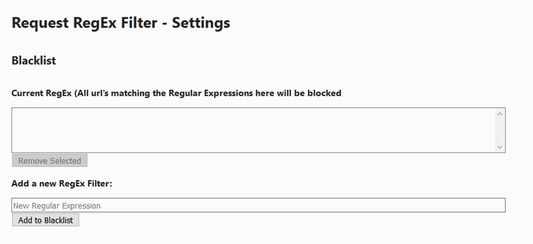
To configure this Add-on, Open the Add-ons/Extensions page of your browser or type "about:addons" in the address bar in Firefox.
Click on "Options" for the Request RegEx Filter add-on.
Then you can add or remove from the list of Regular Expressions that will denylist the http request.
For more details on how to write a regular expression, here are some resources:
For Example:
Add the following regular expression to the denylist
would be blocked.
This regex is purely for demonstration purposes. The above Regular Expression has the limitation that any website starting with "ads." would be blocked. So if you legitimately want to be visiting a site with a domain name prefixed with "ads." you would avoid using this regex.
Click on "Options" for the Request RegEx Filter add-on.
Then you can add or remove from the list of Regular Expressions that will denylist the http request.
For more details on how to write a regular expression, here are some resources:
For Example:
Add the following regular expression to the denylist
- http(s)?:\/\/ads[.]
would be blocked.
This regex is purely for demonstration purposes. The above Regular Expression has the limitation that any website starting with "ads." would be blocked. So if you legitimately want to be visiting a site with a domain name prefixed with "ads." you would avoid using this regex.
5명이 4.6점으로 평가함
권한 및 데이터
추가 정보
- 부가 기능 링크
- 버전
- 1.1resigned1
- 크기
- 10.16 KB
- 마지막 업데이트
- 2년 전 (2024년 4월 25일)
- 관련 카테고리
- 라이선스
- MIT 라이선스
- 버전 목록
- 모음집에 추가