
Ruto - XPath Finder 제작자: TestLeaf, Koushik Chatterjee
Rūto brings the best XPath to you. We are striving hard to improve better performance and more new features
사용자 272명사용자 272명
확장 메타 데이터
스크린샷



정보
Automation is the current trend in the IT markets as it saves a lot of time for the Automation Engineers, there are many tools available in the market to get the job done. But Selenium being the most commonly used open source product beats many others, few of the most commonly used languages with Selenium are Java and Python.
Regardless of the language platform that Selenium being used, XPath is used to locate the web elements in the DOM. Xpaths are much helpful to locate the web elements when there are no useful attributes are available in the HTML tags.
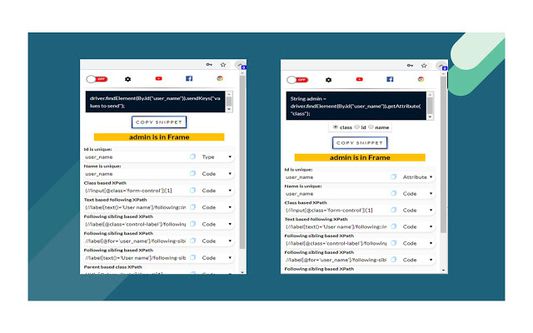
But opening up a notepad and writing XPath seems monotonous or even it is considered time-consuming by Automation Testers, Ruto helps to find unique XPaths just by right-clicking and opting the ‘Add to Ruto’ option.
By the way, Ruto helps to provide XPath in more than 20 patterns. Once you have added the web element to Ruto you can click the extension icon in the browser and copy to the clipboard and paste it in your IDE.
Regardless of the language platform that Selenium being used, XPath is used to locate the web elements in the DOM. Xpaths are much helpful to locate the web elements when there are no useful attributes are available in the HTML tags.
But opening up a notepad and writing XPath seems monotonous or even it is considered time-consuming by Automation Testers, Ruto helps to find unique XPaths just by right-clicking and opting the ‘Add to Ruto’ option.
By the way, Ruto helps to provide XPath in more than 20 patterns. Once you have added the web element to Ruto you can click the extension icon in the browser and copy to the clipboard and paste it in your IDE.
Right click on any web element and select add to Ruto from the context menu, The Xpath will be shown on the pop up page.
리뷰어 7명이 4.4점으로 평가함
권한 및 데이터
필수 권한:
- 클립보드에 데이터 넣기
- 파일을 다운로드하고 브라우저의 다운로드 기록을 읽고 수정
- 컴퓨터에 다운로드된 파일 열기
- 알림 표시
- 브라우저 탭에 접근
- 모든 웹사이트에서 사용자의 데이터에 접근
추가 정보
- 부가 기능 링크
- 버전
- 6.0.1
- 크기
- 119.35 KB
- 최근 업데이트
- 7년 전 (2019년 12월 31일)
- 버전 목록
- 모음집에 추가