
사용자 57명사용자 57명
확장 메타 데이터
스크린샷


정보
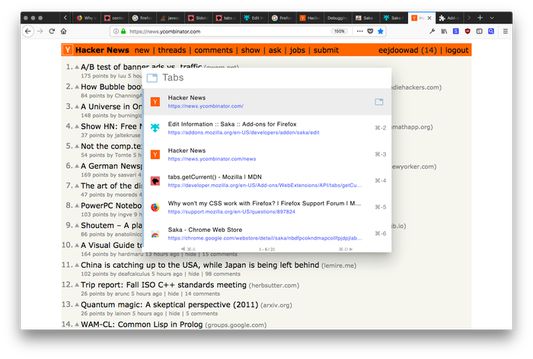
A browser navigation assistant designed to be fast, intuitive, and beautiful. Inspired by Spotlight. Keyboard-focused but mouse friendly too.
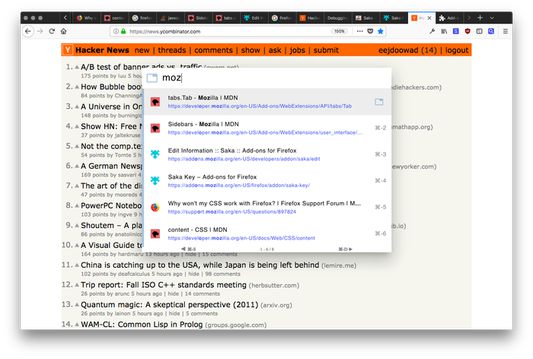
* Lists tabs in order of recency by default, then fuzzy search by title or URL.
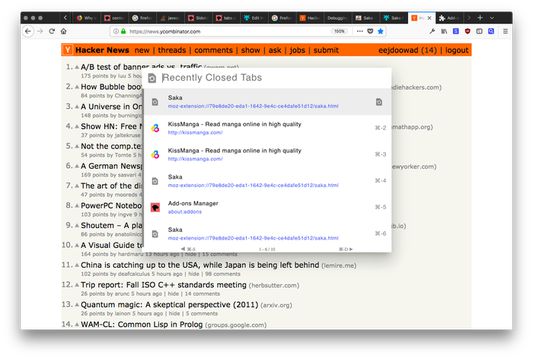
* Search recently closed tabs
* Search all bookmarks
* Search all browsing history
homepage: https://saka.io
github: https://github.com/lusakasa/saka
---
1. Activate the extension by entering CTRL+SPACE or ALT+SPACE on Macs.
2. Search your tabs by title or URL
3. Switch between suggestions using the arrow keys or TAB and SHIFT+TAB.
4. Switch to a tab by pressing ENTER or clicking on a suggestion
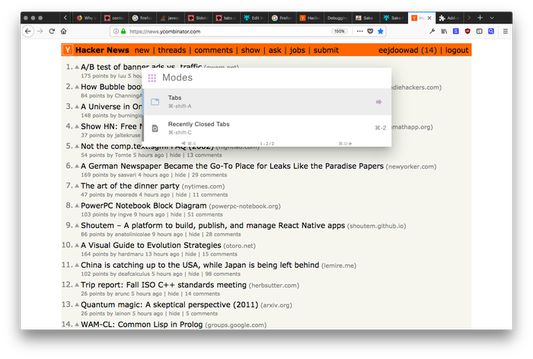
5. Try other search modes using SHIFT+SPACE
If Saka Key (https://key.saka.io) is installed, Saka can be activated by pressing L.
---
Useful keyboard shortcuts:
* CTRL+K (or CMD+K on Macs) - Clear the search
* CTRL+S (or CMD+S on Macs) - View the previous page of suggestions
* CTRL+D (or CMD+D on Macs) - View the next page of suggestions
* CTRL+Backspace (or CMD+Delete on Macs) - Close selected tab
* DOWN ARROW or TAB - Select the next suggestions
* UP ARROW or SHIFT-TAB - Select the previous suggestion
Mode shortcuts
* SHIFT+SPACE - switch modes
* SPACE (but only if the search bar is empty) - switch modes
---
Custom keyboard shortcuts are not supported on Firefox. Install Saka Key (https://key.saka.io) to specify custom shortcuts.
---
Why does Saka need so many permission?
1. Read and change all your data on the websites you visit - needed to insert Saka into each page
2. Read and change your browsing history - needed for upcoming features: history search and recency-based tab switching
3. Read and change your bookmarks - needed for upcoming feature: bookmarks search
---
Like this extension?
Check out my other open source extension for keyboard-only browsing Saka Key.
https://addons.mozilla.org/firefox/addon/saka-key/
---
Release Notes:
0.17.1
* Added feature to close selected tab in Saka when hotkey (ctrl+backspace) is pressed
0.16.4
* Improved fuzzy search to not penalize search results based on length
* Improved mode switcher UI to make it more obvious that it is clickable
* Added restoring of window sessions
0.16.1
* Fixed issue where Saka could not be launched using a custom hotkey in Saka Key
0.16.0
* Added a tab bar at the top of Saka to allow for easy switching between modes
0.15.0
* Added 'Recently Viewed' search mode for all open tabs, closed tabs and browsing history at the same time
0.14.2
* Added optional highlighting + fuzzy search for bookmark and history search
0.14.1
* Fix bug where active selection icon was misaligned
* Fix bug where mode selection was not rendering ⌘ correctly
* Fix bug where suggestions were hidden on new installs first load
0.14.0
* Added History Search
* Added Saka hotkey list on the options page
* Fixed bug where incognito tab favicons could leak into the non-incognito favicon cache when a user loaded Saka while having incognito tabs open (https://github.com/lusakasa/saka/issues/28)
0.13.0
* Added options page for customizing Saka settings
* Choose default mode that Saka opens in
* Enable/Disable suggestions list when Saka first opens
0.12.1
* Added bookmark search
0.12.0
* Rearchitected to support Firefox
* Better viewport and zoom independence
0.11.0
* Improved multi-window support
0.10.0
* Added mode for searching recently closed tabs
* Added mode for selecting what type of search to perform
* The Action button now indicates the current mode
* The active suggestion now shows an icon corresponding to the suggestion type
* Many new keyboard shortcuts
0.9.0
* Added Saka to right-click menu (will make this optional in future)
* Fixed match highlighting bug
0.8.0
* Match highlighting
* Recently closed tabs now appear at end of list when no search text is entered
* Action button icon now changes based on the active suggestion
0.7.0
* Use your mouse wheel to scroll through suggestions!
0.6.0
* Pagination to support viewing more than 6 results
* Moved "activation button" to left side of search bar as part of an upcoming feature
0.5.0
* Lists tabs by recency by default
0.4.0
* CMD+K no longer toggles Saka. Instead, it clears the search bar.
* Integration with Saka Key
0.3.0
* Saka is now zoom independent so its size and location are fixed for common zoom levels and viewport sizes
* When Saka is activated from a reserved page, the opened tab now uses a screenshot of the reserved page as it's background image.
0.2.0
* bug fixes
* changed to persistent background page for reduced latency
0.1.0
* Initial Beta Release
* Lists tabs in order of recency by default, then fuzzy search by title or URL.
* Search recently closed tabs
* Search all bookmarks
* Search all browsing history
homepage: https://saka.io
github: https://github.com/lusakasa/saka
---
1. Activate the extension by entering CTRL+SPACE or ALT+SPACE on Macs.
2. Search your tabs by title or URL
3. Switch between suggestions using the arrow keys or TAB and SHIFT+TAB.
4. Switch to a tab by pressing ENTER or clicking on a suggestion
5. Try other search modes using SHIFT+SPACE
If Saka Key (https://key.saka.io) is installed, Saka can be activated by pressing L.
---
Useful keyboard shortcuts:
* CTRL+K (or CMD+K on Macs) - Clear the search
* CTRL+S (or CMD+S on Macs) - View the previous page of suggestions
* CTRL+D (or CMD+D on Macs) - View the next page of suggestions
* CTRL+Backspace (or CMD+Delete on Macs) - Close selected tab
* DOWN ARROW or TAB - Select the next suggestions
* UP ARROW or SHIFT-TAB - Select the previous suggestion
Mode shortcuts
* SHIFT+SPACE - switch modes
* SPACE (but only if the search bar is empty) - switch modes
---
Custom keyboard shortcuts are not supported on Firefox. Install Saka Key (https://key.saka.io) to specify custom shortcuts.
---
Why does Saka need so many permission?
1. Read and change all your data on the websites you visit - needed to insert Saka into each page
2. Read and change your browsing history - needed for upcoming features: history search and recency-based tab switching
3. Read and change your bookmarks - needed for upcoming feature: bookmarks search
---
Like this extension?
Check out my other open source extension for keyboard-only browsing Saka Key.
https://addons.mozilla.org/firefox/addon/saka-key/
---
Release Notes:
0.17.1
* Added feature to close selected tab in Saka when hotkey (ctrl+backspace) is pressed
0.16.4
* Improved fuzzy search to not penalize search results based on length
* Improved mode switcher UI to make it more obvious that it is clickable
* Added restoring of window sessions
0.16.1
* Fixed issue where Saka could not be launched using a custom hotkey in Saka Key
0.16.0
* Added a tab bar at the top of Saka to allow for easy switching between modes
0.15.0
* Added 'Recently Viewed' search mode for all open tabs, closed tabs and browsing history at the same time
0.14.2
* Added optional highlighting + fuzzy search for bookmark and history search
0.14.1
* Fix bug where active selection icon was misaligned
* Fix bug where mode selection was not rendering ⌘ correctly
* Fix bug where suggestions were hidden on new installs first load
0.14.0
* Added History Search
* Added Saka hotkey list on the options page
* Fixed bug where incognito tab favicons could leak into the non-incognito favicon cache when a user loaded Saka while having incognito tabs open (https://github.com/lusakasa/saka/issues/28)
0.13.0
* Added options page for customizing Saka settings
* Choose default mode that Saka opens in
* Enable/Disable suggestions list when Saka first opens
0.12.1
* Added bookmark search
0.12.0
* Rearchitected to support Firefox
* Better viewport and zoom independence
0.11.0
* Improved multi-window support
0.10.0
* Added mode for searching recently closed tabs
* Added mode for selecting what type of search to perform
* The Action button now indicates the current mode
* The active suggestion now shows an icon corresponding to the suggestion type
* Many new keyboard shortcuts
0.9.0
* Added Saka to right-click menu (will make this optional in future)
* Fixed match highlighting bug
0.8.0
* Match highlighting
* Recently closed tabs now appear at end of list when no search text is entered
* Action button icon now changes based on the active suggestion
0.7.0
* Use your mouse wheel to scroll through suggestions!
0.6.0
* Pagination to support viewing more than 6 results
* Moved "activation button" to left side of search bar as part of an upcoming feature
0.5.0
* Lists tabs by recency by default
0.4.0
* CMD+K no longer toggles Saka. Instead, it clears the search bar.
* Integration with Saka Key
0.3.0
* Saka is now zoom independent so its size and location are fixed for common zoom levels and viewport sizes
* When Saka is activated from a reserved page, the opened tab now uses a screenshot of the reserved page as it's background image.
0.2.0
* bug fixes
* changed to persistent background page for reduced latency
0.1.0
* Initial Beta Release
리뷰어 14명이 4.7점으로 평가함
권한 및 데이터
추가 정보