Salesforce Id CopyPasteGo 제작자: Danny Summerlin
Copy the current Salesforce record's ID to the clipboard, or paste your way to the record's page from where you are!
사용자 10명사용자 10명
확장 메타 데이터
스크린샷
정보
Navigate Salesforce records by ID with keyboard shortcuts and the right-click menu:
- Alt+Shift+C copies the current page's cleaned up URL
- Alt+Ctrl+C copies the current page's record ID
- Alt+Ctrl+V opens the record page for the ID on your clipboard (copied from any source)
- Alt+Ctrl+B opens the record page for the ID on your clipboard in a new tab
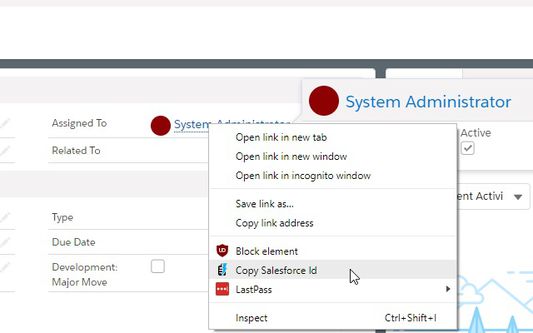
- Right click on any Salesforce link to copy just the Salesforce ID from it or grab a clean version of the URL
This extension works with Classic and Lightning interfaces
- Alt+Shift+C copies the current page's cleaned up URL
- Alt+Ctrl+C copies the current page's record ID
- Alt+Ctrl+V opens the record page for the ID on your clipboard (copied from any source)
- Alt+Ctrl+B opens the record page for the ID on your clipboard in a new tab
- Right click on any Salesforce link to copy just the Salesforce ID from it or grab a clean version of the URL
This extension works with Classic and Lightning interfaces
0명이 0점으로 평가함
권한 및 데이터
필수 권한:
- 클립보드에서 데이터 가져오기
- 클립보드에 데이터 넣기
- force.com 도메인의 사이트에서 사용자의 데이터에 접근
- salesforce.com 도메인의 사이트에서 사용자의 데이터에 접근
- cloudforce.com 도메인의 사이트에서 사용자의 데이터에 접근
추가 정보
- 부가 기능 링크
- 버전
- 1.4.10resigned1
- 크기
- 18.4 KB
- 마지막 업데이트
- 2년 전 (2024년 4월 26일)
- 관련 카테고리
- 라이선스
- MIT 라이선스
- 버전 목록
- 모음집에 추가