Download All Images 제작자: Joe Ertaba
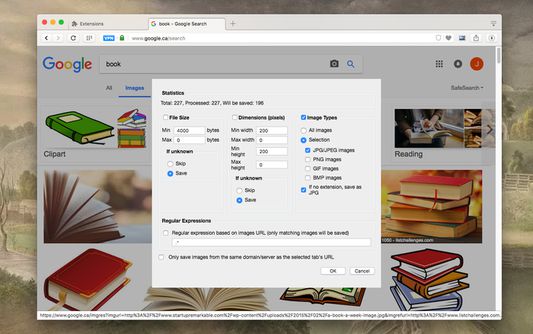
Easily save images with a wide range of customization features, such as file size, dimensions, and image type.
확장 메타 데이터
스크린샷
정보
Download all images from any web page you’re on with this highly customizable extension.
Extension Preview:
https://www.youtube.com/watch?v=YaT5sWRV6JQ
Features:
1. Detects all images loaded on the current web page (even if they’re nested iframes)
2. Filters images by file size, dimension, URL, or type (JPEG, PNG, BMP, or GIF)
3. Finds images in links, background scripts, and CSS files
4. Displays images in a gallery view before downloading
5. Supports dead-blob type images
How-to video:
https://www.youtube.com/watch?v=UZl4hAHziu0
To see our FAQ, please visit:
http://add0n.com/save-images.html
To file a bug report, please use:
https://github.com/belaviyo/save-images/issues
Note: When you press the "Save" button, all selected images are saved to the default download directory of your browser, or a specified subfolder.
Extension Preview:
https://www.youtube.com/watch?v=YaT5sWRV6JQ
Features:
1. Detects all images loaded on the current web page (even if they’re nested iframes)
2. Filters images by file size, dimension, URL, or type (JPEG, PNG, BMP, or GIF)
3. Finds images in links, background scripts, and CSS files
4. Displays images in a gallery view before downloading
5. Supports dead-blob type images
How-to video:
https://www.youtube.com/watch?v=UZl4hAHziu0
To see our FAQ, please visit:
http://add0n.com/save-images.html
To file a bug report, please use:
https://github.com/belaviyo/save-images/issues
Note: When you press the "Save" button, all selected images are saved to the default download directory of your browser, or a specified subfolder.
649명이 3.9점으로 평가함
권한 및 데이터
추가 정보
- 부가 기능 링크
- 버전
- 0.8.5
- 크기
- 143.6 KB
- 마지막 업데이트
- 3달 전 (2026년 2월 14일)
- 개인정보처리방침
- 이 부가 기능에 대한 개인정보처리방침 읽기
- 버전 목록
- 태그
- 모음집에 추가