Firefox 브라우저 부가 기능
  • 확장 기능
  • 테마
    • Firefox용
    • 사전 및 언어 팩
    • 다른 브라우저 사이트
    • Android 부가 기능
로그인
Save to PDF now - with no preview 미리보기

Save to PDF now - with no preview 제작자: jscher2000

Firefox can Print to PDF but some users want to speed it up by skipping the preview. Now you can call Firefox's built-in Save to PDF feature using a toolbar button, keyboard shortcut, or the right-click context menu.

3.5 (리뷰 6개)3.5 (리뷰 6개)
사용자 141명사용자 141명
Firefox를 다운로드하고 확장 기능을 받으세요
파일 다운로드

확장 메타 데이터

스크린샷
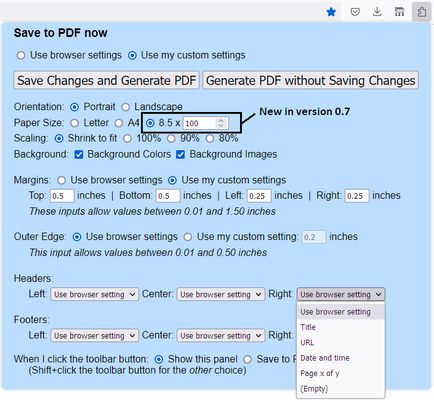
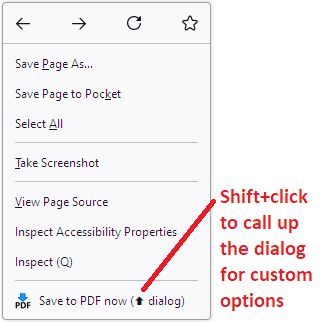
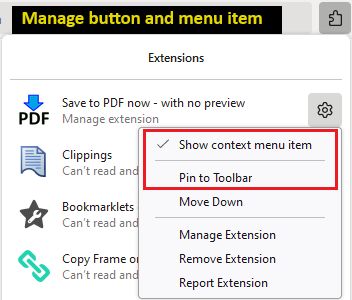
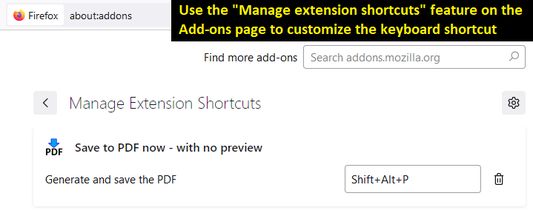
Use the toolbar button to print and also to manage custom settings. (Find the add-on button on the Extensions button drop-down.)Don't need a toolbar button? Use the right-click context menu on a blank area of the page.Don't want the context menu item? Use the toolbar button's right-click context menu to hide it.Customize your keyboard shortcut on the Add-ons page.
정보
Three ways to print

Best for pages that you know will print correctly from past experience, since there's no preview.

Toolbar button

Click the button to open the setup panel. Print without customizing, or set your own margins, headers/footers, etc. Note: for quicker access, pin the button to the main part of the toolbar using the steps in Manage your extensions using the extensions button in the toolbar.

Or Shift+click the button to immediately generate the PDF. If you prefer to make a regular click do this, look for the "When I click the toolbar button" setting on the setup panel, and use Save Changes and Generate PDF to save it.

Right-click context menu

Regular click the "Save to PDF now" menu item to immediately generate the PDF. Shift+click it to drop the setup panel and customize your margins, header/footers, etc. (Note: drop-down doesn't appear in popup windows that do not have a regular toolbar.)

If you want to reduce menu clutter, you can remove this item. Right-click the toolbar button and uncheck "Show context menu item."

Keyboard shortcut

By default, Shift+Alt+P will immediately generate the PDF. Since this is a bit awkward, you can customize the keyboard shortcut using the steps in this support article: Manage extension shortcuts in Firefox.
리뷰어 6명이 3.5점으로 평가함
로그인하여 이 확장 기능의 평점을 남겨주세요
아직 평점이 없습니다

별점 저장됨

5
2
4
2
3
0
2
1
1
1
리뷰 6개 모두 읽기
추가 정보
부가 기능 링크
  • 홈 페이지
  • 지원 사이트
  • 지원 이메일
  • 부가 기능 ID 복사
버전
0.9
크기
23.91 KB
마지막 업데이트
2년 전 (2024년 3월 19일)
관련 카테고리
  • 기타
라이선스
Mozilla Public License 2.0
버전 목록
  • 모든 버전 보기
모음집에 추가
이 부가 기능 신고
Mozilla 홈페이지로 이동

부가 기능

  • 소개
  • Firefox 부가 기능 블로그
  • 확장 기능 워크샵
  • 개발자 허브
  • 개발자 정책
  • 커뮤니티 블로그
  • 포럼
  • 버그 신고
  • 리뷰 지침

다운로드

  • Download Firefox
  • Windows
  • macOS
  • iOS
  • Android
  • Linux
  • All

최신 빌드

  • Nightly
  • Beta

기업용 Firefox

  • Enterprise

커뮤니티

  • Connect
  • Contribute
  • Developer

팔로우

  • Instagram
  • YouTube
  • TikTok
  • Bluesky
  • Podcast
  • 개인 정보
  • 쿠키
  • 법률

특별한 고지가 없는 한, 본 사이트의 콘텐츠는 Commons Attribution Share-Alike License v3.0 또는 그 이후 버전에 따라 사용이 허가됩니다.