
Scratch 3 Developer Tools 제작자: griffpatch
Scratch 3 Developer Tools to enhance your Scratch Editing Experience on https://scratch.mit.edu
사용자 159명사용자 159명
확장 메타 데이터
스크린샷

정보
Hey I'm Griffpatch from Scratch - For those who are serious about their Scratch Coding, this is the tool for you! :)
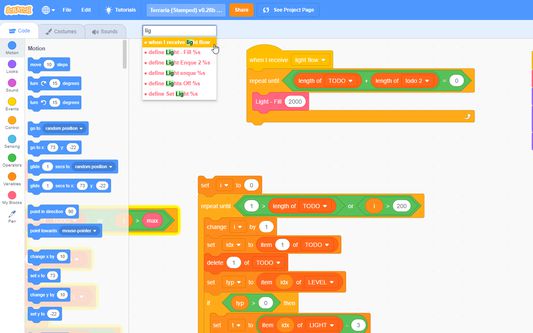
I've waited too long for an official way in Scratch 3 to jump to custom block definitions, etc... so I've begun to create my own chrome extension that allows for speedy navigation to any custom block, event receiver, or other hat blocks in your project. Now supports locating variable and list references by name and an improved script tidier.
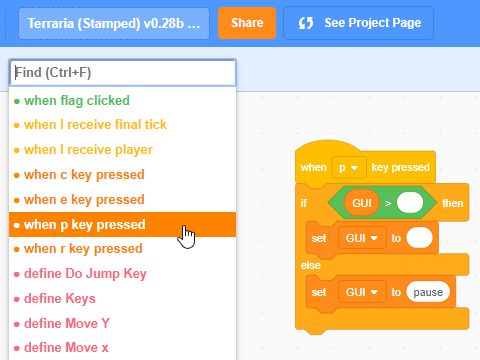
Simply install the extension in Chrome or Firefox, and then load up a scratch project. The new Find box will appear (Ctrl + F to jump to it or mouse over it), and all the hat blocks in the current sprite are listed in order of type, name, and then where they are on the page. Click on one (or use keyboard) to jump straight to the block stack in the editor! YAY!!!
Much more to come if you like this... and the Scratch Team is willing :) - Course they are *grin* - They love the Scratch community and so do I :) - Enjoy everyone and let me know if there's any problems at: https://scratch.mit.edu/users/griffpatch/
Change Log:
Change Log:
1 July 2020 - v0.2.1
● Bug Fixes
● Made Help / Tutorials link fade out when not hovering over toolbar to make interface cleaner
30 June 2020 - v0.2.0
● Fixed find bar disappearing when going to project page and back
● Support for Mac Meta Key in place of control so that Meta + F works too.
● Keyboard navigation (ctrl + left or right arrows) to get back to where you were, or in costume editor change costumes
● Middle click a block to jump to definition
● Context menu options - clean up (+), copy, cut & Paste at mouse cursor (yay!)
● Switch all instances of variable in sprite with another variable - can be used to great effect to solve problems like where you want to use a for this sprite only vs a for all sprites variable.
● Send sprite costume to top / bottom in costume editor by right clicking a costume.
● Added help + link to tutorials on youtube
20 Sept 2019 - v0.1.0
● Added Support for searching variables & lists, plus keyboard navigation between usages (left + right arrows).
● Drop down stays open and current item selected until you click away.
● Blocks are only scrolled into view if they are 'off screen' or hidden under the drop down.
● Tidy Up Scripts button - I think this works better than the standard scratch one - it trys to keep the general order of scripts the same, but pushes things out and arranges them neatly. It also removes the orphaned blocks and places them all down the far left for easy deletion.
v0.0.1 - Initial Release
● Enjoy!
I've waited too long for an official way in Scratch 3 to jump to custom block definitions, etc... so I've begun to create my own chrome extension that allows for speedy navigation to any custom block, event receiver, or other hat blocks in your project. Now supports locating variable and list references by name and an improved script tidier.
Simply install the extension in Chrome or Firefox, and then load up a scratch project. The new Find box will appear (Ctrl + F to jump to it or mouse over it), and all the hat blocks in the current sprite are listed in order of type, name, and then where they are on the page. Click on one (or use keyboard) to jump straight to the block stack in the editor! YAY!!!
Much more to come if you like this... and the Scratch Team is willing :) - Course they are *grin* - They love the Scratch community and so do I :) - Enjoy everyone and let me know if there's any problems at: https://scratch.mit.edu/users/griffpatch/
Change Log:
Change Log:
1 July 2020 - v0.2.1
● Bug Fixes
● Made Help / Tutorials link fade out when not hovering over toolbar to make interface cleaner
30 June 2020 - v0.2.0
● Fixed find bar disappearing when going to project page and back
● Support for Mac Meta Key in place of control so that Meta + F works too.
● Keyboard navigation (ctrl + left or right arrows) to get back to where you were, or in costume editor change costumes
● Middle click a block to jump to definition
● Context menu options - clean up (+), copy, cut & Paste at mouse cursor (yay!)
● Switch all instances of variable in sprite with another variable - can be used to great effect to solve problems like where you want to use a for this sprite only vs a for all sprites variable.
● Send sprite costume to top / bottom in costume editor by right clicking a costume.
● Added help + link to tutorials on youtube
20 Sept 2019 - v0.1.0
● Added Support for searching variables & lists, plus keyboard navigation between usages (left + right arrows).
● Drop down stays open and current item selected until you click away.
● Blocks are only scrolled into view if they are 'off screen' or hidden under the drop down.
● Tidy Up Scripts button - I think this works better than the standard scratch one - it trys to keep the general order of scripts the same, but pushes things out and arranges them neatly. It also removes the orphaned blocks and places them all down the far left for easy deletion.
v0.0.1 - Initial Release
● Enjoy!
리뷰어 17명이 4.5점으로 평가함
권한 및 데이터
추가 정보
- 부가 기능 링크
- 버전
- 1.24.3
- 크기
- 97.27 KB
- 최근 업데이트
- 5년 전 (2022년 2월 11일)
- 버전 목록
- 모음집에 추가