
Seedkeys 제작자: Willem
A password manager that generates your passwords based on a seed.
확장 메타 데이터
스크린샷
정보
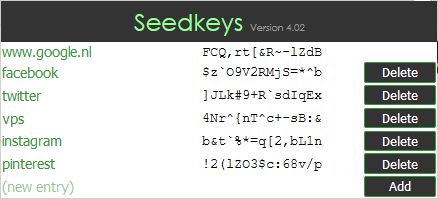
This is a simple password manager that allows you to generate a secure password for any site you visit by only remembering your "master password" (Seed). You can easily auto-fill passwords in forms around the web by entering your seed and letting this add-on convert it to your password.
Set-up
Usage
You can also test this process in a random text field on the web to see what happens. I highly recommend doing this first to have a little understanding in what happens.
How it works
The generator takes your seed, salt, and the entry (hostname of the site or a custom specified value), and hashes them to your password using an algorithm. You are free to go to http://seedkeys.com/ and download the index page to see how it works. Everything is rendered and generated client-side, so you can use this tool while in offline mode.
Disclaimer
I created this tool mainly for myself to have an easier time managing passwords on the web. You are free to use it, but I am in no way responsible for anything in any way. You are fully responsible for the security of your passwords, seed and salt. This product is free to use; if you paid for it, you were scammed!
Set-up
- After installing this add-on, click on the icon that appears and fill in the Salt and Seed fields. You can use anything as value, but it is recommended to use an easy-to-type but hard-to-guess seed.
- Take note of the values you just filled in, including capitals and differentiate between similar characters (such as the capital I and lowercase L). Store this information somewhere safe and secure where nobody can access it.
- You're done setting up.
Usage
- Make sure you have supplied a salt in this addon. You can check your salt by clicking the icon in your browser.
- Go to any website, log in, and edit your password.
- Fill in your seed (instead of your password)
- While your cursor is still in the password field, hit CTRL+ALT+S or right-click and select the "Convert seed to password" option.
- Your seed will be converted to your password.
- Save your new password, log out of the website, and go to the log-in screen again
- Again: Fill in your seed instead of your password, and hit CTRL+ALT+S or right-click and select the "Convert seed to password" option.
- Done.
You can also test this process in a random text field on the web to see what happens. I highly recommend doing this first to have a little understanding in what happens.
How it works
The generator takes your seed, salt, and the entry (hostname of the site or a custom specified value), and hashes them to your password using an algorithm. You are free to go to http://seedkeys.com/ and download the index page to see how it works. Everything is rendered and generated client-side, so you can use this tool while in offline mode.
Disclaimer
I created this tool mainly for myself to have an easier time managing passwords on the web. You are free to use it, but I am in no way responsible for anything in any way. You are fully responsible for the security of your passwords, seed and salt. This product is free to use; if you paid for it, you were scammed!
0명이 0점으로 평가함
권한 및 데이터
추가 정보
- 부가 기능 링크
- 버전
- 5.3resigned1
- 크기
- 18.97 KB
- 마지막 업데이트
- 2년 전 (2024년 4월 26일)
- 관련 카테고리
- 라이선스
- All Rights Reserved
- 버전 목록
- 모음집에 추가